CMK version:
2.3.0p2
OS version:
Ubuntu 22.04.4 for CheckMK
Windows server 2019 for SQL server 2022
Error message:
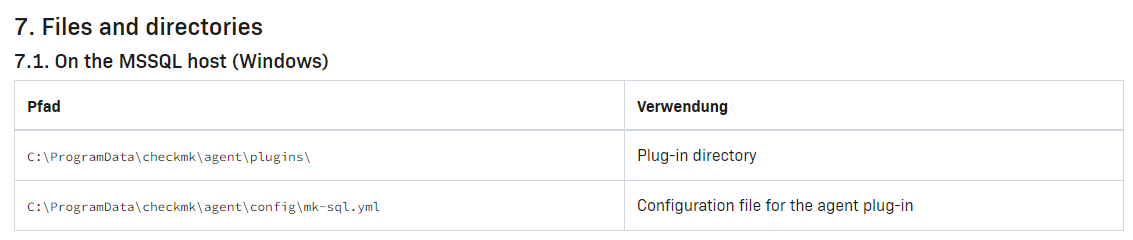
When launching the mk-sql.exe executable from the programdata…plugins directory, I get the following error.
Stop on error: `The config file ".\\mk-sql.yml" doesn't exist`
I assume I need to create this file, but I can’t find any reference to it, so I have no idea how to fill it up. I wanted to use it instead of the original mssql.vbs since that one never worked on our SQL 2017 servers (it works on freshly installed ones) and I never figured out why.
This is a different VM where I’m testing the new plug-in. TCP/IP is enabled on the server.
Output of “cmk --debug -vvn hostname”: (If it is a problem with checks or plugins)
OMD[OMD_Site_name]:~$ cmk --debug -vvn SQL_Server_hostname
value store: synchronizing
Trying to acquire lock on /omd/sites/OMD_Site_name/tmp/check_mk/counters/SQL_Server_hostname
Got lock on /omd/sites/OMD_Site_name/tmp/check_mk/counters/SQL_Server_hostname
value store: loading from disk
Releasing lock on /omd/sites/OMD_Site_name/tmp/check_mk/counters/SQL_Server_hostname
Released lock on /omd/sites/OMD_Site_name/tmp/check_mk/counters/SQL_Server_hostname
Checkmk version 2.3.0p2
+ FETCHING DATA
  Source: SourceInfo(hostname='SQL_Server_hostname', ipaddress='IP_of_server', ident='agent', fetcher_type=<FetcherType.TCP: 8>, source_type=<SourceType.HOST: 1>)
[cpu_tracking] Start [7f892bfab500]
Read from cache: AgentFileCache(SQL_Server_hostname, path_template=/omd/sites/OMD_Site_name/tmp/check_mk/cache/{hostname}, max_age=MaxAge(checking=0, discovery=90.0, inventory=90.0), simulation=False, use_only_cache=False, file_cache_mode=6)
Not using cache (Too old. Age is 1810 sec, allowed is 0 sec)
Connecting via TCP to IP_of_server:6556 (180.0s timeout)
Detected transport protocol: TransportProtocol.TLS
Reading data from agent via TLS socket
Reading data from agent
Detected transport protocol: TransportProtocol.PLAIN
Closing TCP connection to IP_of_server:6556
Write data to cache file /omd/sites/OMD_Site_name/tmp/check_mk/cache/SQL_Server_hostname
Trying to acquire lock on /omd/sites/OMD_Site_name/tmp/check_mk/cache/SQL_Server_hostname
Got lock on /omd/sites/OMD_Site_name/tmp/check_mk/cache/SQL_Server_hostname
Releasing lock on /omd/sites/OMD_Site_name/tmp/check_mk/cache/SQL_Server_hostname
Released lock on /omd/sites/OMD_Site_name/tmp/check_mk/cache/SQL_Server_hostname
[cpu_tracking] Stop [7f892bfab500 - Snapshot(process=posix.times_result(user=0.010000000000000231, system=0.0, children_user=0.0, children_system=0.0, elapsed=6.660000000149012))]
  Source: SourceInfo(hostname='SQL_Server_hostname', ipaddress='IP_of_server', ident='piggyback', fetcher_type=<FetcherType.PIGGYBACK: 4>, source_type=<SourceType.HOST: 1>)
[cpu_tracking] Start [7f892c7900e0]
Read from cache: NoCache(SQL_Server_hostname, path_template=/dev/null, max_age=MaxAge(checking=0.0, discovery=0.0, inventory=0.0), simulation=False, use_only_cache=False, file_cache_mode=1)
Piggyback file '/omd/sites/OMD_Site_name/tmp/check_mk/piggyback/SQL_Server_hostname/vCenter_Server': Successfully processed from source 'vCenter_Server'
No piggyback files for 'IP_of_server'. Skip processing.
Get piggybacked data
[cpu_tracking] Stop [7f892c7900e0 - Snapshot(process=posix.times_result(user=0.009999999999999787, system=0.0, children_user=0.0, children_system=0.0, elapsed=0.0))]
[cpu_tracking] Start [7f892d2d7080]
+ PARSE FETCHER RESULTS
<<<check_mk>>> / Transition NOOPParser -> HostSectionParser
<<<cmk_agent_ctl_status:sep(0)>>> / Transition HostSectionParser -> HostSectionParser
<<<wmi_cpuload:sep(124)>>> / Transition HostSectionParser -> HostSectionParser
<<<uptime>>> / Transition HostSectionParser -> HostSectionParser
<<<mem>>> / Transition HostSectionParser -> HostSectionParser
<<<df:sep(9)>>> / Transition HostSectionParser -> HostSectionParser
<<<fileinfo:sep(124)>>> / Transition HostSectionParser -> HostSectionParser
<<<logwatch>>> / Transition HostSectionParser -> HostSectionParser
<<<checkmk_agent_plugins_win:sep(0)>>> / Transition HostSectionParser -> HostSectionParser
<<<winperf_phydisk>>> / Transition HostSectionParser -> HostSectionParser
<<<winperf_if>>> / Transition HostSectionParser -> HostSectionParser
<<<winperf_processor>>> / Transition HostSectionParser -> HostSectionParser
<<<services>>> / Transition HostSectionParser -> HostSectionParser
<<<ps:sep(9)>>> / Transition HostSectionParser -> HostSectionParser
<<<dotnet_clrmemory:sep(124)>>> / Transition HostSectionParser -> HostSectionParser
Transition HostSectionParser -> NOOPParser
Transition NOOPParser -> NOOPParser
<<<systemtime>>> / Transition NOOPParser -> HostSectionParser
<<<esx_vsphere_vm:cached(1716394611,90)>>> / Transition NOOPParser -> HostSectionParser
<<<labels:sep(0)>>> / Transition HostSectionParser -> HostSectionParser
  HostKey(hostname='SQL_Server_hostname', source_type=<SourceType.HOST: 1>)  -> Add sections: ['check_mk', 'checkmk_agent_plugins_win', 'cmk_agent_ctl_status', 'df', 'dotnet_clrmemory', 'fileinfo', 'logwatch', 'mem', 'ps', 'services', 'systemtime', 'uptime', 'winperf_if', 'winperf_phydisk', 'winperf_processor', 'wmi_cpuload']
  HostKey(hostname='SQL_Server_hostname', source_type=<SourceType.HOST: 1>)  -> Add sections: ['esx_vsphere_vm', 'labels']
Received no piggyback data
Check_MK Agent       Version: 2.3.0p2, OS: windows, Agent plug-ins: 0, Local checks: 0
ESX CPU              demand is 1.007 Ghz, 4 virtual CPUs
Filesystem C:/       Used: 49.41% - 79.2 GB of 160 GB, trend per 1 day 0 hours: +1.81 GB, trend per 1 day 0 hours: +1.13%, Time left until disk full: 44 days 17 hours
Memory and pagefile  RAM: 52.67% - 4.21 GiB of 8.00 GiB, Virtual memory: 52.83% - 4.89 GiB of 9.25 GiB
Service Summary      Autostart services: 78, Stopped services: 5
+ EXECUTING INVENTORY PLUGINS
 allnet_ip_sensoric: skipped (no data)
 allnet_ip_sensoric: skipped (no data)
 aruba_wlc_aps: skipped (no data)
 aruba_wlc_aps: skipped (no data)
 check_mk: ok
 check_mk: skipped (no data)
 checkmk_agent_plugins: ok
 checkmk_agent_plugins: skipped (no data)
 cisco_meraki_org_device_info: skipped (no data)
 cisco_meraki_org_device_info: skipped (no data)
 cisco_meraki_power_supplies: skipped (no data)
 cisco_meraki_power_supplies: skipped (no data)
 dell_hw_info: skipped (no data)
 dell_hw_info: skipped (no data)
 docker_node_info: skipped (no data)
 docker_node_info: skipped (no data)
 esx_systeminfo: skipped (no data)
 esx_systeminfo: skipped (no data)
 fireeye_sys_status: skipped (no data)
 fireeye_sys_status: skipped (no data)
 fritz: skipped (no data)
 fritz: skipped (no data)
 hp_proliant_da_phydrv: skipped (no data)
 hp_proliant_da_phydrv: skipped (no data)
 hp_proliant_mem: skipped (no data)
 hp_proliant_mem: skipped (no data)
 hp_proliant_systeminfo: skipped (no data)
 hp_proliant_systeminfo: skipped (no data)
 ibm_mq_channels: skipped (no data)
 ibm_mq_channels: skipped (no data)
 ibm_mq_managers: skipped (no data)
 ibm_mq_managers: skipped (no data)
 ibm_mq_queues: skipped (no data)
 ibm_mq_queues: skipped (no data)
 infoblox_osinfo: skipped (no data)
 infoblox_osinfo: skipped (no data)
 infoblox_systeminfo: skipped (no data)
 infoblox_systeminfo: skipped (no data)
 inv_cisco_vlans: skipped (no data)
 inv_cisco_vlans: skipped (no data)
 inv_esx_vsphere_hostsystem: skipped (no data)
 inv_esx_vsphere_hostsystem: skipped (no data)
 inv_if: ok
 inv_if: skipped (no data)
 aix_baselevel: skipped (no data)
 aix_baselevel: skipped (no data)
 aix_lparstat_inventory: skipped (no data)
 aix_lparstat_inventory: skipped (no data)
 aix_packages: skipped (no data)
 aix_packages: skipped (no data)
 aix_service_packs: skipped (no data)
 aix_service_packs: skipped (no data)
 azure_load_balancer: skipped (no data)
 azure_load_balancer: skipped (no data)
 inventory_checkmk: skipped (no data)
 inventory_checkmk: skipped (no data)
 checkpoint_vpn_tunnels: skipped (no data)
 checkpoint_vpn_tunnels: skipped (no data)
 citrix_controller: skipped (no data)
 citrix_controller: skipped (no data)
 citrix_state: skipped (no data)
 citrix_state: skipped (no data)
 couchbase_nodes_ports: skipped (no data)
 couchbase_nodes_ports: skipped (no data)
 dmidecode: skipped (no data)
 dmidecode: skipped (no data)
 docker_container_labels: skipped (no data)
 docker_container_labels: skipped (no data)
 docker_container_network: skipped (no data)
 docker_container_network: skipped (no data)
 inventory_docker_container_node_name: skipped (no data)
 inventory_docker_container_node_name: skipped (no data)
 docker_node_images: skipped (no data)
 docker_node_images: skipped (no data)
 docker_node_network: skipped (no data)
 docker_node_network: skipped (no data)
 enviromux_micro_information: skipped (no data)
 enviromux_micro_information: skipped (no data)
 inventory_esx_vsphere_clusters: skipped (no data)
 inventory_esx_vsphere_clusters: skipped (no data)
 inventory_esx_vsphere_virtual_machines: skipped (no data)
 inventory_esx_vsphere_virtual_machines: skipped (no data)
 fortiauthenticator_system: skipped (no data)
 fortiauthenticator_system: skipped (no data)
 fortigate_ha: skipped (no data)
 fortigate_ha: skipped (no data)
 fortimail_system: skipped (no data)
 fortimail_system: skipped (no data)
 fortinet_firewall_network_interfaces: skipped (no data)
 fortinet_firewall_network_interfaces: skipped (no data)
 fortisandbox_software: skipped (no data)
 fortisandbox_software: skipped (no data)
 fortisandbox_system: skipped (no data)
 fortisandbox_system: skipped (no data)
 ipmi_firmware: skipped (no data)
 ipmi_firmware: skipped (no data)
 kube_cluster: skipped (no data)
 kube_cluster: skipped (no data)
 kube_cronjob: skipped (no data)
 kube_cronjob: skipped (no data)
 kube_daemonset: skipped (no data)
 kube_daemonset: skipped (no data)
 kube_deployment: skipped (no data)
 kube_deployment: skipped (no data)
 kube_namespace: skipped (no data)
 kube_namespace: skipped (no data)
 kube_node: skipped (no data)
 kube_node: skipped (no data)
 kube_pod: skipped (no data)
 kube_pod: skipped (no data)
 kube_statefulset: skipped (no data)
 kube_statefulset: skipped (no data)
 kyocera_printer: skipped (no data)
 kyocera_printer: skipped (no data)
 lnx_block_devices: skipped (no data)
 lnx_block_devices: skipped (no data)
 lnx_ip_r: skipped (no data)
 lnx_ip_r: skipped (no data)
 lnx_packages: skipped (no data)
 lnx_packages: skipped (no data)
 lnx_sysctl: skipped (no data)
 lnx_sysctl: skipped (no data)
 lnx_video: skipped (no data)
 lnx_video: skipped (no data)
 mobileiron_inventory: skipped (no data)
 mobileiron_inventory: skipped (no data)
 mssql_clusters: skipped (no data)
 mssql_clusters: skipped (no data)
 oracle_systemparameter: skipped (no data)
 oracle_systemparameter: skipped (no data)
 primekey: skipped (no data)
 primekey: skipped (no data)
 snmp_extended_info: skipped (no data)
 snmp_extended_info: skipped (no data)
 solaris_addresses: skipped (no data)
 solaris_addresses: skipped (no data)
 solaris_pkginfo: skipped (no data)
 solaris_pkginfo: skipped (no data)
 solaris_cpus: skipped (no data)
 solaris_cpus: skipped (no data)
 solaris_routes: skipped (no data)
 solaris_routes: skipped (no data)
 win_bios: skipped (no data)
 win_bios: skipped (no data)
 win_disks: skipped (no data)
 win_disks: skipped (no data)
 win_exefiles: skipped (no data)
 win_exefiles: skipped (no data)
 win_ip_r: skipped (no data)
 win_ip_r: skipped (no data)
 win_networkadapter: skipped (no data)
 win_networkadapter: skipped (no data)
 win_reg_uninstall: skipped (no data)
 win_reg_uninstall: skipped (no data)
 win_video: skipped (no data)
 win_video: skipped (no data)
 win_wmi_software: skipped (no data)
 win_wmi_software: skipped (no data)
 win_wmi_updates: skipped (no data)
 win_wmi_updates: skipped (no data)
 juniper_info: skipped (no data)
 juniper_info: skipped (no data)
 lnx_cpuinfo: skipped (no data)
 lnx_cpuinfo: skipped (no data)
 lnx_distro: skipped (no data)
 lnx_distro: skipped (no data)
 lnx_if: skipped (no data)
 lnx_if: skipped (no data)
 lnx_uname: skipped (no data)
 lnx_uname: skipped (no data)
 lparstat_aix: skipped (no data)
 lparstat_aix: skipped (no data)
 mem: ok
 mem: skipped (no data)
 mem_used: skipped (no data)
 mem_used: skipped (no data)
 mssql_instance: skipped (no data)
 mssql_instance: skipped (no data)
 netapp_api_disk: skipped (no data)
 netapp_api_disk: skipped (no data)
 netapp_api_info: skipped (no data)
 netapp_api_info: skipped (no data)
 oracle_dataguard_stats: skipped (no data)
 oracle_dataguard_stats: skipped (no data)
 oracle_instance: skipped (no data)
 oracle_instance: skipped (no data)
 oracle_performance: skipped (no data)
 oracle_performance: skipped (no data)
 oracle_recovery_area: skipped (no data)
 oracle_recovery_area: skipped (no data)
 oracle_tablespaces: skipped (no data)
 oracle_tablespaces: skipped (no data)
 perle_chassis: skipped (no data)
 perle_chassis: skipped (no data)
 perle_chassis_slots: skipped (no data)
 perle_chassis_slots: skipped (no data)
 perle_psmu: skipped (no data)
 perle_psmu: skipped (no data)
 prtconf: skipped (no data)
 prtconf: skipped (no data)
 snmp_quantum_storage_info: skipped (no data)
 snmp_quantum_storage_info: skipped (no data)
 snmp_info: skipped (no data)
 snmp_info: skipped (no data)
 solaris_prtdiag: skipped (no data)
 solaris_prtdiag: skipped (no data)
 solaris_uname: skipped (no data)
 solaris_uname: skipped (no data)
 suseconnect: skipped (no data)
 suseconnect: skipped (no data)
 win_computersystem: skipped (no data)
 win_computersystem: skipped (no data)
 win_computersystemproduct: skipped (no data)
 win_computersystemproduct: skipped (no data)
 win_cpuinfo: skipped (no data)
 win_cpuinfo: skipped (no data)
 win_os: skipped (no data)
 win_os: skipped (no data)
 win_system: skipped (no data)
 win_system: skipped (no data)
 winperf_if: ok
 winperf_if: skipped (no data)
 netapp_ontap_info: skipped (no data)
 netapp_ontap_info: skipped (no data)
 netapp_ontap_disk: skipped (no data)
 netapp_ontap_disk: skipped (no data)
Piggyback file '/omd/sites/OMD_Site_name/tmp/check_mk/piggyback/SQL_Server_hostname/vCenter_Server': Successfully processed from source 'vCenter_Server'
No piggyback files for 'IP_of_server'. Skip processing.
[cpu_tracking] Stop [7f892d2d7080 - Snapshot(process=posix.times_result(user=0.040000000000000036, system=0.010000000000000009, children_user=0.0, children_system=0.0, elapsed=0.12000000104308128))]
[agent] Success, [piggyback] Successfully processed from source 'vCenter_Server', execution time 6.8 sec | execution_time=6.780 user_time=0.060 system_time=0.010 children_user_time=0.000 children_system_time=0.000 cmk_time_agent=6.640
OMD[OMD_Site_name]:~$
So just wondering how to use the new plugin, especially the configuration file, what to do with that.