MKPs: The min/max version numbers are not adhered to?

CMK version: 2.1.0p48/2.2.0p38
OS version: Ubuntu 22.04

I’m currently on checkmk 2.1 and in the process of updating to 2.2 (and later to 2.3).

For the update 2.1→2.2 I built two MKPs with (almost) the same plugins, but in a slightly different flavour, so that they are compatible with the respective checkmk version.

My MKP for 2.1 has these attributes:

"version.min_required": "2.1.0b0",
"version.usable_until": "2.2.0b0"

My MKP for 2.2 has these attributes:

"version.min_required": "2.2.0b0",
"version.usable_until": "2.3.0b0"

So the first MKP is only for cmk 2.1 and the second is only for cmk 2.2.

While still under 2.1, I installed both these packages. Checkmk told me that it installs the package for 2.2, but disables it because of the “wrong” version number. But the package for 2.1 was enabled and this is exactly what I expected.

During the update process 2.1→2.2 , the 2.1 package was automatically disabled and the 2.2 package was enabled.
This worked great without any errors due to imcompatible plugins.

:star_struck:

Now the site is running under 2.2 and I could delete the 2.1 version of the MKP.

But the strange thing is: In the GUI and in the command line I can also switch back to the old version (2.1) of the MKP. It doesn’t complain about the wrong version numbers but after activating the change, it instead complains about incompatible check plugins and unresolved import statements and such.

It seems that checkmk doesn’t care about the min/max version numbers of the package. Only the update process adheres to them.

Is that intentional behaviour?

(Btw: same behaviour during an update 2.2→2.3. Under 2.3 I can also switch back to the 2.1 and 2.2 MKP, which should not be possible.)
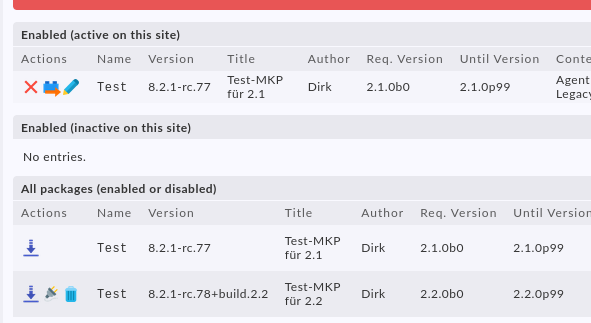
In the end yes - inside the GUI and CLI you cannot activate packages with newer version requirements but all older can be activated. This has also some benefits, like update a old package to newer APIs. I would install this old package in a new CMK and fix all problems. Build the package with new version number and new requirements and can use it on other systems. If you cannot install older packages in newer versions then you would have a problem here.

1 Like

I know what you mean but for development purpose and to see which errors occur during n update, I simply dropped the version restriction of the old package, so that it can be installed on all checkmk versions. After fixing, I re-added the version restriction.

Not sure how you did the switch back. A more detailed description probably with screenshots is welcome.

We use this functionality since 1.6 and for us it works quite well. Without we wouldn’t be able to update anymore.
In my environment I even can install a package which is not valid for current version. If its enabled it will appear in section ’ Enabled (inactive on this site)’ and finally its not unpacked to local.

we use ‘Valid until Checkmk version 2.2.0p99’ and not 2.3.0b0. Maybe thats the issue with it.

regards

Mike

That should have no impact. Booth have the same effect.
What @Dirk means is, you can activate a package the has a until version of 2.2.0p99 or 2.3.0b0 inside a 2.3.0p20 without any error message or warning.
At the next minor/major update of CheckMK this package will be disable, what is correct, but no one hinders you to make “mkp enable …” for this old package.

I would prefer that a warning message is issued in such a case. But it should be possible for the reason i described before.

1 Like

Andreas ist right.

Usually I enable the MKP via commandline (mkp add and mkp enable) and get no complaints. Same with the GUI but there I get a huge red box because all my WATO plugins are incompatible when I enable the 2.1 package under 2.2.
The box is not about wrong version numbers but about incompatible plugins.

Here is an example run. The site is 2.2 and I have already added two MKPs: one for 2.1 and one for 2.2.
With mkp enable I can switch back and forth between them without any warnings. This sould not be the case.

OMD[tsite]:~$ omd version 
OMD - Open Monitoring Distribution Version 2.2.0p35.cee

OMD[tsite]:~$ mkp list 
Name Version         Title            Author Req. Version Until Version Files State   
---- --------------- ---------------- ------ ------------ ------------- ----- --------
Test 8.2.1           Test-MKP für 2.1 Dirk   2.1.0b0      2.1.0p99      629   Disabled
Test 8.2.1+build.2.2 Test-MKP für 2.2 Dirk   2.2.0b0      2.2.0p99      595   Disabled

OMD[tsite]:~$ mkp enable Test 8.2.1
[Test 8.2.1]: Installing

OMD[tsite]:~$ mkp list 
Name Version         Title            Author Req. Version Until Version Files State                        
---- --------------- ---------------- ------ ------------ ------------- ----- -----------------------------
Test 8.2.1           Test-MKP für 2.1 Dirk   2.1.0b0      2.1.0p99      629   Enabled (active on this site)
Test 8.2.1+build.2.2 Test-MKP für 2.2 Dirk   2.2.0b0      2.2.0p99      595   Disabled                     

OMD[tsite]:~$ mkp enable Test 8.2.1+build.2.2
[Test 8.2.1+build.2.2]: Updating from 8.2.1
...

OMD[tsite]:~$ mkp list 
Name Version         Title            Author Req. Version Until Version Files State                        
---- --------------- ---------------- ------ ------------ ------------- ----- -----------------------------
Test 8.2.1+build.2.2 Test-MKP für 2.2 Dirk   2.2.0b0      2.2.0p99      595   Enabled (active on this site)
Test 8.2.1           Test-MKP für 2.1 Dirk   2.1.0b0      2.1.0p99      629   Disabled                     

(I also changed the "version.usable_until" from "2.2.0b0" to "2.1.0p99" but that doesn’t make any difference. It seems that mkp enable simply doesn’t care about the version numbers.)

I am a bit confused about the used terms.
You can upload a MKP to checkmk and you can find it in the section ’ All packages (enabled or disabled)’
Next, you can enable the package and you will find it either in ‘Enabled (active on this site)’ or in ’ Enabled (inactive on this site)’ depending on the options ‘Minimum Required Checkmk version’ and ‘Valid until Checkmk version’.
Even after upgrade the package remain enabled as it was before but it could become active or inactive depending on the package options mentioned above. You may disable then the package and re-enable it again but the result should be the same.
The tests I did with 2.3 is while a while ago but I cannot remember any issues with package management.
As of today we start the upgrade from 2.1 to to 2.2 with all our remote sites and I do not see any issues until now.

For normal upgrading there is no problem.

What @Dirk and myself where having an issue with is that you can enable old packages with a set version until without any output inside a CMK version that is not suitable for the package version.

Simple example:

running version 2.3.0p20
mkp has “version until” set to “2.3.0b1”
now you do a “mkp add old-1.0.0.mkp” and “mkp enable old 1.0.0” after this the mkp is “active + enabled” on the site
There is no warning at all that this package is not suitable for the version 2.3.0p20 as it has a lower until version set.
Best way would be a warning message that you enabled an old package on a newer version.

1 Like

That’s exactly what I meant. I’m running 2.2 and can enable and activate an MKP which is suitable for 2.1 only:

image

(The red box above the table is about incompatibilities in the plugins, but they should not have been activated in the first place.)

One hint I can give is your version scheme. I would recommend to follow semantic versioning.

Use 8.2.1 and 8.2.2 or 8.3.0 or whatever.
checkmk cannot deal with alpahnumerical text in version.
I agree that this is not direct related to the issue with Until Version.
I would have to create a test env to reply this issue.

Well, 8.2.1-rc.78+build.2.2 is a valid version number according to semantic versioning and checkmk happily accepts that number.

Testing in 2.1 it works well:

OMD[test21]:~$ mkp list
Name                      Version Title                                                             Author                                                                       Req. Version Until Version Files State
------------------------- ------- ----------------------------------------------------------------- ---------------------------------------------------------------------------- ------------ ------------- ----- --------
ldap_groups_to_site_multi 3.2.0   Sync and lock authorized sites of users based on group membership tribe29 GmbH, Ronny BRUSKA/ FORVIA, Michael FRANK <michael.frank@forvia.com> 2.2.0b0      2.3.0b0       1     Disabled
ldap_groups_to_site_multi 3.1.0   Sync and lock authorized sites of users based on group membership tribe29 GmbH, Ronny BRUSKA/ FORVIA, Michael FRANK <michael.frank@forvia.com> 2.1.0p1      2.1.0p99      1     Disabled
OMD[test21]:~$ mkp enable ldap_groups_to_site_multi 3.2.0
The package requires Check_MK version 2.2.0b0, but you have 2.1.0p42 installed.
OMD[test21]:~$ mkp list
Name                      Version Title                                                             Author                                                                       Req. Version Until Version Files State
------------------------- ------- ----------------------------------------------------------------- ---------------------------------------------------------------------------- ------------ ------------- ----- -------------------------------
ldap_groups_to_site_multi 3.2.0   Sync and lock authorized sites of users based on group membership tribe29 GmbH, Ronny BRUSKA/ FORVIA, Michael FRANK <michael.frank@forvia.com> 2.2.0b0      2.3.0b0       1     Enabled (inactive on this site)
ldap_groups_to_site_multi 3.1.0   Sync and lock authorized sites of users based on group membership tribe29 GmbH, Ronny BRUSKA/ FORVIA, Michael FRANK <michael.frank@forvia.com> 2.1.0p1      2.1.0p99      1     Disabled
OMD[test21]:~$
1 Like

In 2.2.0p39 its not working correct:

OMD[test]:~$ omd version
OMD - Open Monitoring Distribution Version 2.2.0p39.cee
OMD[test]:~$
OMD[test]:~$
OMD[test]:~$ mkp list
Name                      Version Title                                                             Author                                                                       Req. Version Until Version Files State
------------------------- ------- ----------------------------------------------------------------- ---------------------------------------------------------------------------- ------------ ------------- ----- --------
ldap_groups_to_site_multi 3.2.0   Sync and lock authorized sites of users based on group membership tribe29 GmbH, Ronny BRUSKA/ FORVIA, Michael FRANK <michael.frank@forvia.com> 2.2.0b0      2.3.0b0       1     Disabled
ldap_groups_to_site_multi 3.1.0   Sync and lock authorized sites of users based on group membership tribe29 GmbH, Ronny BRUSKA/ FORVIA, Michael FRANK <michael.frank@forvia.com> 2.1.0p1      2.1.0p99      1     Disabled
OMD[test]:~$ mkp enable ldap_groups_to_site_multi 3.1.0
[ldap_groups_to_site_multi 3.1.0]: Installing
OMD[test]:~$ mkp list
Name                      Version Title                                                             Author                                                                       Req. Version Until Version Files State
------------------------- ------- ----------------------------------------------------------------- ---------------------------------------------------------------------------- ------------ ------------- ----- -----------------------------
ldap_groups_to_site_multi 3.1.0   Sync and lock authorized sites of users based on group membership tribe29 GmbH, Ronny BRUSKA/ FORVIA, Michael FRANK <michael.frank@forvia.com> 2.1.0p1      2.1.0p99      1     Enabled (active on this site)
ldap_groups_to_site_multi 3.2.0   Sync and lock authorized sites of users based on group membership tribe29 GmbH, Ronny BRUSKA/ FORVIA, Michael FRANK <michael.frank@forvia.com> 2.2.0b0      2.3.0b0       1     Disabled
OMD[test]:~$

I will open a ticket.

1 Like

Funny enough, if I enable the package valid for 2.2 it disable the package for 2.1. Thats also not correct.

OMD[test]:~$ mkp enable ldap_groups_to_site_multi 3.2.0
[ldap_groups_to_site_multi 3.2.0]: Updating from 3.1.0
OMD[test]:~$ mkp list
Name                      Version Title                                                             Author                                                                       Req. Version Until Version Files State
------------------------- ------- ----------------------------------------------------------------- ---------------------------------------------------------------------------- ------------ ------------- ----- -----------------------------
ldap_groups_to_site_multi 3.2.0   Sync and lock authorized sites of users based on group membership tribe29 GmbH, Ronny BRUSKA/ FORVIA, Michael FRANK <michael.frank@forvia.com> 2.2.0b0      2.3.0b0       1     Enabled (active on this site)
ldap_groups_to_site_multi 3.1.0   Sync and lock authorized sites of users based on group membership tribe29 GmbH, Ronny BRUSKA/ FORVIA, Michael FRANK <michael.frank@forvia.com> 2.1.0b0      2.2.0b0       1     Disabled
OMD[test]:~$

1 Like

Thank you for your tests. I’m glad you could recreate the problem.

I think the min_version is honored, so if you install a 2.2 package under 2.1, it is enabled but inactive. That’s exactly what I need for the update. I want to install both a 2.1 and a 2.2 package under 2.1. As soon as I update my site from 2.1→2.2, checkmk automatically switches the packages. That’s really awesome.
But after the update I can re-enable the old package and that should not be possible.
This indicates that the max_version (or whatever it is called) is ignored.

I opened now three tickets with high prio for MKP Management in 2.2:

Extension Package Until. and Req. Version not respected
MKP vanish after disabled on remote sites
MKPs not removed from remote system after removed from master

1 Like

These two should be fixed with the recent 2.3 versions.
But not in 2.2 i think.

That is exactly the expected behavior. If your site is at CMK version 2.2.

That is to discuss. It must be possible to activate older packages but you should get a warning.

Thanks :slight_smile: ! IIRC we have to thank @mike1098 for requesting this feature.

As Andreas already indicated: That is due to a more fundamental problem/feature (depending on your view): This page currently serves as means to administer MKPs, and to edit MKPs. And you can only edit an MKP that is enabled (:person_facepalming:). So we have to ignore the max_version when enabling manually, to allow changing it, if necessary and possible.

Let me take this opportunity to ask you this (very seriously, not rethorically!): Would you prefer if Checkmk adhered to the version fields unconditionally, even if you could not edit such an MKP anymore at all in a not supported site?

1 Like

Clear no - from my point of view a warning message that you enabled an old MKP would be the best solution.
Result:
You can edit the package but you also see that old MKPs are enabled with the warning.

5 Likes

Ahh, not worth to mention :blush:

So, its a feature not a bug :slight_smile: ? I thought about that yesterday also and decided to do some more tests. In normal case you dont install a package which has lower version requirement’s than master.

Let me discuss this with our developer team. Until now it was not a problem that we are not able to edit a a package which is enabled but not active because anyway we have an instance with the required version somewhere ready where we can edit that package. Allowing to install e.g. a 2.1 MKP on a 2.2 system is some kind of risk to break something. So we need to balance here between convenience and risk.

1 Like