Hello.
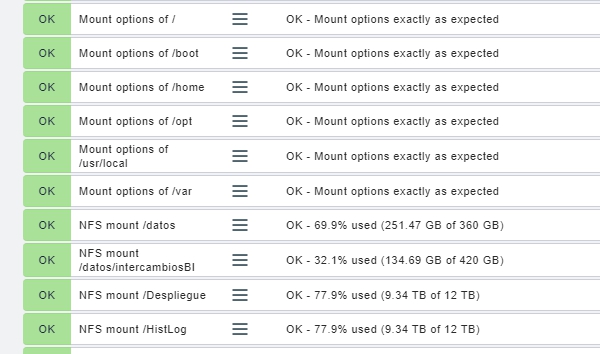
I am monitoring a linux server and want to know if the NFS services can be set a threshold for when the volume reaches 80%. Is there an agent or some way to monitor it or do I have to make a script.
I attach an image
Quizás quisiste decir: [Agradezco cualquier ayuda o opinión ](javascript:void(0))
checkmk don’t like to monitor NFS shares on there mount points because there are several problems with. If you get a stale NFS you van’t gather informations anymore, you don’t know about set soft and hard limits, this values aren’t passed to the client always correctly, and so on. Please check out if it’s possible to monitor the file size of you NFS at the server (origin of NFS).
When the df -h command is run on NFS mounts, the Check MK server reports the same values as the operating system.
The question is, would an alert occur in Check MK when the NFS mount is populating?
You should monitor NFS filesystems on the server (at the source), not at the client. But if you insist, you may try removing “nfs” from the line below inside of your check_mk_agent script:
section_df() {
    if [ -n "$IS_DOCKERIZED" ]; then
        return
    fi

    # The exclusion list is getting a bit of a problem.
    # -l should hide any remote FS but seems to be all but working.
    local excludefs
    excludefs="-x smbfs -x cifs -x iso9660 -x udf **-x nfsv4 -x nfs** -x mvfs -x prl_fs -x squashfs -x devtmpfs"
YMMV and your change will be overwritten when you upgrade the agent.
Good afternoon.
Thanks for your time. Removing it does nothing.
All nfs services are managed by a HPE 3PAR booth and the checkmk does not have or cannot find a specific plugin for the filesystem of the 3par
You are correct. I thought I figured out as a few lines below the excludefs, you see ‘df’ called with the ‘l’ option which says to include “local” filesystems only. However, after removing that I am still not getting NFS filesystems back. It appears that I get it back in the raw agent output though… so maybe I am doing something in the gui to ignore them.
Try removing the ‘l’ from the ‘df’ line:
# We really *need* word splitting below!
# shellcheck disable=SC2086
df -PTlk ${excludefs} | sed 1d