Hello together,
I would like to monitor on a single host, which processes use most of the CPU.
Sometimes the server hangs up and we have to forcefully reboot it, becaus we can’t access it anymore.
Also I would like to be able to display how it was started (cmd parameters?)
I have found some scripts and fiddled around, but sadly I can’t get it working.
$threshold = 10
$exitCode = 0
$ps_out = Get-Process | Sort-Object CPU -Descending | Select-Object -First 10

# Iterate through each process
foreach ($ps_row in $ps_out) {
    # Calculate the CPU usage percentage
    $cpuUsage = ($ps_row.CPU / (Get-WmiObject -Class Win32_Processor | Select-Object -ExpandProperty NumberOfLogicalProcessors)) * 100

    # Display the process information
    Write-Host "Process: $($ps_row.ProcessName) (PID: $($ps_row.Id)) CPU Usage: $cpuUsage%"

    # Check if the CPU usage is greater than 10%
    if ($cpuUsage -gt 10) {
        # Set the exit code to 2
        $exitCode = 2
    }
}

# Exit the script with the saved exit code
exit $exitCode
On my local machine I had to change $cpuUsage = ($ps_row.CPU / (Get-WmiObject -Class Win32_Processor | Select-Object -ExpandProperty NumberOfLogicalProcessors)) * 100
into $cpuUsage = ($ps_row.CPU / (Get-WmiObject -Class Win32_Processor | Select-Object -ExpandProperty NumberOfLogicalProcessors)) / 10
to get correct percentages.
While question of OP is about cpu, your demo script can possibly be a nice starting point to convert into top X processes using most memory.
Or maybe keep CPU usage and add memory.
I have a few endpoint clients that sometimes are crashing due to high memory usage when they don’t log off after office hours. I suspect some sites cause a memory leak in Chrome.
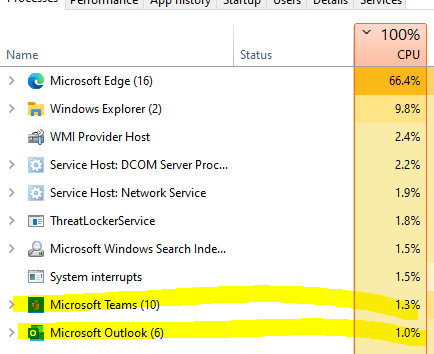
Hi, how did you get the correct percentages for high CPU usage? When I run the script with your section the results just don’t add up to what I’m seeing in task manager, see example:
I find it tricky to compare directly to taskmanager or process explorer since they show more processes, group them and / or have a refresh rate going on so the top processes jump all over the place from one moment to the next. So the moment in time for ps is never the same as the gui tools. But in general they feel to be similar.
…
Reading back what I wrote back then, and looking at current script, looks I goofed up on Sep 12: / 10 should have been / 100, so: $cpuUsage = ($ps_row.CPU / (Get-WmiObject -Class Win32_Processor | Select-Object -ExpandProperty NumberOfLogicalProcessors)) / 100