Hi Team,
How to monitor Redhat subscription status of a linux server using Check_MK?
Command: subscription-manager status
Hi Team,
How to monitor Redhat subscription status of a linux server using Check_MK?
Command: subscription-manager status
Hi @priya7793
Really don’t know if there’s already some plugin for that or not, but take a look at :
Hi @priya7793
I found the following script on the Nagios Exchange:
#! /bin/bash

# Product ID 479 is RHEL
product_id=479

threshold=$1

if [[ ! $threshold =~ ^[0-9]+$ ]]
then
	echo "Usage: sudo $0 nb_days_before_expiration"
	exit 3
fi

subscription_expiration=$(/usr/sbin/subscription-manager list --matches=$product_id | egrep '^Ends:' | awk '{ print $2 }')

# subscription_expiration can be in YYYY-MM-DD or MM/DD/YYYY depending on locales
if [[ ! $subscription_expiration =~ ^[0-9/-]+$ ]]
then
	echo "UNKNOWN - Can't find expiration date of product ID $product_id (Red Hat Enterprise Linux)"
	exit 3
else
	today_date=$(date +%Y%m%d)
	let date_diff=(`date +%s -d $subscription_expiration`-`date +%s -d $today_date`)/86400

	human_readable_exp_date=$(date -d $subscription_expiration)

	if [[ $date_diff -le 0 ]]
	then
		echo "CRITICAL - Subscription is expired since $human_readable_exp_date"
		exit 2
	elif [[ $date_diff -le $threshold ]]
	then
		echo "WARNING - Subscription expires in $date_diff days, that is on $human_readable_exp_date"
		exit 1
	else
		echo "OK - Subscription expires in $date_diff days, that is on $human_readable_exp_date"
		exit 0
	fi
fi
Try it out and it should be really easy to adapt it to the Localcheck Syntax.
Other than that I know that it’s possible to monitor the subscription status on SUSE Systems with Checkmk. (SuSE Linux Enterprise Server: License Information)
Hope this helps. 
Regards
Norm
Hello all,
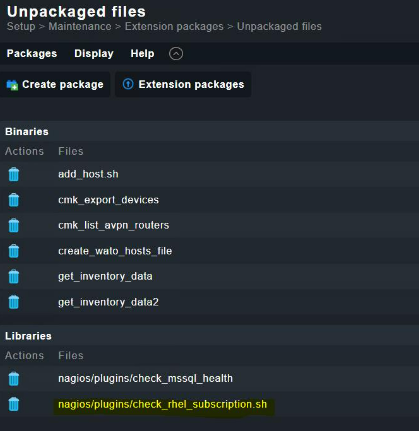
I found this package inside check_mk . How to deploy it ?
This topic was automatically closed 365 days after the last reply. New replies are no longer allowed. Contact an admin if you think this should be re-opened.