Hello.
I have the version checkmk raw 1.6.0.p9. I would like to configure the Monitor specific TCP / UDP connections and listeners rule (Wato> Manual Checks> NETWORKING) to monitor ssh connections. This rule requires the netstat.linux plugin; I already have this plugin on the server where I want to monitor the ssh connections. I have created the rule. I have checked that there are ssh connections on the server but I do not get any data on how many connections there are or any other data. How should I configure the rule? or I have to modify the command in the netstat.linux to get more information about the ssh connections.
you do not have to modify the netstat.linux plugin to get this to work.
Did you put the plugin in the right folder (/usr/lib/check_mk_agent/plugins/), is it executable and is the <<<netstat>>>-section in the agent-output for that host?
Have a look at the agent output, you should see the netstat-section and this basically should be the output of the netstat-command from that host.
If you don’t see it in the agent output, the plugin is not being executed.
If you do see it, then your rule is propably not configured properly.
Did you download the file from the checkmk-server? Or did you get the contents for that file from somewhere else?
I seems in your version of the file the “netstat” is missing in the section header. That would explain why you don’t see anything on the checkmk-server.
I guess that’s just the forum software: it mangles the inner angled brackets, (mis-) interpreting <netstat> as an HTML tag. @francis: try to format such code as preformatted text:
@martin.schwarz ah - good catch, handn’t thought about that thank you!
@francis could you check if the plugin is executable? For example just try to run it from the commandline, e.g. /usr/lib/check_mk_agent/plugins/netstat.linux, and see if it outputs anything.
It is correct what @martin.schwarza says that happened to me. @ikoening I have run it and if I get a netstat output of all connections. What I do not understand the output that appears in the checkmk
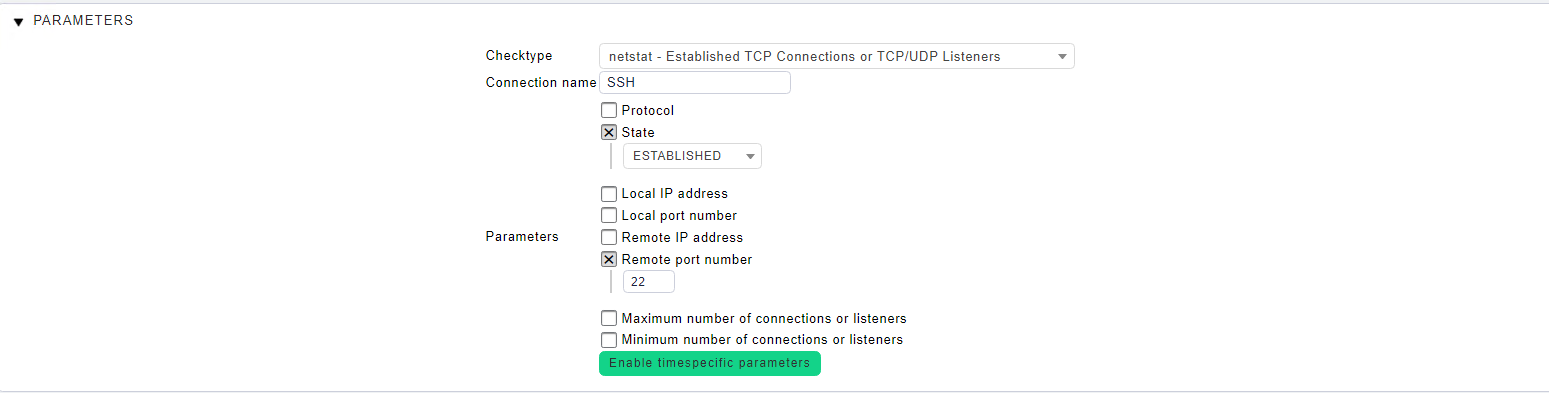
I don’t understand the matching entries found: 0. In the netstat I see that there are three established ssh connections. The question is, as long as there are connections, will it show me the output of the image? Doesn’t it count?
Are you trying to monitor the SSH connections to that host, so how many users are logged in on that machine, or do you want to monitor SSH connections from that host, so how many users are connection to a machine via SSH from that host?
Because in the screenshot from above you have specified the remote port to be port 22, so that would monitor outgoing SSH connections from that host to other hosts.
If you want to monitor SSH connections to that host you have to input port 22 for “Local port number” and not “Remote port number”
To achieve this, you could also just deploy the mk_logins plugin. Very simple, it just does a who | wc -l. But it’s an official check, and you can configure the limits via WATO.
This topic was automatically closed 365 days after the last reply. New replies are no longer allowed. Contact an admin if you think this should be re-opened.
 thank you!