Hello All,
I configured the fileinfo file in the .yaml file on a Windows server.
I was able to see the desired files in Check_MK. I used two rules: Size, age, and count of file groups and Group patterns.
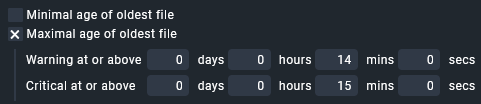
What I wanted to monitor was if files with the .tif, .tiff, and .pdf extensions were present for more than 30 minutes. This triggered an alert so action could be taken and the files could begin moving again. The files typically remain in the folder for no more than 2 to 5 seconds. [The reporting time parameter has now changed to 15 minutes.]
Today, the parameter was met, and Check_MK didn’t report anything; the alert remained green. The files being queued (more than 180) no longer met the Group patterns rule; they were added as alerts.
Could you help me determine what the error could be?
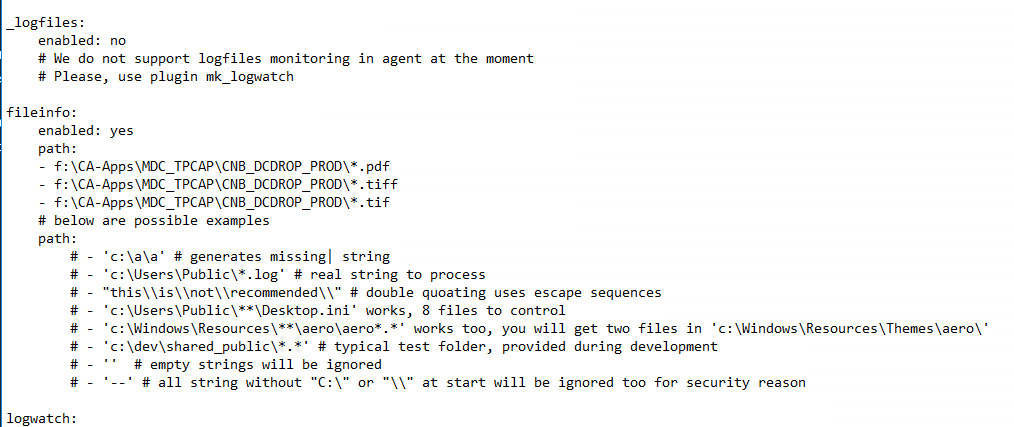
This is the configuration in the .yaml file, after editing it I restarted the Check_MK agent on the Windows server that I need to monitor the path and files.
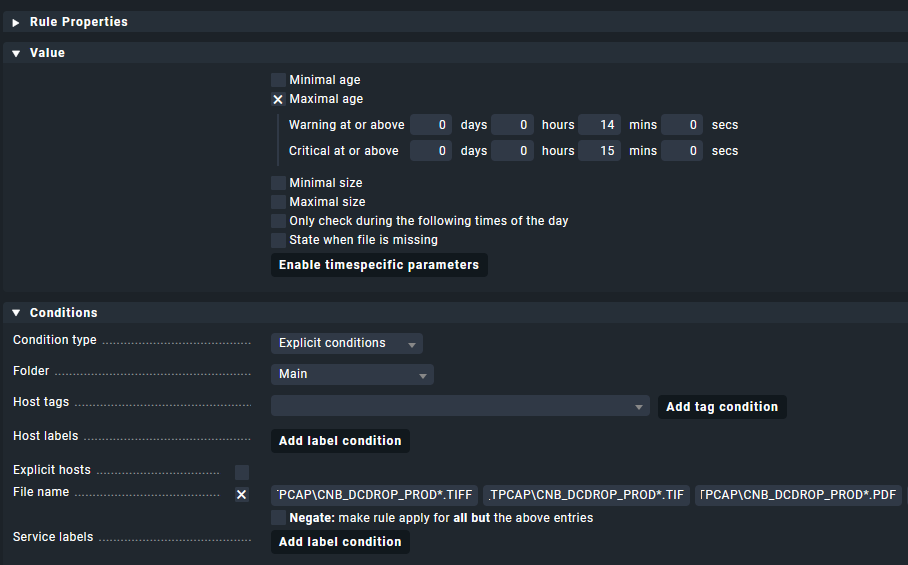
**[Group pattern] This is how I have the rules configured [I have three rules configured, I need to monitor three types of files that are on the same server and in the same path]



**[ Size, age and count of file groups] This is how I have set up the three size rules:
Configure three rules like the one in the image, just change the extension at the end.
f:\CA-Apps\MDC_TPCAP\CNB_DCDROP_PROD*.TIF
f:\CA-Apps\MDC_TPCAP\CNB_DCDROP_PROD*.TIFF
f:\CA-Apps\MDC_TPCAP\CNB_DCDROP_PROD*.PDF

Thanks in advance.
Regards,
Vix