Monitoring hard drive corruption

Hi, What is the best way to monitor for hard drive corruption/health?
I was looking at the rule ‘Openhardwaremonitoring SMART’ for Windows.

Is a pre-requisite for this that we must install https://www.smartmontools.org on the Windows host we want to monitoring for disk health or corruption?
image

Can someone explain the process of using SMART for detecting corruption in hard drives and health please?

I was also thinking of just using event logs to monitor for these:

:small_blue_diamond: Critical Disk & Storage-Related Event IDs to Monitor

Event ID Source Description
7 Disk Bad blocks detected on the disk.
52 Ntfs Corruption detected in an NTFS file system structure.
55 Ntfs File system corruption has been detected and must be repaired.
98 Ntfs Volume needs a chkdsk scan due to inconsistencies.
129 Ntfs / Disk / stornvme Disk I/O timeout detected. Often related to failing hardware or driver issues.
153 Disk The I/O operation at a specific block address was retried. Can indicate a disk nearing failure.
154 Disk The disk is experiencing serious errors and might fail soon.
157 Disk A disk was unexpectedly removed (common in virtualization or external drives).
158 Disk The system detected a surprise removal of a storage device.
159 Disk Disk has been recovered from a failure, but data loss is possible.
161 Disk A hard drive has failed, often related to RAID or storage controllers.
26214 Chkdsk Windows chkdsk detected and repaired file system corruption.
1 Like

I’m not familiar with OpenHardwareMonitor, but smartmontools is usually used in linux environments to get hw metering of attached harddrives that support SMART.
In windows i think your next post using eventlog should be sufficient cause windows probably natively watches SMART data.

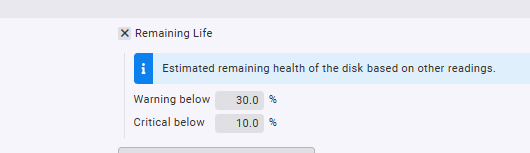
There seems to only be one reading for ‘Remaining Life’ for the Windows monitoring based on ‘other readings’:

image

Yes but the windows evenlog in the windows agent will by default notify you of errors seen there, so any detected corruption should allready appear when using the checkmk windows agent…

Our event logging is disabled but for specific items.

I have created this script which monitors the health using WMIC and also a specific set of Event IDS:

# Define time range for event log check (last 24 hours)
$startTime = (Get-Date).AddDays(-1)

# Retrieve SMART disk health status
$disks = Get-WmiObject -Class Win32_DiskDrive | Select-Object Model, Status

# Retrieve disk-related errors from Event Logs
$eventIDs = @(7, 55, 98, 153, 157, 129, 140, 141)  # Add more if needed
$diskErrors = Get-WinEvent -FilterHashtable @{LogName='System'; ID=$eventIDs; StartTime=$startTime} -ErrorAction SilentlyContinue

# Initialize health status
$diskFailure = $false
$output = @()

# Check each disk's SMART status
foreach ($disk in $disks) {
    if ($disk.Status -ne "OK") {
        $output += "2 SMART_Status - Drive $($disk.Model) is reporting issues: $($disk.Status)"
        $diskFailure = $true
    }
}

# Check Event Logs for disk errors
if ($diskErrors) {
    foreach ($event in $diskErrors) {
        # Exclude specific messages using regular expressions
        if ($event.Message -match 'No action is needed') {
            continue
        }
        if ($event.Id -eq 55 -and $event.Message -match 'power management capabilities') {
            continue
        }
        if ($event.Id -eq 153 -and $event.Message -match 'Virtualization-based security') {
            continue
        }
        $output += "2 Disk_EventLog - Event ID $($event.Id): $($event.Message -replace '\s+', ' ')"
        $diskFailure = $true
    }
}

# If no failures, report OK
if (-not $diskFailure) {
    Write-Output "0 Disk_Health - All drives OK, no recent errors"
} else {
    $output | ForEach-Object { Write-Output $_ }
}

image

1 Like

So there’s one pitfall with this construction, you can actually miss out on disk failures, cause if the logentry is older that the time or amount of events you look for, you will get an ok again, so maybe it’s better to enable snmp monitoring and make sure to have a hardware monitoring package running for disk information…

What do you mean by a hardware monitoring package running?
The above can still be useful if it alerts for events or disk health that’s fading though right? The alert would still be emailed through as a notification though for that time period?

1 Like

Yes if you setup alerting correctly than you will have no problem getting notified, the hardware monitoring package is for instance on a dell server the openmanage service.

This topic was automatically closed 365 days after the last reply. New replies are no longer allowed. Contact an admin if you think this should be re-opened.
