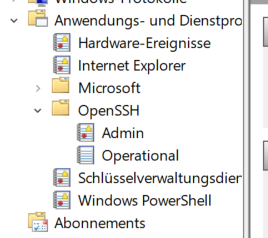
I’m running 1.6.0.p12. The standard entries in check_mk.user.yml imply that it should be possible to monitor the Admin log file for OpenSSH. Here’s what the logwatch segment of my check_mk.user.yml file looks like:
logwatch:
    enabled: no

    sendall: no   # this is MANDATORY
    vista_api: no # this is RECOMMENDED
    max_size: 500000 # default value

     # entries in the windows eventlog
    logfile:
        # - 'EventLogName': <crit|warn|all|off> + [context|nocontext]
        - 'Application': crit context # example
        - 'System': warn nocontext    # another example
        - 'OpenSSH/Admin': all nocontext    # yet another example
        - '*': warn nocontext         # This is default params for not missing entries
No matter what I try, though, the OpenSSH log doesn’t show up:
<<<logwatch>>>
[[[Application]]]
[[[HardwareEvents]]]
[[[Internet Explorer]]]
[[[Key Management Service]]]
[[[Security]]]
[[[System]]]
[[[Windows PowerShell]]]
The basic problem would seem to be that the log file is in a subdirectory, but the configuration explicitly says where to look for it!?!
Can anybody tell me how to activate monitoring of this OpenSSH log file?