Hello everyone,
I want to monitor this specific Event Category:
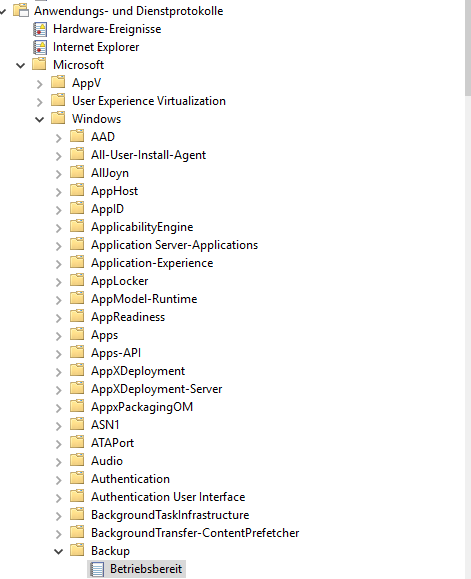
Its a folder inside the Microsoft folder and I don’t know how to catch it so I can write it in the checkmk_mk_user.yml
Can anyone help me with my problem 
I am using CRE.
Hello everyone,
I want to monitor this specific Event Category:
Its a folder inside the Microsoft folder and I don’t know how to catch it so I can write it in the checkmk_mk_user.yml
Can anyone help me with my problem
I am using CRE.
It looks like you want to monitor the Betriebsbereit event under Microsoft > Windows > Backup. In Checkmk, to catch a specific event from the Windows Event Log, you typically need to:
Identify the exact Event Log name. In your case, it seems to be Microsoft-Windows-Backup/Operational.
Use the Event Log Source in your checkmk_mk_user.yml configuration. For CRE, you can create a rule under Windows Event Log Monitoring and specify the log source and the event ID or keyword you want to monitor.
For custom logs under Applications and Services Logs, you usually reference them with their full path, e.g., Microsoft-Windows-Backup/Operational.
Test with winlogbeat or wevtutil qe "Microsoft-Windows-Backup/Operational" to make sure the event exists and the ID is correct.
Here’s an example snippet for your checkmk_mk_user.yml:
# checkmk_mk_user.yml
- name: backup_betriebsbereit
  log: Microsoft-Windows-Backup/Operational
  event_id: <event_id_here>
  severity: info
You’ll need to replace <event_id_here> with the actual ID of the Betriebsbereit event. You can find it by opening the event in Event Viewer and checking the Event ID field.
From your screenshot, it seems like the full path is visible; make sure to use that exact path when specifying the log in your configuration.
You can refer to this image for your reference:
This should allow Checkmk CRE to pick up events from that specific category.
where exactly do I have to paste the example snippet in the check_mk_user.yml?
I don’t find anything like that in my config.
I don’t think that you can filter the Event ID on the checkmk Agent.
We are also monitoring the Microsoft-Windows-Backup as described here: CheckMK2 RAW - Windows Event Log auslesen (Windows Backup) und Wartungszeiten definieren - #7 by redseven
logwatch:
    # enabled: yes

    # sendall: no   # this is MANDATORY
    vista_api: yes # this is RECOMMENDED
    # max_size: 500000 # default value
     # entries in the windows eventlog
    logfile:
        - 'Microsoft-Windows-Backup': warn context
We are filtering the relevant Event IDs in the checkmk EventConsole.
I finally got the service in my checkmk. Thank you for that!
How did you do that? Is there any tutorial for this?
In the knowledge Base there is an example with some Security Eventlog Events and the Event Console:
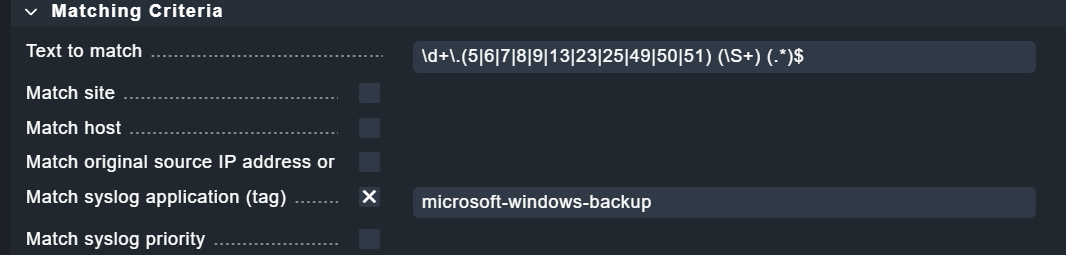
This is the filter in the Event Console Rule which we are using to get some errors:
However, if you are not currently using the Event Console, setting it up might require too much effort.
There are also other solutions in Checkmk for filtering logwatch messages (e.g., logfile patterns), but I’m not very familiar with them.