Monitoring Specific Web Page

I’ve been fiddling around with monitoring a specific web page and struggling a little bit, perhaps the community might be able to assist me.

As an example.

I’ve been trying to set up a monitor for the following URL: www.news24 .com/sport

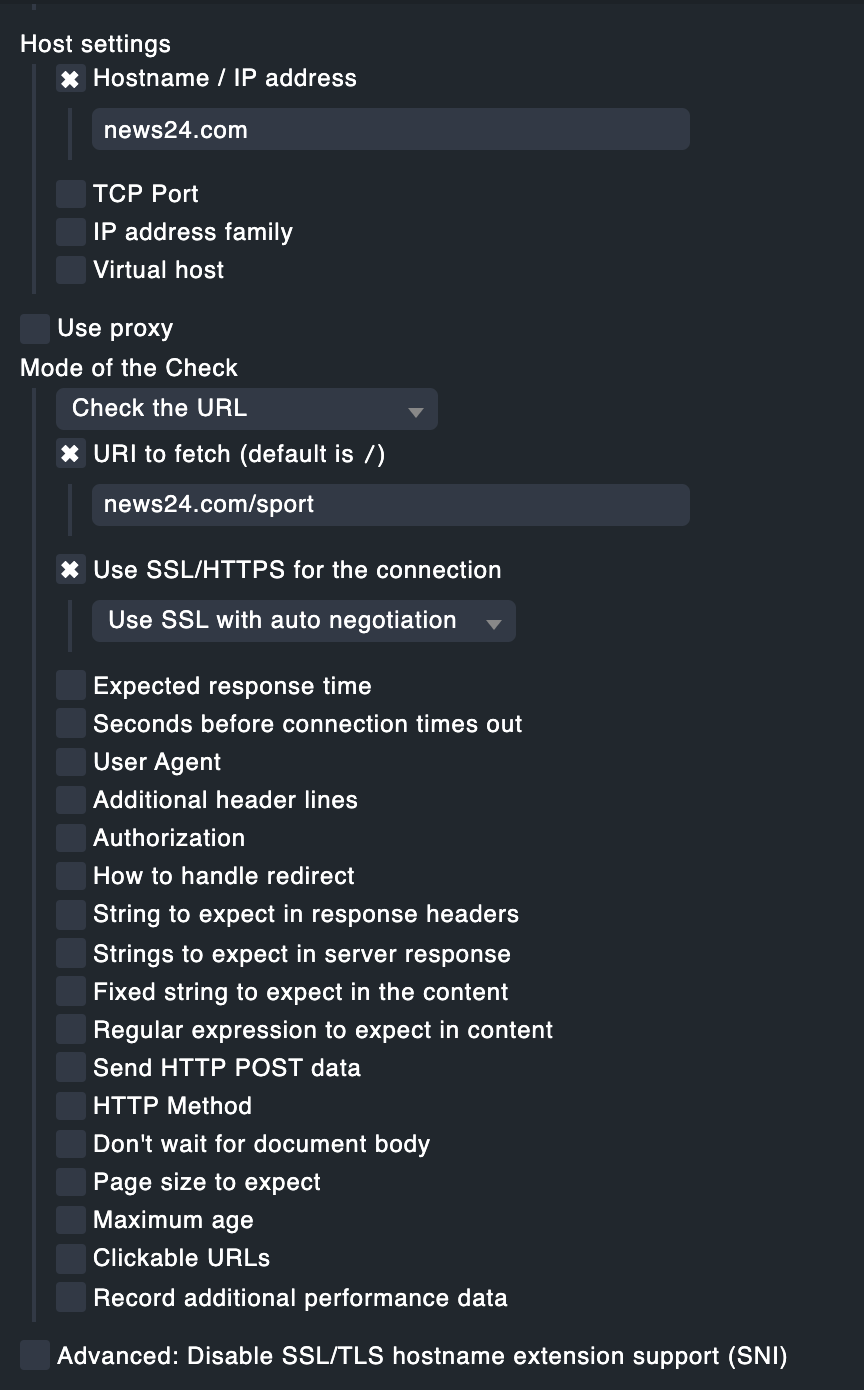
In Check_HTTP_Service i have the following configured:

However, I get the below WARN on the actual test:

Am I missing something or is this type of check not designed for what I’m trying to achieve?

Regards

Ro

  1. You can’t have the domain name in the URI unless the URI is news24.com/news24.com/sport
  2. If you use SSL your server needs to have all the certs. use curl to check if you can access the site first (this is a good practice)
    3.) The site might have re-directs and if Checkmk is not told to follow them, it won’t. SPORT24 - On top of your game might be re-directed (as an example) to news24.com/sport/index.html

Thanks for the guidance @Anders , appreciated.

I’ve modified the configuration as you’ve suggested:

And unfortunately still failing:

image

Performing a CURL from the CheckMK Server, it looks like everything works fine (200 OK)

curl -vo /dev/null https://www.news24 .com/sport
% Total % Received % Xferd Average Speed Time Time Time Current
Dload Upload Total Spent Left Speed
0 0 0 0 0 0 0 0 --:–:-- --:–:-- --:–:-- 0* Trying 104.16.251.81:443…

  • TCP_NODELAY set
  • Connected to www.news24.com (104.16.251.81) port 443 (#0)
  • ALPN, offering h2
  • ALPN, offering http/1.1
  • successfully set certificate verify locations:
  • CAfile: /etc/ssl/certs/ca-certificates.crt
    CApath: /etc/ssl/certs
    } [5 bytes data]
  • TLSv1.3 (OUT), TLS handshake, Client hello (1):
    } [512 bytes data]
  • TLSv1.3 (IN), TLS handshake, Server hello (2):
    { [122 bytes data]
  • TLSv1.3 (IN), TLS handshake, Encrypted Extensions (8):
    { [19 bytes data]
  • TLSv1.3 (IN), TLS handshake, Certificate (11):
    { [2298 bytes data]
  • TLSv1.3 (IN), TLS handshake, CERT verify (15):
    { [78 bytes data]
  • TLSv1.3 (IN), TLS handshake, Finished (20):
    { [52 bytes data]
  • TLSv1.3 (OUT), TLS change cipher, Change cipher spec (1):
    } [1 bytes data]
  • TLSv1.3 (OUT), TLS handshake, Finished (20):
    } [52 bytes data]
  • SSL connection using TLSv1.3 / TLS_AES_256_GCM_SHA384
  • ALPN, server accepted to use h2
  • Server certificate:
  • subject: C=US; ST=California; L=San Francisco; O=Cloudflare, Inc.; CN=news24.com
  • start date: Apr 30 00:00:00 2022 GMT
  • expire date: Apr 30 23:59:59 2023 GMT
  • subjectAltName: host “www.news24.com” matched cert’s “*.news24.com
  • issuer: C=US; O=Cloudflare, Inc.; CN=Cloudflare Inc ECC CA-3
  • SSL certificate verify ok.
  • Using HTTP2, server supports multi-use
  • Connection state changed (HTTP/2 confirmed)
  • Copying HTTP/2 data in stream buffer to connection buffer after upgrade: len=0
    } [5 bytes data]
  • Using Stream ID: 1 (easy handle 0x5630f5ac98c0)
    } [5 bytes data]

GET /sport HTTP/2
Host: www.news24.com
user-agent: curl/7.68.0
accept: /

{ [5 bytes data]

  • TLSv1.3 (IN), TLS handshake, Newsession Ticket (4):
    { [230 bytes data]
  • TLSv1.3 (IN), TLS handshake, Newsession Ticket (4):
    { [230 bytes data]
  • old SSL session ID is stale, removing
    { [5 bytes data]
  • Connection state changed (MAX_CONCURRENT_STREAMS == 256)!
    } [5 bytes data]
    < HTTP/2 200
    < date: Sat, 20 Aug 2022 17:35:51 GMT
    < content-type: text/html; charset=utf-8
    < cf-ray: 73dce3478fa171c8-LHR
    < cache-control: no-store,no-cache
    < last-modified: Sat, 20 Aug 2022 17:23:30 GMT
    < strict-transport-security: max-age=31536000; includeSubDomains; preload
    < vary: cf-device-type, is-app, tf_articles, tf_article_audio, tf_bookmarks, tf_comments, tf_newsletters_all, tf_newsletters_free, tf_pdf, tf_traffic_all, tf_traffic_single, tf_weather_all, tf_weather_single, tf_suspended, tf_legacy_payu, Accept-Encoding
    < cf-cache-status: EXPIRED
    < cachekey: News24 | Not Found
    < cf-device-type: desktop
    < cf-worker-referrer: null
    < content-security-policy: frame-ancestors ‘none’;
    < expect-ct: max-age=604800, report-uri=“https://report-uri.cloudflare.com/cdn-cgi/beacon/expect-ct
    < feature-policy: accelerometer ‘none’;autoplay ‘none’;camera ‘none’;document-domain ‘none’;encrypted-media ‘none’;gyroscope ‘none’;magnetometer ‘none’;microphone ‘none’;midi ‘none’;payment ‘none’;picture-in-picture ‘none’;publickey-credentials-get ‘none’;sync-xhr ‘none’;usb ‘none’;xr-spatial-tracking ‘none’;
    < referrer-policy: strict-origin-when-cross-origin
    < request-context: appId=cid-v1:e70fb5ac-8db1-4a94-a8a6-0ade72950168
    < tf_version: v14
    < x-content-type-options: nosniff
    < x-frame-options: DENY
    < x-permitted-cross-domain-policies: none
    < set-cookie: __cf_bm=qcmdTIltHdW6SReNCmryOqV5gBeRRG5CR8t7TG6uv.4-1661016951-0-AVk78U7X/MWZrkNs1TjSp+cI0sVJbndE+ixOk4DvJ1zR5QoyRdmxIiYxKEylxtxON6d5a3KZ9SZiuN04/lIucFI=; path=/; expires=Sat, 20-Aug-22 18:05:51 GMT; domain=.news24.com; HttpOnly; Secure; SameSite=None
    < server: cloudflare
    < alt-svc: h3=“:443”; ma=86400, h3-29=“:443”; ma=86400
    <
    { [156 bytes data]
    100 183k 0 183k 0 0 175k 0 --:–:-- 0:00:01 --:–:-- 175k
  • Connection #0 to host www.news24.com left intact

Any further insights would be appreciated :slight_smile:

Found the solution in another thread :slight_smile:

Thanks @Josef

Yes,
Just so anyone else finding this post - The solution is to add the Virtual Host as well. This is a bit confusing (actually most text in English here is confusing for someone who have worked with the web for over 20 years…)

This, i think just means you should send a HTTP/1.1 request where you include the domain name in the request (This was added long time ago in browsers, curl etc that allows the web host to have mutilple domain-namnes on the same IP adress, that was not possible with HTTP/1.0)

And with HTTPS you have the same feature, called SNI. Most CDNs will check both to see if they mach, if not they might refuse the connection like we saw here :frowning:

This topic was automatically closed 365 days after the last reply. New replies are no longer allowed. Contact an admin if you think this should be re-opened.