CMK version: Checkmk Raw Edition 2.2.0p9 OS version: Ubuntu 20.04
Error message: Error: passphrase chosen is below the length requirements of the USM (min=8).
snmpbulkwalk: (The supplied password length is too short.)
Error generating a key (Ku) from the supplied authentication pass phrase. (Exit-Code: 1)
Description: I am currently facing an issue with the implementation of SNMPv3 on my system. Despite attempting various password lengths and combinations, as suggested by the error message, I have been unable to establish a successful connection. I have experimented with password lengths ranging from less than 8 characters to 16 characters, including variations in case sensitivity, and the inclusion of special characters and numbers.
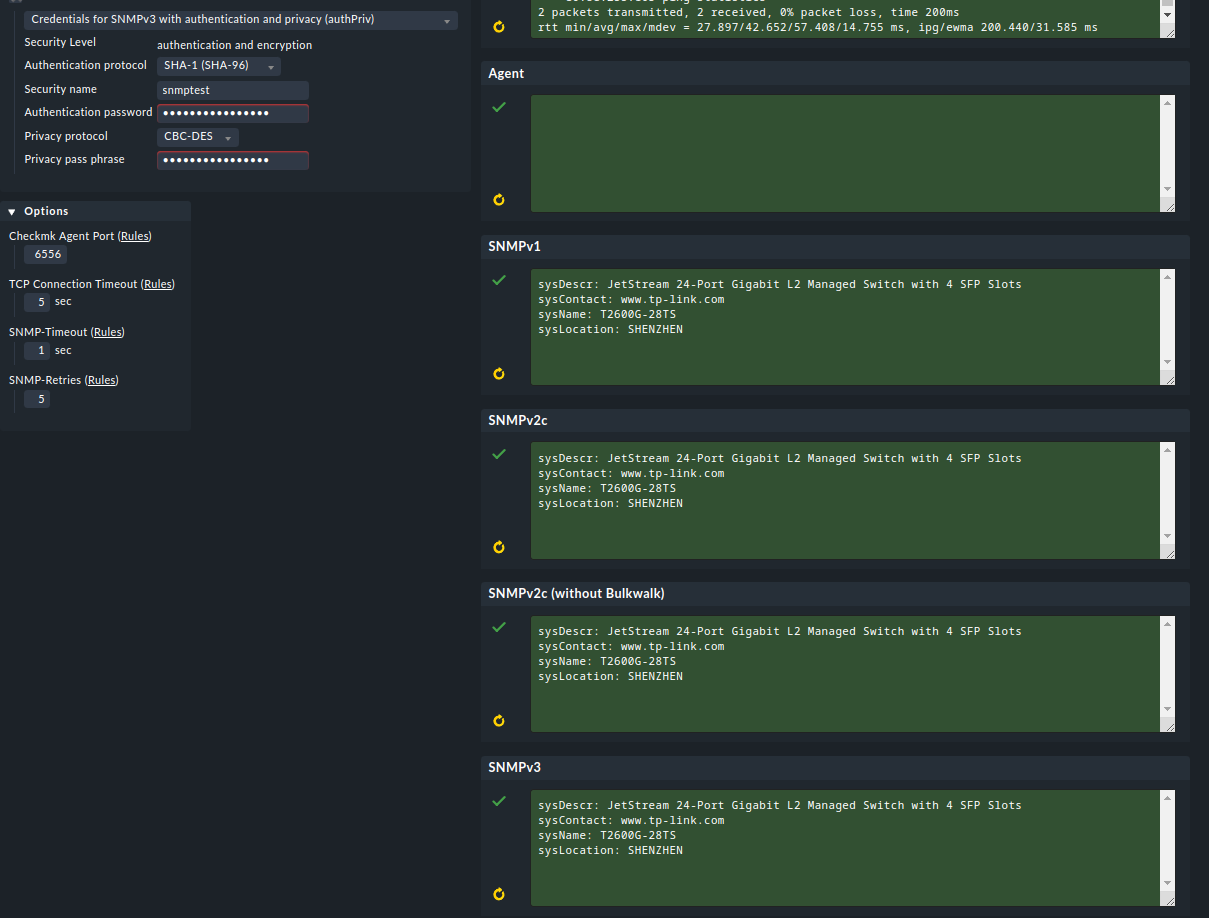
Despite these efforts, the connection consistently returns the same error, as depicted in the attached image. The error message provides no specific information on the nature of the issue, making it challenging to identify the root cause of the problem.
In further debugging of the SNMPv3 connection problem I noticed some strange behavior. When I configure credentials using Host properties and run connection tests, I always get an error message as shown in the previous image. However, if I manually re-enter the same credentials during the connection test, the connection succeeds (see next image).
This discrepancy raises concerns because credentials, when issued through the Host property, do not appear to provide accurate connection checks. I want to confirm that there is no typo here, as I have validated the inputs with the command “cmk --debug -vvn”, which confirmed that the credentials used by Check_MK are the same as the credentials I entered manually.
Given this evidence, it strongly suggests that a potential software-related issue rather than a user bug would cause issues. I request help in investigating and maintaining this behavior to ensure consistent and reliable SNMPv3 connection.
I face the same issue. It occurred after upgrading from 2.0 to 2.2.0p14 (Enterprise) and only with newer Hardware. Our 15 year old switches working fine with SNMPv3 and auth+encrypt.
It seems to be a GUI issue only. See the logfile /opt/omd/sites/sitename/var/log/web.log
2023-12-13 14:32:57,606 [30] [cmk.web.automations 15047] 'check_mk --automation diag-host SNMPHostname snmpv3 10.10.20.30 6556 1 5 5  authPriv SHA-256 snmpuser AES ' returned 'Error: passphrase chosen is below the length requirements of the USM (min=8).
'
When you do a request on shell it’s working properly:
OMD[sitename]:~$ cmk -nv HOSTNAME
The workaround i’m doing right now is:
Host configuration
SNMP credentials
Enter the current password again
Go directly to “Save & Run Service discovery”
Do a Rescan
This does not work with folders and inherited credentials.
It’s dirty, i know…
I’ve send CheckMK already a feedback yesterday about this issue.
Hi Firappa, thanks for your feedback! Unfortunately, the workaround doesn’t work for me. I’m experiencing the same issue even when I create the host without a folder. I hope the Checkmk team addresses this soon
This topic was automatically closed 365 days after the last reply. New replies are no longer allowed. Contact an admin if you think this should be re-opened.