CMK version: CEE 2.3.0p43
OS version: Ubuntu 20.04 LTS
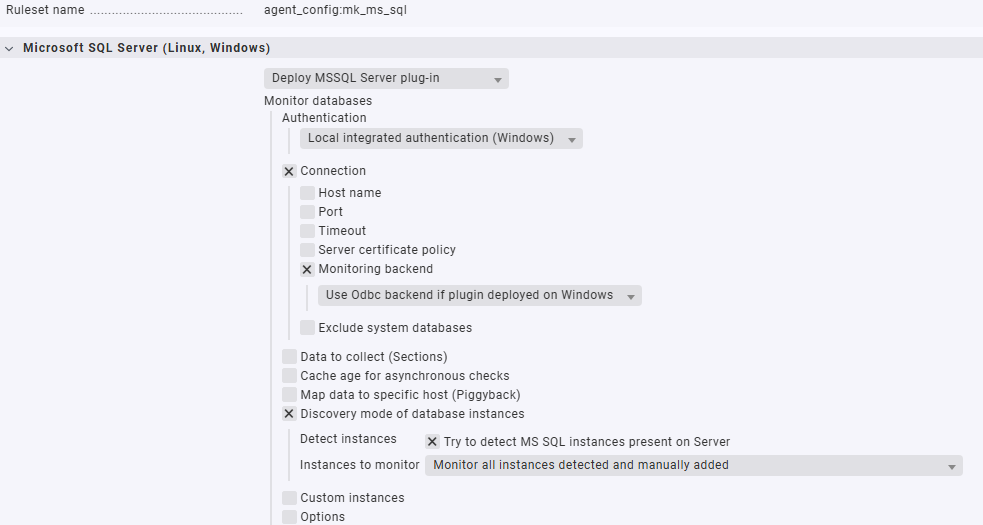
We are trying to configure the new MSSQL Plugin ( Monitoring Microsoft SQL Server ) to monitor MSSQL Server Instances in a Failover Cluster.
Our problem is, no instances are found by the plugin. As seen in the logs the agent tries to find instances only on localhost, but the instances are running on a dedicated cluster node IPs.
What we are trying to achieve is to use one rule for all cluster hosts with the option “Try to detect MS SQL instances present on server”.
The deprecated plugin mssql.vbs solves this issue by querying the registry (lines 467- 474 and 489-499).
Error message (new plugin):
2026-03-11 14:38:56.571 +01:00 [INFO] [mk_sql::setup]: Using config file: C:\ProgramData\checkmk\agent\config\mk-sql.yml
2026-03-11 14:38:56.576 +01:00 [INFO] [mk_sql::config::ms_sql]: localhost is defined, adding registry instances
2026-03-11 14:38:56.576 +01:00 [ERROR] [mk_sql::platform::registry]: Failed to open registry key: Os { code: 2, kind: NotFound, message: "Das System kann die angegebene Datei nicht finden." }
2026-03-11 14:38:56.577 +01:00 [INFO] [mk_sql::config::ms_sql]: Found 2 SQL server instances in REGISTRY: [ SQL99:Port(63262), SQL98:Port(57026) ]
2026-03-11 14:38:56.577 +01:00 [INFO] [mk_sql::setup]: Cache dir exists "C:\\ProgramData\\checkmk\\agent\\state\\mk-sql-cache\\mssql-990DD514E6A69BCC"
2026-03-11 14:38:56.578 +01:00 [INFO] [mk_sql::ms_sql::instance]: Using cache dir "C:\\ProgramData\\checkmk\\agent\\state\\mk-sql-cache\\mssql-990DD514E6A69BCC"
2026-03-11 14:38:56.578 +01:00 [INFO] [mk_sql::ms_sql::instance]: Generating main data
2026-03-11 14:38:56.578 +01:00 [INFO] [mk_sql::ms_sql::instance]: Finding instances...
2026-03-11 14:38:56.578 +01:00 [INFO] [mk_sql::ms_sql::client]: Local connection by port `localhost:1433`
2026-03-11 14:38:56.578 +01:00 [INFO] [mk_sql::ms_sql::client]: Connecting to addr 'localhost:1433'...
2026-03-11 14:38:57.728 +01:00 [WARN] [mk_sql::ms_sql::client]: Timeout: deadline has elapsed when creating client from config
2026-03-11 14:38:57.728 +01:00 [ERROR] [mk_sql::ms_sql::instance]: Failed to create main client: Timeout: deadline has elapsed when creating client from config
2026-03-11 14:38:57.728 +01:00 [INFO] [mk_sql::ms_sql::instance]: Finding instances by SQL Browser
2026-03-11 14:38:57.728 +01:00 [WARN] [mk_sql::ms_sql::instance]: Error discovering instances: Impossible to connect
2026-03-11 14:38:57.728 +01:00 [INFO] [mk_sql::ms_sql::instance]: Found 0 instances by discovery: [  ]
2026-03-11 14:38:57.728 +01:00 [INFO] [mk_sql::ms_sql::instance]: Add custom instance SQL98
2026-03-11 14:38:57.728 +01:00 [INFO] [mk_sql::ms_sql::instance]: Add custom instance SQL99
2026-03-11 14:38:57.729 +01:00 [ERROR] [mk_sql::platform::registry]: Failed to open registry key: Os { code: 2, kind: NotFound, message: "Das System kann die angegebene Datei nicht finden." }
2026-03-11 14:38:57.729 +01:00 [INFO] [mk_sql::ms_sql::instance]: Connecting using port from endpoint 57026
2026-03-11 14:38:57.729 +01:00 [INFO] [mk_sql::ms_sql::client]: Local connection by port `localhost:57026`
2026-03-11 14:38:57.729 +01:00 [INFO] [mk_sql::ms_sql::client]: Connecting to addr 'localhost:57026'...
2026-03-11 14:38:58.739 +01:00 [WARN] [mk_sql::ms_sql::client]: Timeout: deadline has elapsed when creating client from config
2026-03-11 14:38:58.739 +01:00 [ERROR] [mk_sql::ms_sql::instance]: Error creating client for `SQL98`: Timeout: deadline has elapsed when creating client from config
2026-03-11 14:38:58.740 +01:00 [INFO] [mk_sql::ms_sql::instance]: Instance `SQL98` at port 57026 not found. Try to use named connection.
2026-03-11 14:38:58.740 +01:00 [INFO] [mk_sql::ms_sql::client]: Browse connection at port `localhost:`
2026-03-11 14:38:58.740 +01:00 [INFO] [mk_sql::ms_sql::client]: Named connection to addr localhost:1434