CMK version: 2.4.0p2
OS version: Docker
Error message: Cannot connect to ‘unix:/omd/sites/cmk/tmp/run/live’: [Errno 111] Connection refused
Output of “cmk --debug -vvn hostname”: command not found
I am creating an enforced process check for a selection of Linux servers. I need to know if the process is running and what resources it is consuming.
When I create a State and Count of Processes" services with the following settings the NAGIOS Core will crap out as soon as the first check for this service happens:
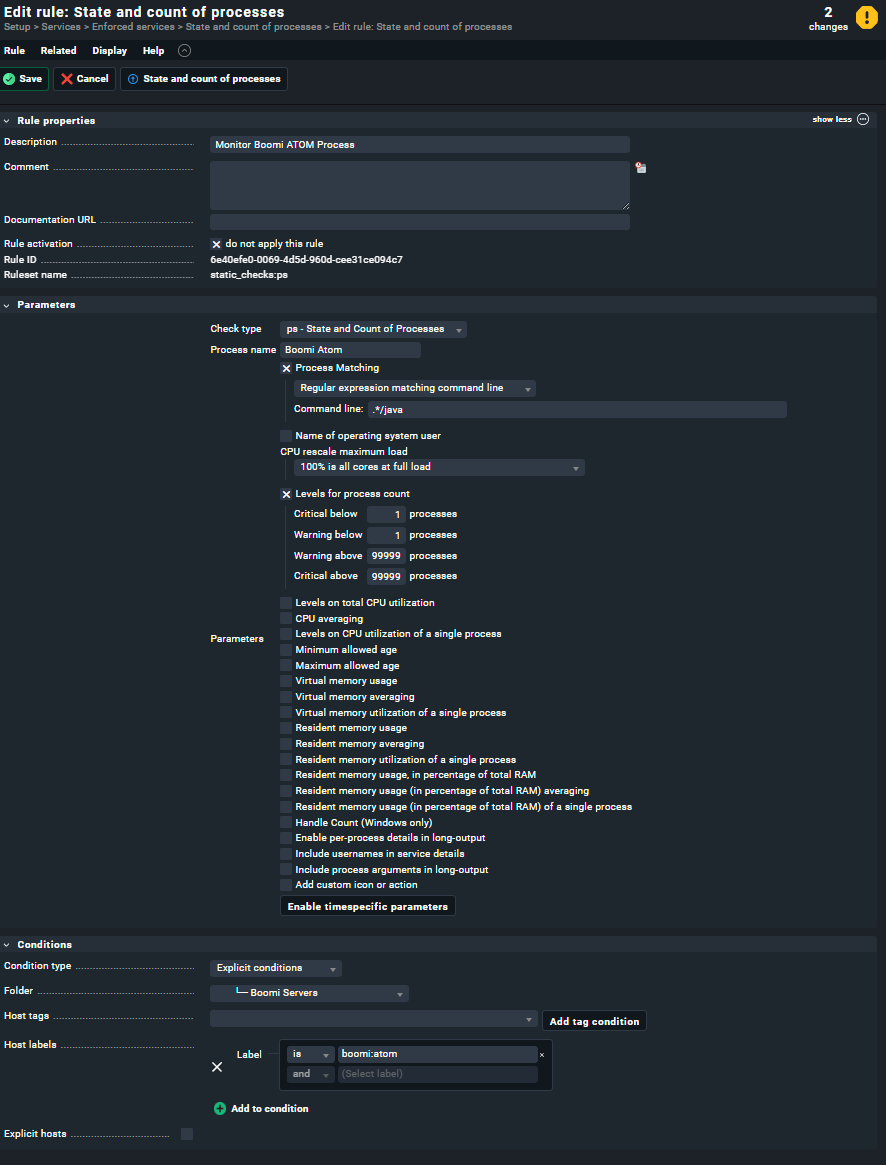
(ignore the “do not apply this rule” option being enabled. If I enable it I will have to restart CheckMK every 5 mins.)
I’ve tried various methods of matching, including the full path of the process, which did initially work but now does not.
I also tried just matching the user the process is running under (as its the only thing this user account does). But this does the same time.
To me, it seems that when I successfully match the process name or successfully pull all processes running as a specific user NAGIOS Core craps out. If I deliberately cause the match to fail NAGIOs Core remains functioning.
Any suggestions on what I might be doing wrong or how to fix this crash?