NagVis Map doesn't work since Update to 2.3.0p21

CMK version:2.3.0p24

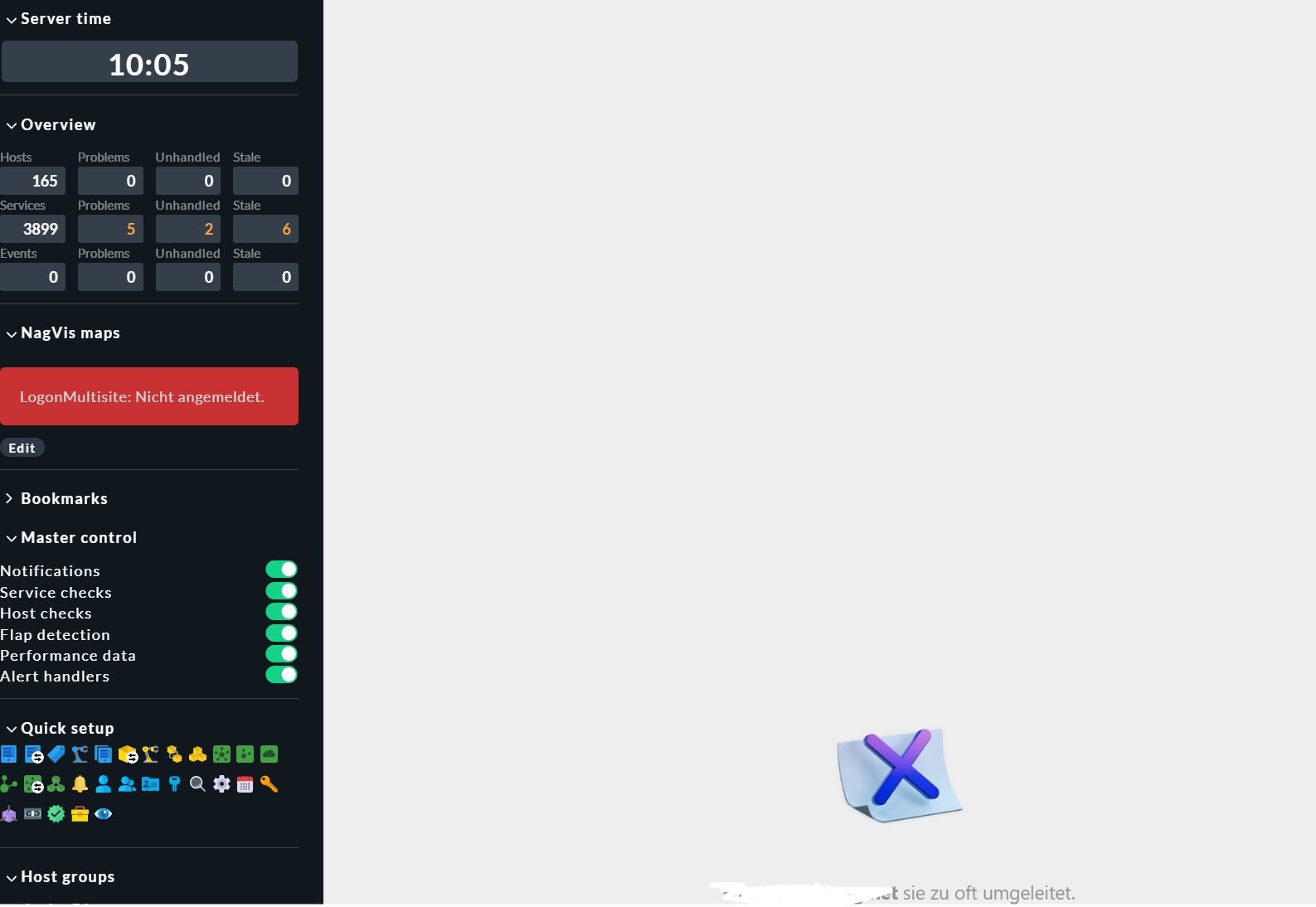
Error message:LogonMultisite: Not Authenticated

Hi,
since we updated our checkmk to 2.3.0p21 the NagVis Map shows “LogonMultisite: Not Authenticated.”.

I did my research already but didn’t find anything helpful.
When i click on the Map, it shows an error “too many redirects”.

We didn’t change the config of the NagVis at all. It just popped up after the last update.
We already updatet to the latest version p24 but the error is still showing.

Does anyone have a fix for that?

Regards

CMK Raw Edition: 2.3.0p24 (Docker)

Hi,

I have exactly the same problem.

Regards

There is another post https://forum.checkmk.com/t/nagvis-not-working-after-upgrade-from-2-3-0p17-to-p18/51369 with similar problem.

I’ve checked my /etc/hosts file on the running cmk docker container:

127.0.0.1     localhost
 ::1          localhost

I think it is because checkmk or nagvis is confused about the port.
Some component wrongly uses the port that is forwarded by the docker hosts.

If you use the same port on the docker host as in the docker container nagvis works:

docker container run \
	 -e CMK_SITE_ID="mysite" \
	 -e CMK_PASSWORD='secret' \
	 -dit \
	 -p 5000:5000 \
	 --tmpfs /opt/omd/sites/cmk/tmp:uid=1000,gid=1000 \
	 --name monitoring \
	 -v /etc/localtime:/etc/localtime:ro \
	 --restart always registry.checkmk.com/enterprise/check-mk-enterprise:2.3.0p27

But if you forward e.g. 8080/tcp

$ docker port monitoring
5000/tcp -> 0.0.0.0:8080

then nagvis does not work.

I was not yet able to identify where the port 8080 needs to be replaced by the inner apache port 5000.

But as a workaround this helped for me:

Getting a root shell in the container, and install vim.

docker container exec -it -u root monitoring bash
apt-get update
apt-get -y install vim

become site user

root@5423db102ab0:/# omd su mysite

modify this file so the site apache also listens to 8080:

OMD[mysite]:~$ cat etc/apache/listen-port.conf 
# This file is created by 'omd config set APACHE_TCP_PORT'.
# Better do not edit manually
ServerName 0.0.0.0:5000
Listen 0.0.0.0:5000

# added as a workaround
ServerName 0.0.0.0:8080
Listen 0.0.0.0:8080

restart apache

omd restart apache

TL;DR

I believe something is confused about http://localhost:8080 and http://localhost:5000
There are two localhost in the game: the docker host localhost and the docker container localhost.

Hardcoding the port to 5000 also fixes the problem for me.

Looks like $_SERVER[‘SERVER_PORT’] contains the docker host port 8080 and not the
docker container port 5000

diff -u /opt/omd/versions/2.3.0p27.cee/share/nagvis/htdocs/server/core/classes/CoreLogonMultisite.php.orig  /opt/omd/versions/2.3.0p27.cee/share/nagvis/htdocs/server/core/classes/CoreLogonMultisite.php
--- /opt/omd/versions/2.3.0p27.cee/share/nagvis/htdocs/server/core/classes/CoreLogonMultisite.php.orig	2025-02-25 22:36:38.733707704 +0100
+++ /opt/omd/versions/2.3.0p27.cee/share/nagvis/htdocs/server/core/classes/CoreLogonMultisite.php	2025-02-25 22:37:53.235145396 +0100
@@ -137,7 +137,8 @@
 
         // Check session periods validity
         $site = getenv('OMD_SITE');
-        $port = $_SERVER['SERVER_PORT'];
+        // $port = $_SERVER['SERVER_PORT'];
+        $port = 5000;
         $url = "http://localhost:$port/$site/check_mk/api/1.0/version";
         
         $headers = [
1 Like

We at checkmk have got a ticket open for this issue with internal reference SUP-22217 but no progress so far, unfortunately.

image