Need help for graph metrics correctly

Hi,

after a long time i’m writing a new agent based check for NVMe multipath over FC (like the old multipath check). Following Agentenbasierte Check-Plugins entwickeln i’ve created some metrics in my check function:

$ cmk -vpn <host>
...
NVMe multipath NetApp ONTAP Controller Number of paths: 8, Number of paths in state live: 8 (count_nvme_paths=8;;;0; count_nvme_paths_live=8;;;0; count_nvme_paths_new=0;;;; count_nvme_paths_connecting=0;;;; count_nvme_paths_deleting=0;;;; count_nvme_paths_resetting=0;;;; count_nvme_paths_dead=0;;;;)
...

For the first metric “count_nvme_paths” i’ve created a Metric()

from cmk.graphing.v1 import Title
from cmk.graphing.v1.metrics import Color, Graph, MaximumOf, Metric, Unit, DecimalNotation
from cmk.graphing.v1.perfometers import Closed, FocusRange, Perfometer

metric_nvme_subsystems_count_nvme_paths = Metric(
    name = "count_nvme_paths",
    title = Title("Count of NVMe paths"),
    unit = Unit(DecimalNotation("")),
    color = Color.ORANGE,
)

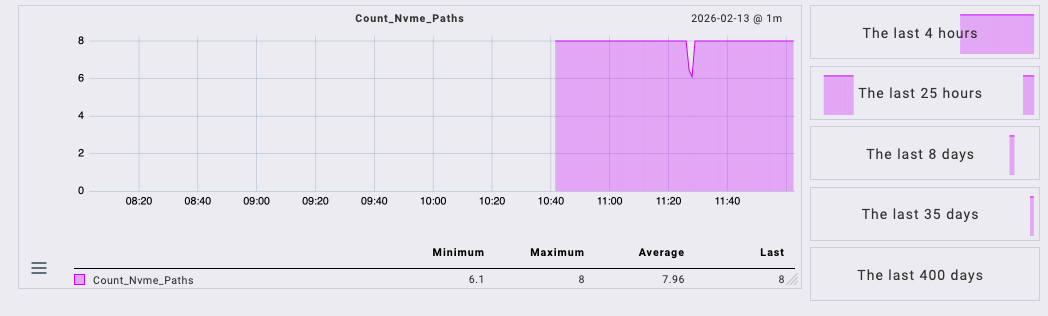
This file is located in ~/local/lib/python3/cmk_addons/plugins/nvme/graphing/graphing_nvme.py. The graph is rendered like this:

I guess my Metric() is ignored, i can’t find any reason why.

What i’m missing here ?

The code looks good to me.

Sometimes you need to omd restart apache for changes in the graphing part of checkmk to take effect. Also, you might want to have a look into ~/var/log/web.log.

What I usually do is:

# clear the web.log
OMD[cmk]:~$ > ~/var/log/web.log

OMD[cmk]:~$ omd restart apache
Temporary filesystem already mounted
Stopping apache...killing 574770...........................OK
Starting apache...OK

OMD[cmk]:~$ cat ~/var/log/web.log

I tried to reproduce the behaviour (with cmk 2.3.0p34.cee) with your metric plugin. I let one of my own plugins

yield Metric("count_nvme_paths", 200, boundaries=(0, None))

and then the web.log showed me this error:

2026-02-13 13:35:21,326 [40] [cmk.web 620290] cmk_addons.plugins.test.graphing.test_graph: cannot import name 'Graph' from 'cmk.graphing.v1.metrics' (/omd/sites/cmk/lib/python3.12/site-packages/cmk/graphing/v1/metrics.py)

So I removed all the unused imports from the plugin and kept only

from cmk.graphing.v1 import Title
from cmk.graphing.v1.metrics import Color, Metric, Unit, DecimalNotation

and then it worked.

(When I want to use Graph, I do from cmk.graphing.v1.graphs import Graph.)

As said, I use cmk 2.3.0p34.cee. Maybe it’s slightly different in 2.4.

Hi,
you load the Graph class from Metrics which is the wrong library. If you need to import it like that:

from cmk.graphing.v1.graphs import (
    Graph,
)

To check if your import is correct, use python3 yourgraph.py to see if there is an exception.

I think (but am not 100% sure) that the MaximumOf doesn’t really calculate the greatest value of a metric but is just the upper boundary given in this statement:

yield Metric("count_nvme_paths", 200, boundaries=(0, None))

So it would be None in this case (I took the boundaries from the … count_nvme_paths=8;;;0; … in your first post).

Try

...
focus_range=perfometers.FocusRange(
    perfometers.Closed(0),
    perfometers.Open(250),
),
...

with some reasonable value for the Open() thingy. If the actual value is greater, this doesn’t harm. The perfometer is drawn correctly anyway.

Or return an upper boundary from your check plugin and stick to the Closed() thingy. If the actual value is then greater, the perfometer is completely filled.
I do not think i understand the meaning of MaximumOf(). Anyway i use now Open(1). This is not correct but my performeter looks good in any case.

Thanks a lot

1 Like