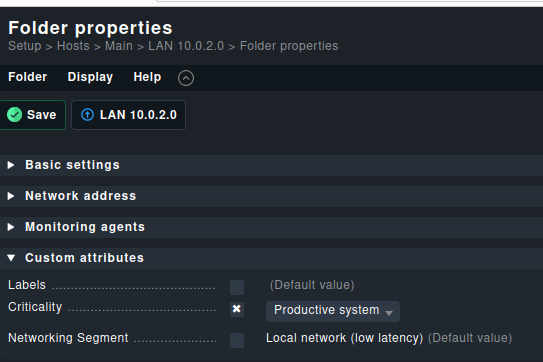
I have created two Host folders, one with auto discover for a specific network and a second folder for the network that hosts will be monitored.
we would like to monitor using ping only at this time
The main goal is to auto-discover devices than moved the new discovered hosts to the second folder, when the hosts are moved to the second folder is there a way to remove the “do not monitor this host” as a policy in that folder ? (not doing each host separately)
or in other words once the hosts are moved from the auto-discover folder to the second folder they will be monitored
It would happen automatically if it is not explicitly set.
The problem with the network scan is, is set the criticality explicit on the host
I would prefer that this setting can be omitted and it would be set on the folder level.
With the setting on the folder level it would be possible to move the host the another folder and it inherit the setting from the new one.
I have set Critically (there is an X in the checkbox) for Productive system, but when I move a host from a different folder to that folder the host does not take the folder Critically value and stays at “Do Not monitor this host”
That is what I said before, the network scan is practical not usable in your setup. Network scan sets the attributes as explizit attribute and that’s one big fail inside the scan function.
If a folder has a network scan enabled, you can “set critical host tag”
to monitor (Productive system) or not monitor (Do not monitor host)
and if I set the tag to “Do not monitor host” and I move the discovered host to another folder, the only option to enable monitor is to manually do it by hand for each host ?
This topic was automatically closed 365 days after the last reply. New replies are no longer allowed. Contact an admin if you think this should be re-opened.