CMK version: CRE 2.2.0p27 OS version: Ubuntu 22.04 LTS
So I have a weird problem. I have set up a network scan on a folder that should
run every 1 day 0 hours
scan a given IP range (172.20.19.3…250)
use the IPv4 address found as IPv4 address of the host
not use parallel pings (well, maybe it uses a default value, I did not set anything)
run as cmkadmin
Every now and then, it finds hosts that don’t exist. Usually in this case, it would find one or two, but today it found eight of them. Consequently, the newly added hosts go DOWN right after the scan and have to be removed.
I am clueless as to why that happens. Is there a way to debug this, e.g. running such a scan manually on the command line with verbose output? Is there any log output for the network scans?
Well yes, I have the IPs, Checkmk used them as hostname when adding the hosts.
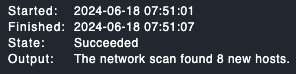
The network scan finished on 07:51 as you can see on the screenshot I posted. At 08:00:29, the core was restarted, indicating the changed config with the newly found hosts was activated, and just 6 seconds after that, Checkmk realizes these hosts are down:
[Tue Jun 18 08:00:29 2024] Nagios 3.5.1 starting... (PID=449423)
...
[Tue Jun 18 08:00:35 2024] HOST ALERT: 172.20.19.109;DOWN;SOFT;1;CRITICAL - 172.20.19.109: rta nan, lost 100%
[Tue Jun 18 08:00:35 2024] HOST ALERT: 172.20.19.147;DOWN;SOFT;1;CRITICAL - 172.20.19.147: rta nan, lost 100%
[Tue Jun 18 08:00:35 2024] HOST ALERT: 172.20.19.156;DOWN;SOFT;1;CRITICAL - 172.20.19.156: rta nan, lost 100%
[Tue Jun 18 08:00:35 2024] HOST ALERT: 172.20.19.188;DOWN;SOFT;1;CRITICAL - 172.20.19.188: rta nan, lost 100%
[Tue Jun 18 08:00:35 2024] HOST ALERT: 172.20.19.212;DOWN;SOFT;1;CRITICAL - 172.20.19.212: rta nan, lost 100%
[Tue Jun 18 08:00:35 2024] HOST ALERT: 172.20.19.206;DOWN;SOFT;1;CRITICAL - 172.20.19.206: rta nan, lost 100%
[Tue Jun 18 08:00:35 2024] HOST ALERT: 172.20.19.38;DOWN;SOFT;1;CRITICAL - 172.20.19.38: rta nan, lost 100%
[Tue Jun 18 08:00:35 2024] HOST ALERT: 172.20.19.58;DOWN;SOFT;1;CRITICAL - 172.20.19.58: rta nan, lost 100%
For context, this /24 is a network for one specific device type only, and there is no DHCP server involved. I know all devices in that network.
The only way I can think of to figure out what’s going on (assuming that these IPs actually did respond to ping when the scan was running) is to give the monitoring server a network interface in the 172.20.19.0/24 network/VLAN and make a cron job that logs the output of arp -a | grep 172.20.19 to a file every minute, and then wait for this issue to reoccur.
The log excerpt I posted literally says rta nan, lost 100%, which very much sounds like ping. And there is no Host check command rule for any device in this network.
I’m starting to assume that this bit somehow fails, which is why I’d like to capture the output of the ping command.
the expected behavior is that the host should respond to an Checkmk agent, so if the device that was added with network scan does not respond to 6556 the checkmk service will be CRIT and the host as well.
But yea not sure what’s going on here, im not using the network scan as its screws things up, we import from our CMDB and IPAM instead.
hey!
we are facing the same problem with 2.2.0p18 RAW! there are hosts popping up after networkscan where we see the ping with no response on our firewalls like all other IPs that are not added to checkmk.
did you ever find a solution?
regards,
Unfortunately not, no. The network in question is for a certain type of SNMP device, and it doesn’t happen often that devices are being added/removed, so I ended up disabling the network scanning.
To me, the automatic discovery and addition of hosts by periodic network scans sounded like a nice feature for certain kinds of devices, and that it would save a bit of manual work and help make sure that every device is being monitored, but it caused more issues with bogus hosts than it actually helped, so now I have taken another approach to verify that all devices are added to the monitoring.