After a little break, I restarted the work on NVDCT. This time, it was all about making NVDCT (and with it the Network Visualization) easier to use.
Previously, the entire configuration had to be done on the CLI. With version 1.1.0 of NVDCT, it is now possible to integrate NVDCT as an active check in to Checkmk. All options that could previously only be configured via the NVDCT configuration file can now be configured in the Checkmk web GUI.
The documentation on integration NVDCT as an active check (and for NVDCT) is available here
The option --time-format has ben deprecated. Use --output-directory instead. After the update the option is gone in the active check. So adjust your rule(s). For the CLI there is “only” a warning for now. Here you should also adjust your configuration. I plan to remove the option from the CLI tool with version 1.2.0. Why is this? It was a kind of magic, especially for the active check. You had to configure an empty output directory and set the time format option. Now there is only the output directory, which is always treated as a time format string.
FIXED
missing seperator in the active check output for “Devices”
NVDCT no longer uses a default configuration file → use -c/–config to specify one
FIXED
Do not create host objects implicitly (when creating services) → avoid unnecessary objects in topology data.
NEW FEATURES
L2 Skip neighbour interfaces
With his option enabled NVDCT will not add any interfaces/ports to the layer 2 topology, but connects neighbours/hosts directly to each other
L2 Neighbour from service
Before this configuration section was introduced, neighbors that were not hosts in Checkmk but services on a Checkmk host were not correctly mapped in the topology. With this new feature, you can configure NVDCT to find neighbors as services of a host. One such case are Cisco wireless access points, which appear as services on the Cisco Wireless LAN Controller (WLC) in Checkmk. (ThX to @adadietrich for pushing this feature forward)
Typo in rule set (Right service) ThX to @adadietrich
NEW FEATURES
--merge
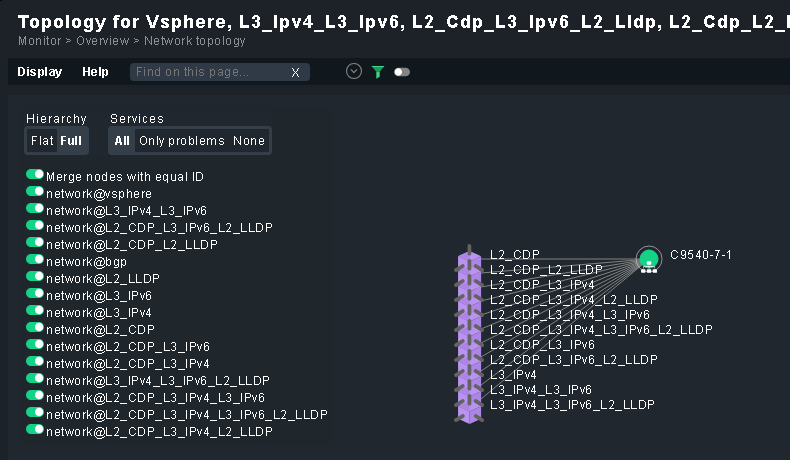
Use this option to combine data from similar sources. For example, CDP and LLDP or L3v4 and L3v6.
Together with the STATIC topology, you can also use this function to connect separate parts of a topology.
HEADS UP
With NVDCT 1.2.0 I will raise the minimum Checkmk version required to 2.3.0p31/2.4.0b4.
Why? To get rid of some ugly code to deal with the restrictions of some REST API endpoints (URL length restriction in GET requests).
See Checkmk Werks #17003 and #17512.
So if you are running older Checkmk versions, one more reason to update.
DEPRECATED
The option --update-config has ben deprecated. There is no replacement. I plan to remove the option from the NVDCT with version 1.2.0.
Why? Cleanup of old (and mostly unused) code.
NEW FEATURES
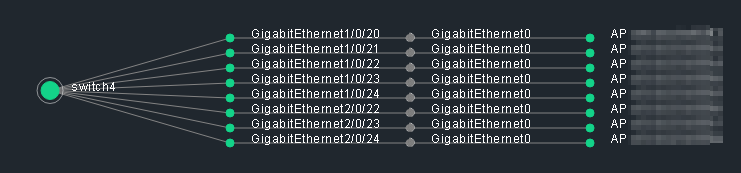
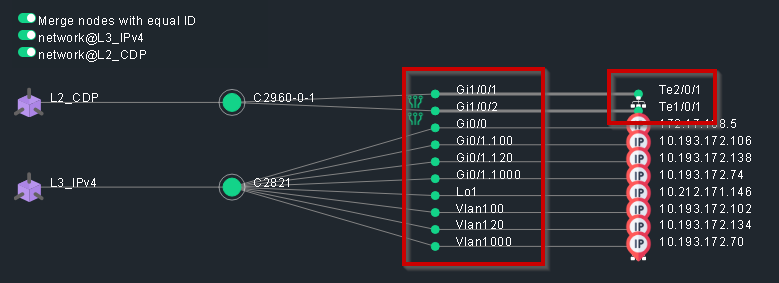
--display-short-if-names
If enabled NVDCT will use short interface names in the topology. Ie. “GigabitEthernet0/0/0” becomes “Gi0/0/0”.
Filter by site/customer in active check was broken
NEW FEATURES
--l2-ignore-mismatch ByLABEL
Prior to this release, connection mismatch detection for DUPLEX/SPEED/VLAN in layer 2 topologies could only be disabled for the entire topology. With this new option, you can use service labels to tell NVDCT which mismatches to ignore. Details can be found in the wiki.
reduced topology data file size by removing not needed data
NEW FEATURES
--remove-untouched-layers
When this option is enabled, NVDCT removes old (untouched) layers from the output directory. These can pile up if you
play around a bit with the topologies (CDP/LLDP/L3v4/L3v6) you want to create, especially if you use the “merge” option.
Here’s an example
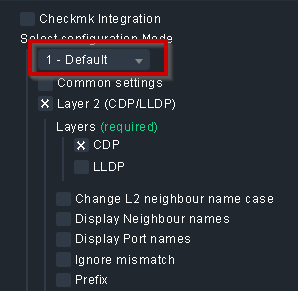
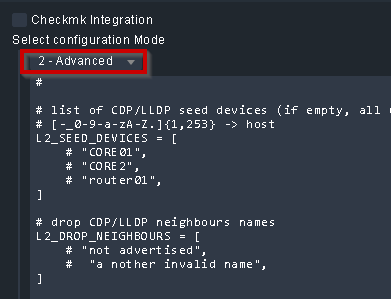
advanced option for the active check (basically write the config file directly from the GUI)
Why?
It’s now easy to migrate from the CLI to the GUI, just copy&paste your existing config
If you are used to the CLI, why not try it from the GUI?
In larger environments it might be a bit cumbersome to configure all options in the GUI, especially if you are using the STATIC layer or many filter options.
Note: after updating open/save your NVDCT rules to adjust to the new format
[FILTER_BY_SERVICE_LABEL] section.
This option now allows you to filter what goes into the topology at the interface level. Simply add service labels to the interfaces you want to filter and configure NVDCT accordingly.
And yes, you can have as many labels as you need/whish.
CHANGED
Replaced the MonitoredHost/MonitoredService form_specs with String in the active check rule set.
Why? → [BUG] (or by design?) form_spec MonitoredHost doesn’t work as expected
So you have to type the correct host/service names your self now. The input validation will still check if the host/service exists.
Note: the next version will finaly remove the deprecated options --time-format/--update-config and raise the minimum required Checkmk version to 2.3.0p31/2.4.0b4. In addition, I plan to begin preparations for the upcoming Checkmk version 2.5. This will also require updating the inventory plugins.
dont add L2_SEED_DEVICES without neighbours to the topology
allow FILTER_BY_SERVICE_LABEL to work if l2_skip_if is enabled
--log-file will skip any path configured. The log file is always saved under ~/var/log
removed L2_/L3_ from layer names
disabled filters in STATIC topology
ADDED
check the min. Checkmk version
check the min. version of the installed Network Visualization plugins
IMPROVED
input validation in active check and NVDCT
Why all these changes? And was it necessary?
Most of these changes are to prepare for Checkmk 2.5. I didn’t have to put all the changes into version 1.2.0 right away. But that would mean having another “breaking” update at the latest with the release of Checkmk version 2.5.
And yes, I think with the changes in Checkmk 2.5, it’s worth the effort.
thanks again for your amazing project!
We have been using it for quite a while in our environment and recently switched to the Active Check for topology creation.
However, when using the “Seed Devices” option in the ruleset, we noticed that the “ValidateMonitoredHost” function is a bit too strict.
We do have a distributed setup with a central site for configuration and multiple remote sites.
During a Checkmk update of a remote site, the ruleset validator is being run for all rules.
The validator then fails whenever a seed device is not known, because that seed device is monitored on a completely different remote site.
Therefore the update resulted in many messages like: WARNING: Invalid rule configuration detected -| Ruleset: active_checks:nvdct -| Title: NVDCT -| Folder: main -| Rule nr: 1 -| Exception: Host samplehost not found in Checkmk. Only names of hosts that exists in Checkmk are allowed.
Maybe a less strict validator would be better here, what do you think?
As I’m not exactly a big fan of the Exchange, I only update my content there occasionally and on request. I guess this counts as a request, so I’ve uploaded the latest version (1.2.5-20260421).
thanks for uploading the newest version of NVDCT to Checkmk Exchange
Unfortunatly the uploaded version of the CDP-inv mkp there is not compatible with it.
So, could you please also upload the newst version of the CDP-inv plugin to Checkmk Exchange?
btw. right now, the CDP-inv plugin can be found twice in Checkmk Exchange: Checkmk Exchange and Checkmk Exchange
Both are version 0.7.9-20251018 with the same hash for the mkp file
Could you please also upload the newest version of the lldp-inv, the interface names inventory and the inv_ip_address plugins as well?
I have updated all my MKPs on the Exchange (hope I have not sikpped one). About new content, I will not create any new packages on the Exchange for now, so if something is missing you can always download the MKP from my Git page (https://thl-cmk.hopto.org).
 )
)

