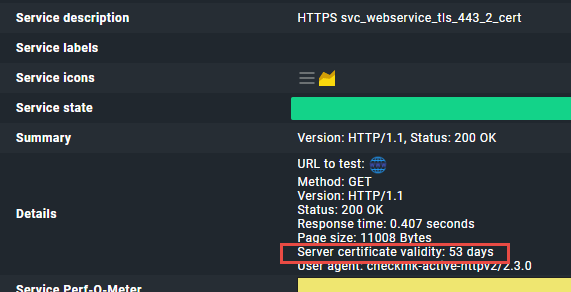
does anybody know, how i can add the status or response of certificate validity from the new check HTTP services as a column to a custom view? I can’t find any appropriate column in the view edit mode.
I used the old https_check, there i had some checks, only for certificate validity. Summary showed me the time, when they expired in one custom view.
Split the certificate validity to the new check Certificates check.
In that way you will get back (with an additional check) the summary you are after.
i also was struggling with it, and then split off certificate checking…i was happy again.
Hello Glowsome,
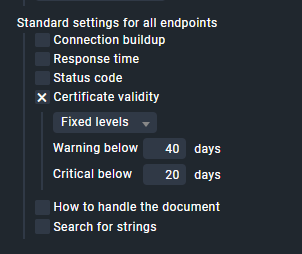
many thanks for your suggestion. I’m struggling with that, what you mean with “split” - i tried to only use “certificate validity”, but that results in the same summary
I looked for other possibilities of what splitting could mean, but was unsuccessful.
Perhaps you would be so kind as to enlighten me what you mean by “split” in detail.
Many thanks in advance.
You cannot configure what is displayed in the summary, and you cannot display individual information from the check details in separate columns in a custom view.
What he means is that you can split the HTTP and Cert Check into two separate services. For the certificate check you can simply use the dedicated ‘Check certificates’ instead of the ‘Check HTTP web service’
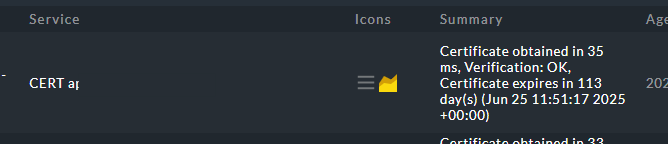
The ‘Check certificates’ shows you the expiration date of the certificat in the summary:
If one of the answers helped you solve your question, please mark it as the solution. This way, you thank the person who helped you and also indicate that the question has been resolved. This, in turn, helps others who come across the same question.
This topic was automatically closed 365 days after the last reply. New replies are no longer allowed. Contact an admin if you think this should be re-opened.