I am looking to set up a new deployment of CheckMK (to replace our old monitoring PRTG) and want to follow the best practices/recommendations for this. I’ve had a look through the following guide about Distributed monitoring: Distributed monitoring - Scaling and distributing Checkmk
Our Environment:
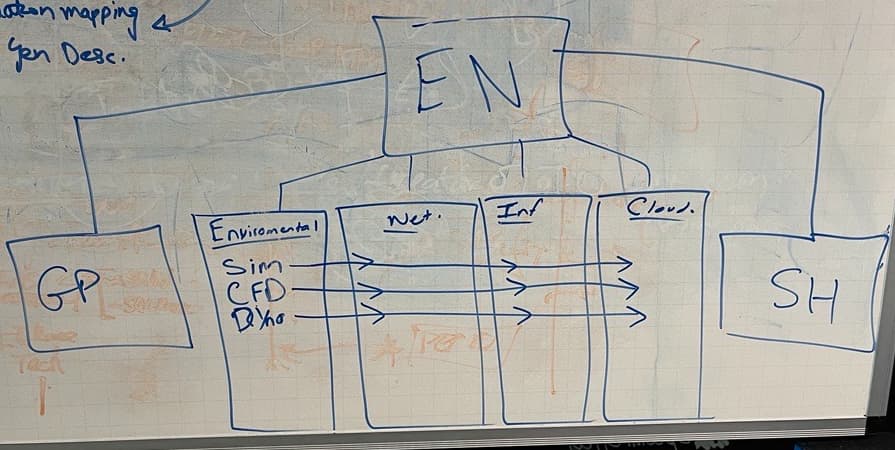
We are a factory with 2 datacentres on site, and 2 remote locations that move around the world. Within the factory there are around 4 areas we would like to split up for management purposes.
Main Factory: EN
Remote location 1: GP
Remote location 2: SH
The question:
We are unsure whether we should just run the factory (EN) and the two remote locations as their own VMs. So 3 VMs in total.
Or if we should break up the factory (EN) into its subsections like in the diagram so that each of those are a CheckMK VM instance as well. So 4 additional VMs.
It looks like the second option is recommended, which would bring performance and management benefits.
But we just want to make sure that all information can be managed and configurated via the main EN node?
The main worry is that we run the factory (EN) sensors all on one VM and it becomes overloaded as we have a LARGE number of devices that will be going on here, especially for being on the RAW version.
Would appreciate some input before we deploy if anyone has been in a similar scenario?
yes, this is possible. You can use the EN site as the “central” that does no monitoring at all but is only there for the management of the configuration, the central UI for the checkmk Users and maybe to send centralized notifications.
The setup depends on the amount of hosts you are monitoring. But looking at your diagram it would make sense to split the sites, especially if you you are talking about a lot of SNMP devices.
The RAW Edition with the nagios core has some scalability limititations that you can avoid when you split compute into different sites.
I would definitely recommend the enterprise / cloud editions, as you will have a lot of performance (and other) benefits in larger environments. ( e.g. livestatus proxy, Micro Core)
as Example
we have a Main in the HQ and a remote on each continent as well in our Cloud Environments
but we use the remotes just for time-critical thinks to compensate the Latenz over the ocean or for sec reason in the cloud and for E2E-tests
90% of the Host are hostet central in the HQ just 10% remote
some remote Server are so small that they running on a extreme core switch as VM
one special think we running CMK Server on our mining machines to collect the Data for maintenance & production and if the mining machines is reaching WiFi the Data will be pushed.
This setting was inspired by the Swiss Railways
Environment ~100 Core Switches ~3K AP ~2,5K Switches ~1K Server ~2K other Stuff (UPS, IP-Sensors, PLC, Valves, …)
Thanks all for your recommendations!
Will be going ahead with the approach of one central EN site that does no monitoring and a VM for the rest of the locations.
This topic was automatically closed 365 days after the last reply. New replies are no longer allowed. Contact an admin if you think this should be re-opened.