To keep things interesting, the new year starts with a new topology.
This time it’s about your BGP routing instances.
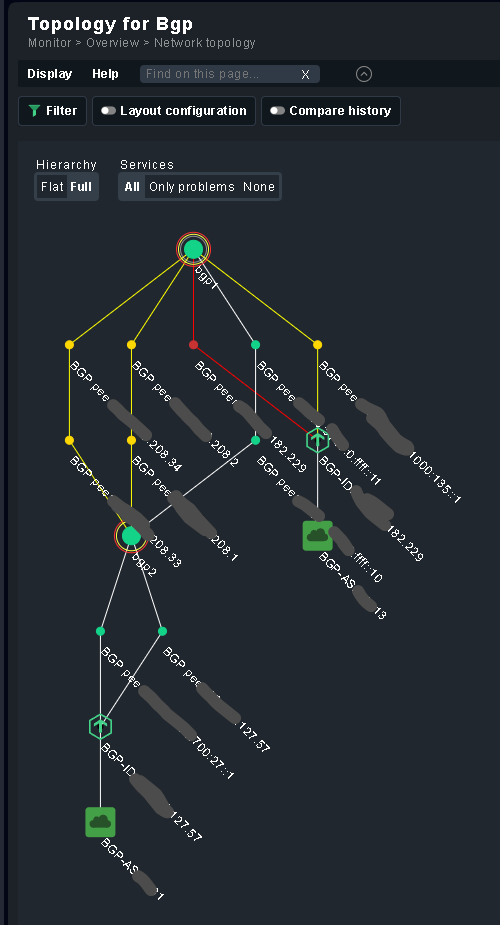
This topology is implemented as an active check. It works with the built-in Cisco BGP plugin and with my base BGP (RFC-based BGP4-MIB) and Cisco BGP plugin. You can download the plugin here or (soon) from the Checkmk Exchange.
How to:
- Install/activate the plugin
- Configure the plugin (Setup → Services → HTTP, TCP, Email… → BGP Topology)
- Let it run
- Show your topology of BGP peers

Note: The plugin must run on the same Checkmk site on which you want to display the topology.
How it works:
The plugin collects the data for the topology from the detailed output of the BGP peer services via live status. Here it finds the:
- Local AS (not for the built-in plugin)
- Local address
- Local identifier
- Remote AS
- Remote address
- Remote identifier
The plugin uses this information to display the connections between the BGP peers. For external (to Checkmk) BGP peers or BGP connections that are not established, the topology only displays limited information
Note: If you use my BGP plugins, you must at least update to the following versions
- Base BGP peer: 2.2.7-20241220
- Cisco BGP peer: 1.0.2-20241220
If you would also like to have the BGP peers from Arista, Huawei or Juniper in the topology, please send me a direct message.
Cheers
Thomas
 Let me know if you need some adjustments/info from my side to make this work.