Was wondering if anyone can help with this error below? Not able to bring nagios process when I started omd :
Note: I just replaced the parent value with ‘ppp’ and host with ‘hh’
Error: ‘pp-ppp-ppp-pp’ is not a valid parent for host 'hh-hhh-hh-hh!
Checked 226 hosts.
Checking host groups…
Checked 11 host groups.
Checking service groups…
Checked 0 service groups.
Checking contacts…
Checked 13 contacts.
Checking contact groups…
Checked 4 contact groups.
Checking service escalations…
Checked 0 service escalations.
Checking service dependencies…
Checked 135 service dependencies.
Checking host escalations…
Checked 0 host escalations.
Checking host dependencies…
Checked 0 host dependencies.
Checking commands…
Checked 60 commands.
Checking time periods…
Checked 3 time periods.
Checking for circular paths between hosts…
Checking for circular host and service dependencies…
Checking global event handlers…
Checking obsessive compulsive processor commands…
Checking misc settings…
Total Warnings: 0
Total Errors: 1
***> One or more problems was encountered while running the pre-flight check…
 Check your configuration file(s) to ensure that they contain valid
 directives and data defintions.  If you are upgrading from a previous
 version of Nagios, you should be aware that some variables/definitions
 may have been removed or modified in this version.  Make sure to read
 the HTML documentation regarding the config files, as well as the
 'Whats New' section to find out what has changed.
I manage to get nagios started, by commenting out the troubled parent and host in the check_mk_objects.cfg.
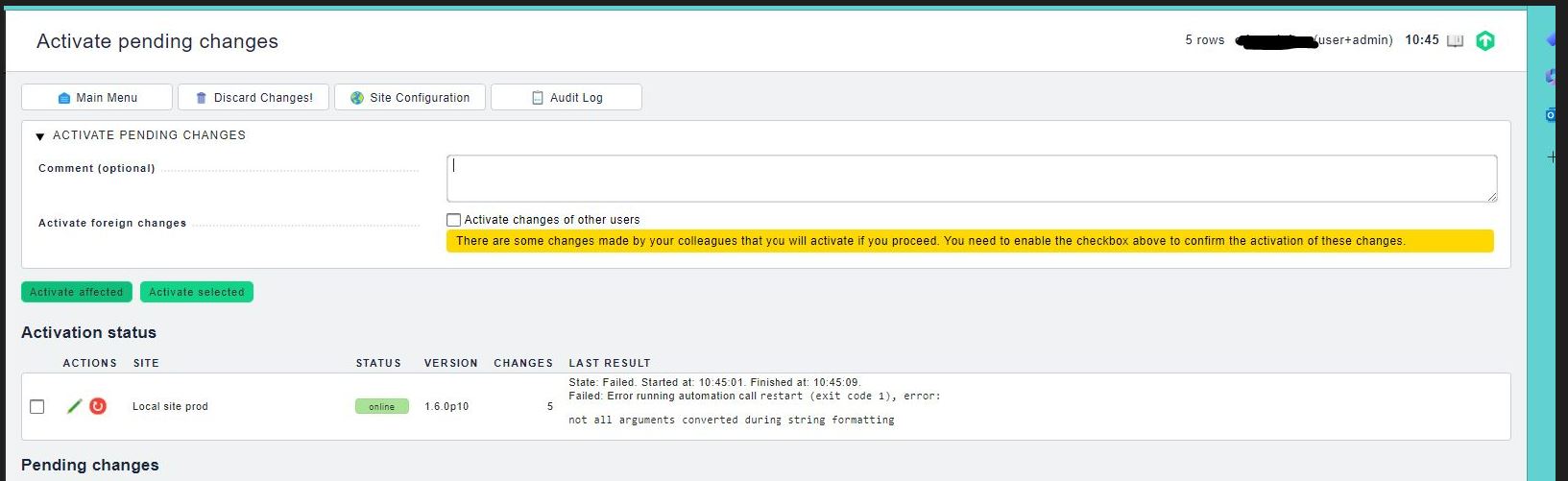
However, the issue I am facing now is when I try to activate a change via the portal, the error shown is “There are some changes made by your colleagues and you did not confirm to activate these changes. In order to proceed, you will have to confirm the activation or ask you colleagues to activate these changes in their own”. I am trying to remove the same troubled hosts on Gui. Please see the attached screenshot for your reference.
This file is not existent in the enterprise edition and host should be managed in file hosts.mk below ~/etc/check_mk/conf.d/wato.
Nevertheless you must not alter files of checkmk and you should do modifications only with setup.
You can easily remove the parent from the hostobject in the GUI.
I am not sure why this is an error. Normally it should only be a warning and config could be activated. Can you share the command which produced this output.
Maybe try cmk -X on command line to evrify your config.
Nevertheless you need to check the ‘Activate foreign changes’ to be able to activate your current config.
This topic was automatically closed 365 days after the last reply. New replies are no longer allowed. Contact an admin if you think this should be re-opened.