Hi, if I’m not mistaken, there is no option to set notification rules based on notification types, correct?
If so, would it be possible to implement this? Otherwise, what is the point of notification types?
Thanks in advance!
Hi, if I’m not mistaken, there is no option to set notification rules based on notification types, correct?
If so, would it be possible to implement this? Otherwise, what is the point of notification types?
Thanks in advance!
No, you can/must setup notification rules for every type of different notification type.
One rule for MSTeams and another rule for mail for instance.
Or do you mean something else?
Hi, good morning. I meant something else. 
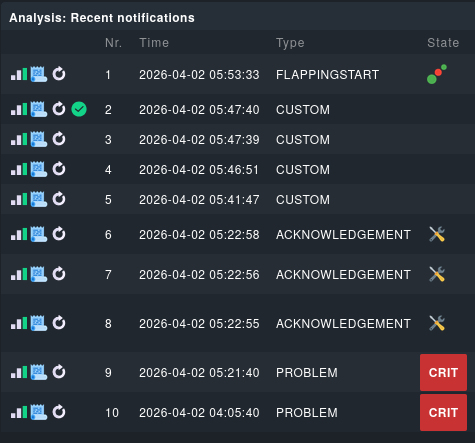
Every notification has a type, like “Custom”, “Problem”, “Recovery” etc:
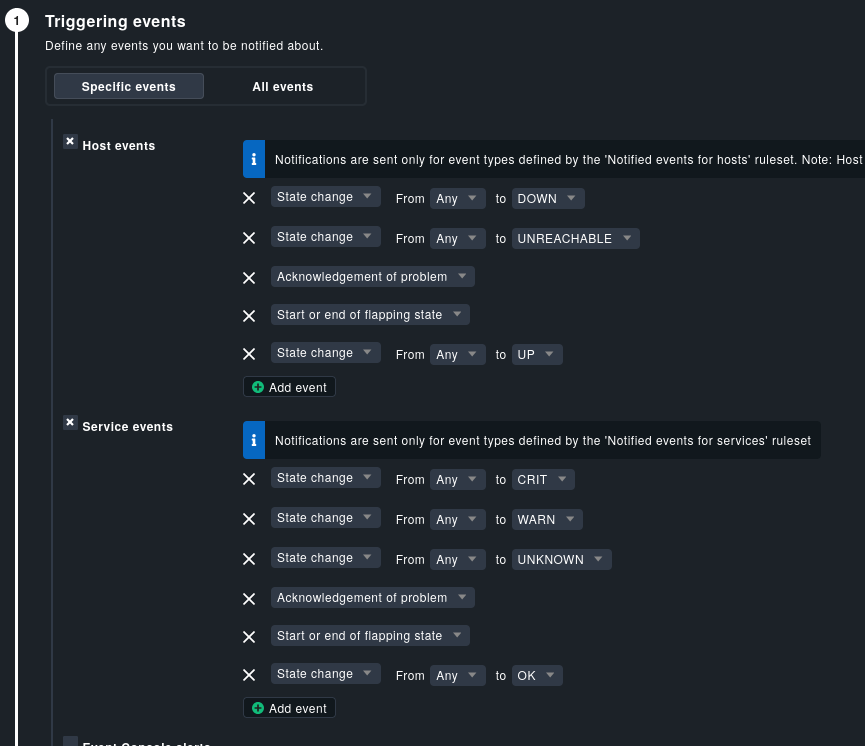
But the triggering events within he global notification rules do not offer to use them for the configuration:
I think it could be comfortable to filter triggering events based on the notification type?!
In your screenshot you have exactly shown what you want.
The triggering events section provides the filter options you need. Only the naming is a little bit more verbose. This is needed as the shown types from the core log are not so good to show what really happens.
Acknowledgement → “Acknowledgement of problem”
Problem → “State change”
Flappingstart → “Start or end of flapping state”
The only thing you cannot select directly is “CUSTOM” as this is normally a service or host notification with state change “any” to “any”.
But it is also possible to filter
Exactly. That’s why I’m suggesting to add a filter category “notification type”. In my opinion it would be easier and visually more transparent.
But again, just a suggestion for your consideration in future versions.
But why an extra condition for something that is already there?
As I said: That’s just my opinion. I think it would be easier and more intuitive to configure.
If I may add something here: is there still no way to set time periods AND put notifications outside of those periods on hold? So that they are sent retroactively when the time period is active again?
That is possible but only if the problem persists at the moment the time period is active again and only if you have done this with “Notification period for services/hosts”. If you have done the filtering inside the Notification system then you have no way to get your filtered messages again.
Thank you, I’ll try that out (again^) soon