CMK version:
2.3.0p19.cre raw
OS version:
Docker
Error message:
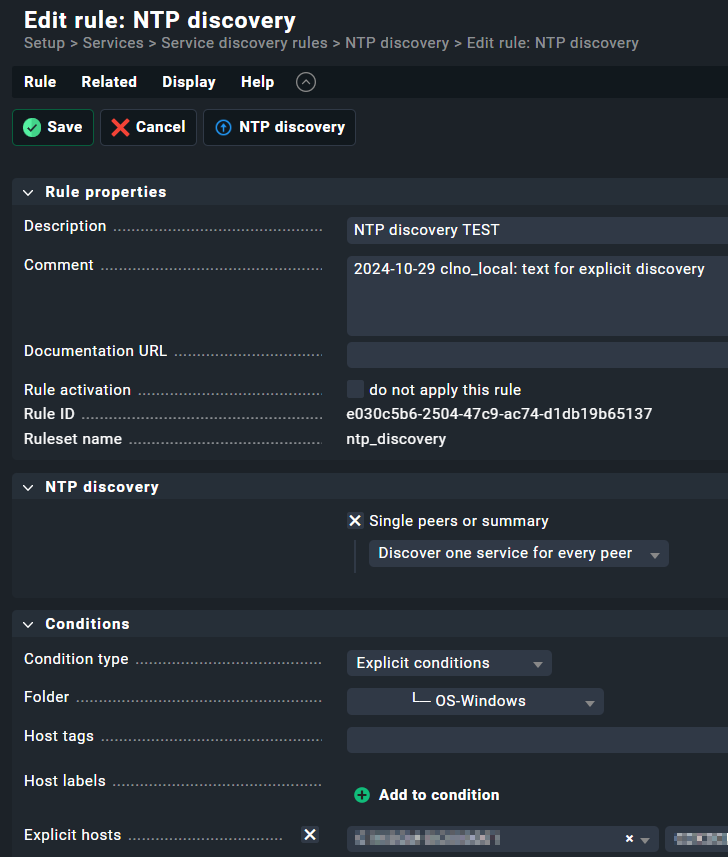
Rule for NTP service detection created for 2 specific hosts:
Problem:
Setup > … > Host > Auto discovery: the service is not discovered and does not appear in the list of “undiscovered services”. Maybe I don’t understand how it works, but I cannot see it anywhere appearing in the host services.
Analysis:
- Checkmk server → 123/udp → host: custom Python NTP tool is working; NTP communication to host is working (both on Checkmk host and within Checkmk docker container).
- the rest of those windows hosts are monitored by the agent and is working as expected
- configuration should be ok:
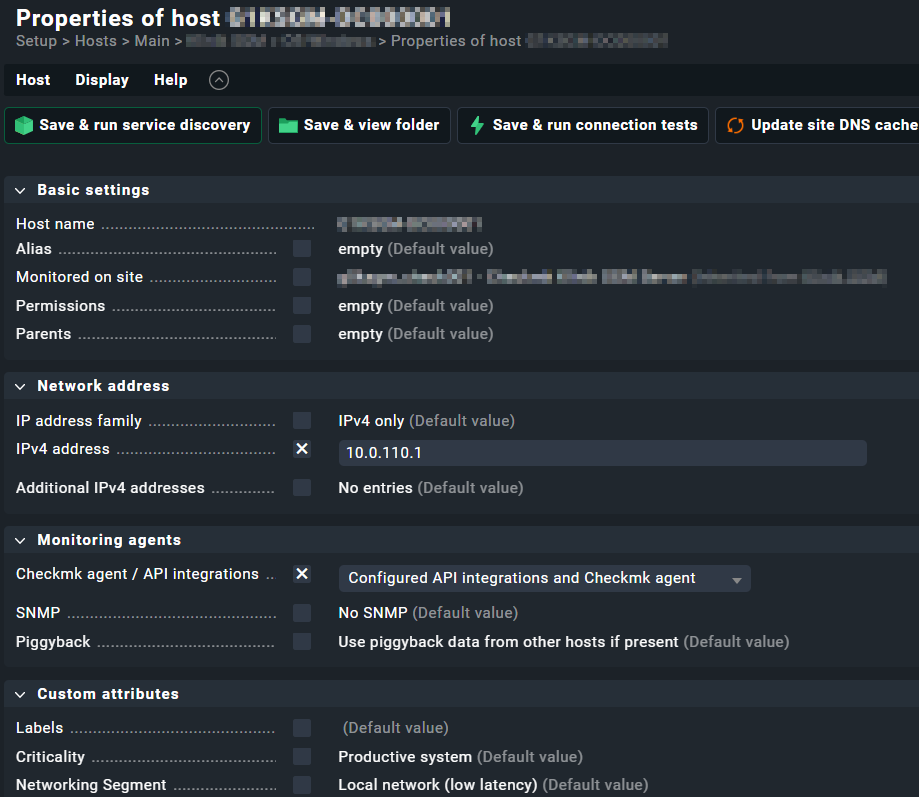
Output of “cmk --debug -vvn hostname”: (If it is a problem with checks or plugins)
$ cmk --debug -vvn 10.0.110.1
value store: synchronizing
Trying to acquire lock on /omd/sites/g0abcd_check001/tmp/check_mk/counters/10.0.110.1
Got lock on /omd/sites/g0abcd_check001/tmp/check_mk/counters/10.0.110.1
value store: loading from disk
Releasing lock on /omd/sites/g0abcd_check001/tmp/check_mk/counters/10.0.110.1
Released lock on /omd/sites/g0abcd_check001/tmp/check_mk/counters/10.0.110.1
Checkmk version 2.3.0p19
Updating IPv4 DNS cache for 10.0.110.1: 10.0.110.1
Trying to acquire lock on /omd/sites/g0abcd_check001/var/check_mk/ipaddresses.cache
Got lock on /omd/sites/g0abcd_check001/var/check_mk/ipaddresses.cache
Releasing lock on /omd/sites/g0abcd_check001/var/check_mk/ipaddresses.cache
Released lock on /omd/sites/g0abcd_check001/var/check_mk/ipaddresses.cache
+ FETCHING DATA
  Source: SourceInfo(hostname='10.0.110.1', ipaddress='10.0.110.1', ident='piggyback', fetcher_type=<FetcherType.PIGGYBACK: 4>, source_type=<SourceType.HOST: 1>)
[cpu_tracking] Start [7f220f779190]
Read from cache: NoCache(10.0.110.1, path_template=/dev/null, max_age=MaxAge(checking=0.0, discovery=0.0, inventory=0.0), simulation=False, use_only_cache=False, file_cache_mode=1)
No piggyback files for '10.0.110.1'. Skip processing.
No piggyback files for '10.0.110.1'. Skip processing.
Get piggybacked data
[cpu_tracking] Stop [7f220f779190 - Snapshot(process=posix.times_result(user=0.0, system=0.0, children_user=0.0, children_system=0.0, elapsed=0.0))]
[cpu_tracking] Start [7f22101cff80]
+ PARSE FETCHER RESULTS
  HostKey(hostname='10.0.110.1', source_type=<SourceType.HOST: 1>)  -> Add sections: []
Received no piggyback data
No piggyback files for '10.0.110.1'. Skip processing.
No piggyback files for '10.0.110.1'. Skip processing.
[cpu_tracking] Stop [7f22101cff80 - Snapshot(process=posix.times_result(user=0.029999999999999805, system=0.0, children_user=0.0, children_system=0.0, elapsed=0.03999999910593033))]
[piggyback] Success (but no data found for this host), execution time 0.0 sec | execution_time=0.040 user_time=0.030 system_time=0.000 children_user_time=0.000 children_system_time=0.000 cmk_time_agent=0.000

$ cmk -D -vvn G1ABCD-DC000001

G1ABCD-DC000001
Addresses:              10.0.110.1
Tags:                   [address_family:ip-v4-only], [agent:all-agents], [checkmk-agent:checkmk-agent], [criticality:prod], [hnd-mon-servicedesk:hnd-mon-servicedesk-yes], [if_alias_desc:if_desc], [ip-v4:ip-v4], [networking:lan], [os-variant:osv-winsrv-2022], [os-windows:os-windows], [piggyback:auto-piggyback], [site:g0abcd_check001], [snmp_ds:no-snmp], [sys-fn-domaincontroller:sys-fn-domaincontroller-yes], [tcp:tcp]
Labels:                 [cmk/os_family:windows], [cmk/os_platform:windows], [cmk/site:g0abcd_check001]
Host groups:            check_mk
Contact groups:         check-mk-notify, all, non-infra
Agent mode:             Normal Checkmk agent, all configured special agents
Type of agent:
  TCP: 10.0.110.1:6556
  Process piggyback data from /omd/sites/g0abcd_check001/tmp/check_mk/piggyback/G1ABCD-DC000001
Services:
  checktype