What options does one have for monitoring a Linux VPS hosted in a 3rd party provider (not GCP/Azure/AWS)? Of course, I have full root and SSH access and I don’t want to open on-premises inbound firewall ports.
Then you can monitor this machine with the normal CheckMK agent that is called over SSH.
2 Likes
Thanks for responding. I think the SSH tunnel would be a viable option, however, for obvious reasons I don’t allow Root SSH login.
I did come across this post: Alternatives to root user when using ssh agent - General - Checkmk Forum where @martin.schwarz suggested additional security measure to help mitigate risks, but I require more specifics to better understand implementation and risk. I’ve already implemented the usual suspects in locking down SSH; it’s the advance stuff he reference puts me at a loss.
You don’t need root for basic monitoring of your VPS.
With the modifications for the SSH access @martin.schwarz mentioned, i don’t see a problem to use root in your case.
I would possibly agree, but his brief explanation of the settings does not lend itself to understanding the implementation.
Are you saying setup a non-privilege user and just replace Root with new user following same steps?
His settings secure the access with root SSH to only execute the checkmk agent and some other best practice SSH settings.
Yes you can do the same with a unprivileged user but you will miss some data that this user cannot fetch.
Here you have some description about a non root agent deployment. –> Werk #17901: Linux agent: non-root deployment
I’ve read the article. The discussed solution is only available in the Enterprise versions. I’m running the Raw edition.
In essence i use the same ‘restricted’ ssh -way to gather the agent information.
The key only allows execution of a/the one command which is required to gather the information (as root).
In essence this was the only way for me to get the data, as firewall policies did not allow me to open up the xinetd -port.
And yes, i am also using RAW/cre edition.
- Glowsome
Can you be more specific?
In my setup, the only thing open to me was running via SSH ( due to firewall-restrictions).
So:
The post from @martin.schwarz was (prior to his post) already the way in which i set communications up.
In the to-monitoring-host the ssh-key reference to the monitoring-server in authorized_hosts is pre-pended with command="/usr/bin/check_mk_agent"
→ this makes sure when a connection is presented with this specific ssh-key only this command is allowed to be executed.
Then on the monitoring server a rule is created to make sure that the connection flows thru ssh:

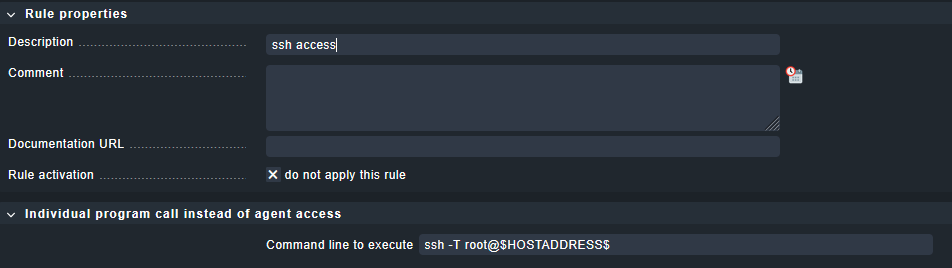
This allows you to differentiate between normal agent-operations and specifically ssh-only accessible hosts. (dont mind the ticked ’ do not apply this rule’, i just grabbed a quick screenie, for taking effect this should not be ticked  )
)
i have been using this scheme since cmk 2 , and i’m still very happy with it.
Additional: i deploy, and update a/the checkMK agent(s) (and SSH-keys) via Ansible.
And havent had a fail since i created the playbooks for it.
One extra thing, if you install the agent on a ‘to-monitor-host’ it will install (and start) a service that will (if xinetd service is present) create a listener.
In my Ansible playbook i disable that service, and with every (agent-)update i re-disable it with ansible.
As its no use to have a service listening on a port which is not going to be used it should not be there.
The service is : cmk-agent-ctl-daemon
- Glowsome
I have implemented SSH monitoring using Root basic security measures. From cmdline on the checkmk server in OMD mode I can retrieve check_mk_agent data successfully.
From the server GUI I’ve implemented the Individual program call instead of agent access rule using $HOSTADDRESS$ macro and applied to hosts, but the GUI test connection failed. The article is incomplete about how to apply this rule and configuring the host(s).
I would think there’d be a need to configure SSH Agent. I then found how I’d need to change the Agent port…still no go. And when I run the discovery the error message “Agent exited with code 255: ssh: connect to host x.x.x.x” is still showing “port 22”; even though Effective parameters show correct port inherited. Any suggestions?
-
PermitRootLogin forced-commands-onlyin the sshd config
- I read about the benefit of making this change, so I’ve implemented. -
limiting the key to the monitoring server’s IP address (
from=...) in the authorized_keys file
- I’d like to lockdown further with this setting, but on-prem IP is dynamic (although stable) could change. Yet, I tried by proceeding from=”x.x.x.x” before “command=” string and connection denied, Any insight on how to implement? -
further limiting the key usage with options like
no-pty,no-user-rc,no-port-forwarding,no-X11-forwarding,no-agent-forwarding
- I’ll need to further research these options for impact.
This below rant is not directed to you two, but rather the general public.
Suggestion: OMD mode = Everyone that’s writes a solution involving changing into this mode should state how it’s done clearly or that it is even required. Why do we have to make it difficult for the next guy. I’ve been in IT for over 25 years and I don’t understand this mentality.
1 Like
I had some issues with that, and the solution for me was the following command on the monitoring server (as siteuser) :
ssh -l root -i /etc/check_mk/check_mk.key ip-of-host-to-monitor-here
As i dont (on a regular base) create new hosts to monitor this had slipped my mind.
Sorry if this upset you a bit.
Added comment:
Your basic connection works, as when you created the entry for the ssh-key ( i assume via ssh-copy-id) it will both create an entry in ~/.ssh/authorized_keys aswell as a reference in ~/.ssh/known_hosts .
..and there you have the catch…
CheckMK (as site-user) uses its own known_hosts -file located in /omd/sites/YourSiteName/.ssh/known_hosts.
As the GUI / check does not have the capability to accept the question about trusting the host it will default to error code 255 and fail.
The above command will introduce the missing entry in CheckMK’s known_hosts .. but yeah, it has to be done manually.
- Glowsome
It appears I’ve gotten my two VPS successfully monitored via SSH tunnels. Both are showing all green OK for all states. The only failure is “ping”. But that’s because I disabled ping via IPTable. I need to find out if I can allow ping only from my IP.
Andreas,
Although I did test SSH connection from cmdline and accepted thumbprint in OMD mode as the article suggest; apparently not enough. So I took your suggesting with added step of deleting known_hosts, then executed “ssh -l root -i ~/.ssh/id_ed25519” (Important: in OMD mode). Also the host setting for “Checkmk agent / API integrations” should be set to “Configured API integrations and Checkmk agent”. I also changed the $HOSTADDRESS$ macro to $HOSTNAME$.
Thanks for all your help!
Allowing of PING will greatly depend on how/where it has been blocked.
As your setup/infra is not known (to me) it is hard to even guess where this should be implemented.
One caution i must express:
Switching out $HOSTADDRESS$ for $HOSTNAME$ will mean the to-monitor-host will depend on DNS-resolution.
If the CheckMK Server cannot resolve the host via DNS it will cause errors.
However, as you expressed before your env is built on DHCP, it will function aslong as DNS works.
In general, regarding this post:
I am glad to see, even if it took some writing back-and forth it is working for you.
- Glowsome
PS,
You seem to be in a very different timezone from me (CET), but as an insomniac i tend to reply on awkward times from my timezone.. .
Care to enlighten me on your timezone ? .. or are you a/the same insomniac-type as me ? 
LOL, yes I can be an insomniac as well and I love what I do. I’m in Texas or CST time zone.
I’m already covered for name resolution by adding entries in hosts file. As for the ping, I’m using UFW firewall, but you have to modify iptable file to disable ping. I’ll need to see if there is a way to allow ping from a specific IP while blocking others. I’ve worked with Linux for several years, but this is my first time using on open internet; so security is top of mind.
I was able to resolve the VPS ping issue by modifying the “/etc/ufw/before.rules” file with:
# ok icmp codes for INPUT
-A ufw-before-input -p icmp --icmp-type destination-unreachable -j DROP
-A ufw-before-input -p icmp --icmp-type time-exceeded -j DROP
-A ufw-before-input -p icmp --icmp-type parameter-problem -j DROP
-A ufw-before-input -p icmp --icmp-type echo-request -s x.x.x.x -j ACCEPT
set first three setting to DROP (default ACCEPT)
x.x.x.x = internet IP address
Reload firewall > sudo ufw reload
Hey @TechBrain
If you ever can’t or don’t want to allow ping: You can use a
different “host check command” with a rule, and use the check
result of any service as “host state”.
An example how this works, can be found in the official documentation for
Docker monitoring, i.e. here: Monitoring Docker - Monitoring the host state
HTH,
Thomas
Thanks for your feedback, but I was fully about to remediate the issue using the iptable method.
1 Like