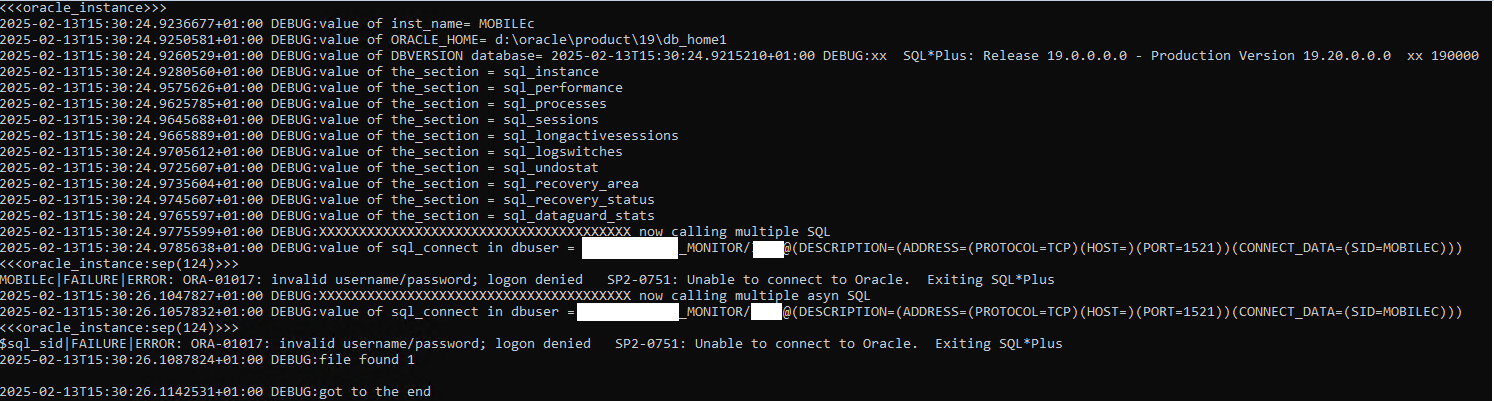
Error message: ERROR: ORA-01017: invalid username/password; logon denied SP2-0751: Unable to connect to Oracle. Exiting SQL*Plus
I am trying to monitor an Oracle 19 Database on a Windows server with the mk_oracle.ps1 plugin. The configuration and deployment is done via Agent Bakery and the credentials work via CMD, but the plugin can’t connect to the database.
With the DEBUG option, the plugin returns the same error:
I have already tried a few things like inserting the hostname or IP address in the Bakery and activating only the Section “General instance status”, but now I’m running out of ideas
Can anyone help me?
I’ve talked to the Oracle database admin, who told me that with ORACLE19 we need to use the SERVICE_NAME instead of the SID. In our case, the connect string should look like this:
If I change the content of mk_oracle.ps1 to this explicit string, the check works fine. However, this is not the right solution. I can’t find an option in the agent rule to choose between SID and SERVICE_NAME. Can someone relate to this problem with an ORACLE19 database?
Whatever your Oracle Version it’s possible to connect by a SID or SERVICE_NAME in [TNS Alias].
For me the script is able to contact the database and the problem is with your credential.
On a 19C Database i tried a connexion with same string like you and with wrong password.
sqlplus USER_MONITOR@(DESCRIPTION=(ADDRESS=(PROTOCOL=TCP)(HOST=)(PORT=9999))(CONNECT_DATA=(SID=MYDBSID)))

SQL*Plus: Release 19.0.0.0.0 - Production on Tue Feb 18 13:02:08 2025
Version 19.25.0.0.0

Copyright (c) 1982, 2023, Oracle.  All rights reserved.

Enter password:
ERROR:
ORA-01017: invalid username/password; logon denied


Enter user-name:
After i test with same connexion string and right credentials.
sqlplus USER_MONITOR@(DESCRIPTION=(ADDRESS=(PROTOCOL=TCP)(HOST=)(PORT=9999))(CONNECT_DATA=(SID=MYDBSID)))

SQL*Plus: Release 19.0.0.0.0 - Production on Tue Feb 18 13:01:24 2025
Version 19.25.0.0.0

Copyright (c) 1982, 2023, Oracle.  All rights reserved.

Enter password:
Last Successful login time: Tue Feb 18 2025 13:00:13 +01:00

Connected to:
Oracle Database 19c Enterprise Edition Release 19.0.0.0.0 - Production
Version 19.25.0.0.0

SQL> SELECT OPEN_MODE FROM V$DATABASE;

OPEN_MODE
--------------------
READ WRITE
I’ve double-checked the credentials, but maybe something is wrong with the tnsnames or so.
Here is the mk_oracle.cfg:
mk_oracle.cfg
> # Connection and authentication
> $DBUSER=@("***_EXTERNAL_MONITOR", "***", "", "", "1521")
> $ASMUSER=@("/", "", "SYSASM", "", "")
>
> # Sections to run in foreground and wait for the result
> $SYNC_SECTIONS=@("instance", "performance", "processes", "sessions", "longactivesessions", "logswitches", "undostat", "recovery_area", "recovery_status", "dataguard_stats")
>
> # Sections to run in the background, at a slower interval cached
> $ASYNC_SECTIONS=@("tablespaces", "rman", "resumable", "locks")
>
> # Sections to run in foreground for ASM
> $SYNC_ASM_SECTIONS=@("instance")
>
> # Sections to run in the background for ASM
> $ASYNC_ASM_SECTIONS=@()
>
> # Cache time (i.e. check interval) for async sections
> $CACHE_MAXAGE=600
> # Oracle plugin will not check if the used binaries are write-protected for non-admin users
> $SKIP_ORACLE_SECURITY_CHECK=1
I tried to help you but i don’t have Oracle Database on Windows Server (only on Linux).
In Oracle 19C by default, the password is Case Sensitive.
Example :
If on a 11G database you disable the case senstivite and your password is [CheckMK] it works with [CHECKMK].
But in 19C it doesn’t work instead you configure [sec_case_sensitive_logon] at [FALSE].
Other idea :
Did you try to configure the DBUSER in mk_oracle.cfg unique for your instance
If you have only one instance on your Windows Server.
Try to replace : $DBUSER=@("***_EXTERNAL_MONITOR", "***", "", "", "1521")
By (a uniq line for each instance) : $DBUSER_MOBILEc=@("***_EXTERNAL_MONITOR", "***", "", "", "1521")
Thanks for the tip about the password, but that is not the problem.
I’ve configured the mk_oracle.cfg with the user and instance, but it only works with my workaround in the mk_oracle.ps1. If I use the default plugin it doesn’t work.
So for me, the problem is in line 545 of the mk_oracle.ps1, if I change the connect string to “SERVICE_NAME=…” everything works fine.
However, maybe it’s not a checkmk problem, but a special case on our Oracle server. I don’t want to waste your and mine time on this case, and I can live with the workaround.
I really appreciate your help. Thank you very much!
This topic was automatically closed 365 days after the last reply. New replies are no longer allowed. Contact an admin if you think this should be re-opened.