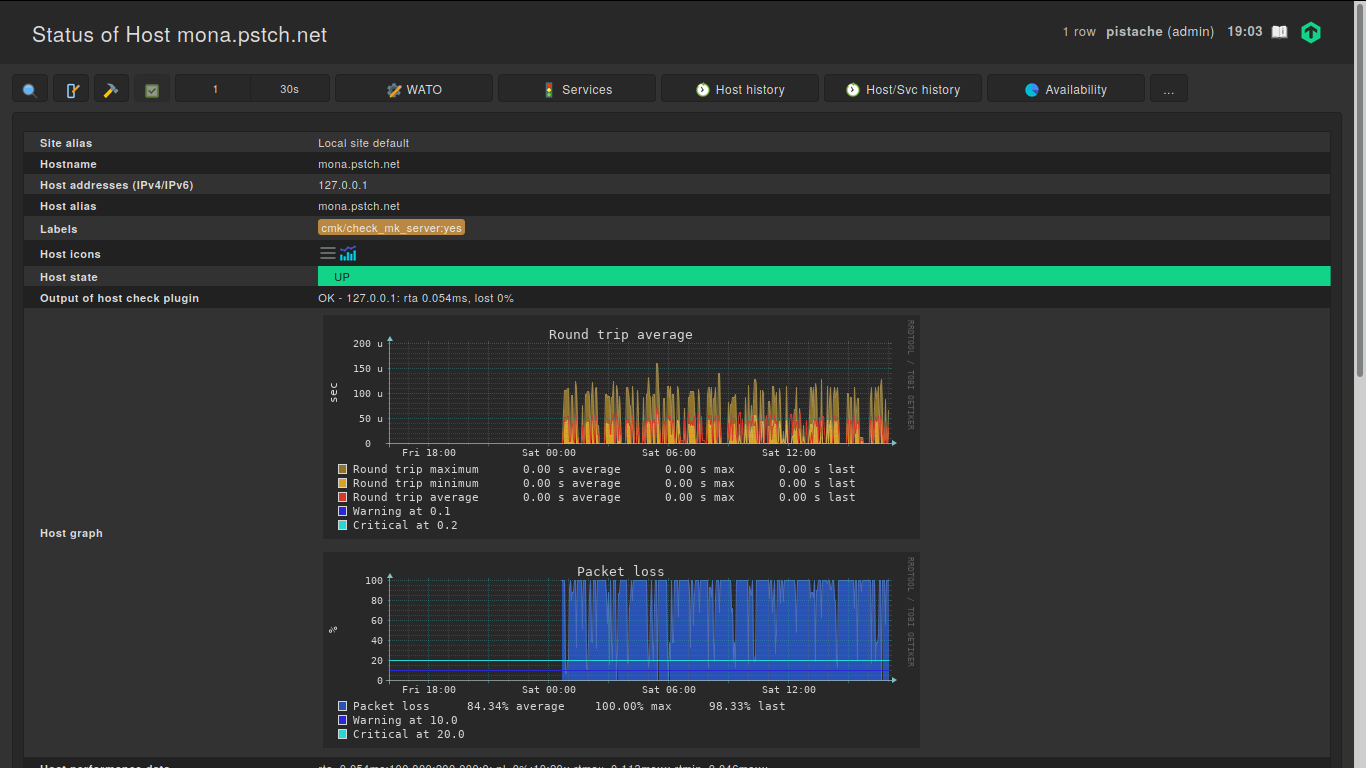
Hi ! I’ve recently moved a CheckMK instance (with ~15 hosts, 300 services) from a container host to another (using rsync), and all of the hosts that existed before the migration (including localhost) have now started showing intermittent severe (100%) packet loss. However, the host check never fails, and although CheckMK shows the packet loss in graph of the host status page, the host is always up, and all services are monitored without interruption. Also, new hosts that were created after the migration don’t exhibit this behaviour.
I’ve checked that the network behaves correctly, and I’ve used tcpdump to confirm that replies are received for all ping checks. I’ve tried resetting the perfdata for one of the affected hosts (including flushing the RRD cache), but the new packet loss graphs still exhibit the behaviour.
I’m starting to suspect some kind of resource limit that is exhausted which makes the ICMP check fail entirely, but it wouldn’t explain the fact that new hosts don’t exhibit this behaviour. I’ve checked my firewall rules (where there is no rate limiting logic, especially for localhost), and I’ve disabled Linux’s ICMP rate limiting (icmp_ratelimit), although I was far from the previous limit (1000/s).
For example, this the host status page for localhost :
What could explain this weird situation, and more importantly, how can I solve this problem without deleting all of my perfdata, reinstalling CheckMK from scratch and restoring a WATO backup ?
I’m pretty clueless right now. The only that you should have done is to use the omd backup/restore commands for the migration instead of an rsync. Btw, which parameters did you use for your rsync?
Is the new host again a container system and CMK also running inside a container?
If yes, then your assumption that you have something limiting there could be the problem.
This is an RAW edition and the normal RAW edition does a ICMP burst with 5 packets at the same time.
If you create a new host inside the same instance then there is no problem?
If it is so - inspect the host check command for the new and old hosts.
There must be a difference.
The new container host is a container system of the same type as the old one (LXD), with the exact same configuration (using config management tools), and the whole container was moved to the new host.
Yes, when I create a new host then there is no problem. If I recreate a new host in WATO with the same address as one of the hosts showing packet loss then this new host doesn’t show any packet loss, but the old one continues showing packet loss.
The host check is the same for old and new hosts (check-mk-host-ping!-n 10 -t 5 -w 100.00,10.00% -c 200.00,20.00%). The host state stays UP, only the graph shows packet loss.
Also, if I block the ICMP packets, the host check properly fails, and the host goes DOWN.
This cannot be There must be a difference between the two hosts. It is possible that it has something to do with your way to “move” the site. But i cannot image what it is.
One check you should do, take a look at the file “~/etc/nagios/conf.d/check_mk_objects.cfg” and inspect an old and new host there if it is really a identical configuration.
How did you copy the temporary filesystem /opt/omd/sites/$SITE/tmp? If you did that with rsync as well, and then start the copy, the copy will mount a tmpfs over the copied structure. This won’t do harm except wasting space.
Also: did you create the same site user/group with the same ids on the target machine?
The tmpfs was not copied, as I copied the whole container from the host while the container was properly shut down.
Yes the site is using the same user IDs, as the whole container was copied (not only the OMD site).
I rebooted the whole host yesterday, and the packet loss stopped. However, a few hours later it started again, this time for all hosts (including the ones that were created after the migration).
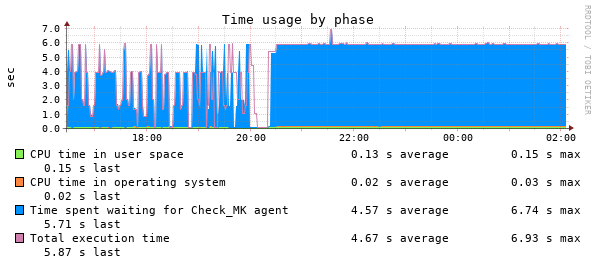
I have also observed some related changes in the CheckMK service graph :
Before 20:00 this host was showing packet loss, at 20:00 I rebooted the whole host, and after that the host stopped showing packet loss. The following day, the host started showing packet loss again, and the “time spent waiting for CheckMK agent” started spiking again. This happens for all hosts, and nothing wrong is visible in CheckMK itself (except for the packet loss and spikes in CheckMK service for hosts that have an agent).
I’ve created a new temporary monitoring host on another physical machine, copied the OMD site itself (using omd backup/restore), and there I don’t have any problem (no packet loss, consistent times for the CheckMK service graph), so I believe that something is wrong with my container setup, and not really with CheckMK itself, but it’s still weird that it manifests this way.
I will try to investigate what is changing on the container system when the problem starts appearing.
I would say it again this is a network or load problem on your hosting machine.
The last graph shows check_mk service timeouts. (6 seconds is the normal timeout there)
This value should be between 0 and 1.
How many resources are assigned to your container and how does the usage looks like?
Load is around 0.20, and this is an eight-core machine. I don’t think it can be a “network” problem as even localhost is affected. I’ve tried running 16 concurrent flood pings and didn’t lose a single packet.
However, I think that I found the cause of the problem : I’ve hit a weird bug in the container system I’m using, where sometimes the container’s systemd process becomes a zombie, and the container gets restarted, but its old child processes keep running. I didn’t notice this at first because of the high numbers of idle containers on this machine.
So it seems that when multiple instances of the same OMD sites are running, the perfdata for the host check gets corrupted, which is not really unexpected. I’m just very surprised that it didn’t cause more problems.
OMD/CMK inside a container for production use is always a bad idea
For testing it is ok. The problem is the high demand on resources and the high rate of change for these.
 There must be a difference between the two hosts. It is possible that it has something to do with your way to “move” the site. But i cannot image what it is.