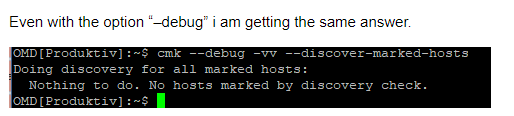
If you do this is, is there a host marked for discovery?
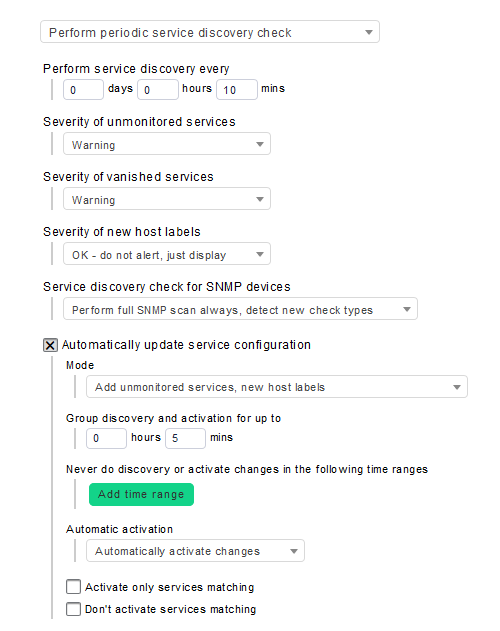
Your rule says run every 10 minutes and after 5 minutes activate all changes.
This is very quick. You really sure that it does nothing or is it only quicker then you think?
Under normal conditions i run this check only every 4 or 6 hours not every 10 minutes. And then i group the activation to 30 minutes or 1 hour.
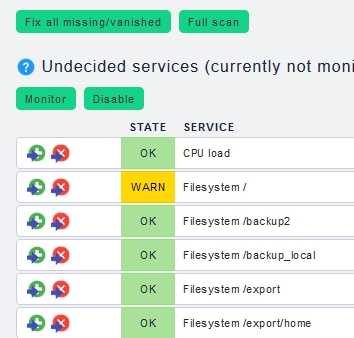
For further troubleshooting it would be good if you have a discovery service with new found items and also items that are not activated at the moment.
The screenshots don’t answer anything.
The important things are the output of your command cmk --debug -vv --discover-marked-hosts and how does the status of your Check_MK Discovery looks like.
Is it something like the following?
WARN - 2 unmonitored services (df:2), no vanished services found, no new host labels, rediscovery scheduled
The discover marked Hosts should be without the line “Nothing to do.”.
If this is inside the output it means no one of your Discovery Checks has found anything to add or remove.
No the discovery service is one of the services on your hosts. If you created the “Periodic service discovery” rule then you should also have a “Check_MK Discovery” check.
Like this
FETCHING DATA
[agent] Not using cache (Don’t try it)
[agent] Execute data source
[…
…
…
OK - no unmonitored services found, 1 vanished services (systemd_units.services:1), no new host labels
vanished: systemd_units.services: Systemd Service ntpd
ignored: …
OMD[pfs]:~$
OMD[pfs]:~$
OMD[pfs]:~$ cmk --debug -vv --discover-marked-hosts
Doing discovery for all marked hosts:
Nothing to do. No hosts marked by discovery check.
OMD[pfs]:~$
Der “Denkfehler” ist hier höchstwahrscheinlich in der Discovery Regel - du willst doch bestimmt die verschwundenen Services nicht automatisch wieder bereinigen oder?
Das muss in der Regel auch explizit ausgewählt werden.
Ne nicht direkt - diese Befehle (–discover-marked-hosts und --check-discovery) sind eigentlich nicht geeignet für die Command line.
Dort würde ich nur -I oder -II verwenden für Discovery. Das ist viel eindeutiger -I = alles was neu ist / -II = Tabula Rasa.
–check-discovery = “Check_MK Discovery” in der WebGUI triggern
–discover-marked-hosts = Automation Action wenn es eine Discovery Rule gibt welche automatisch Services aktualisiert, unabhängig davon ob in der Regel nur neues dazu kommt oder auch altes bereinigt werden soll - es ist damit hier nicht erkenntlich was eigentlich passieren soll - halte ich für problematisch
 , this is also the reason why we ask most times for the version of the problematic system.