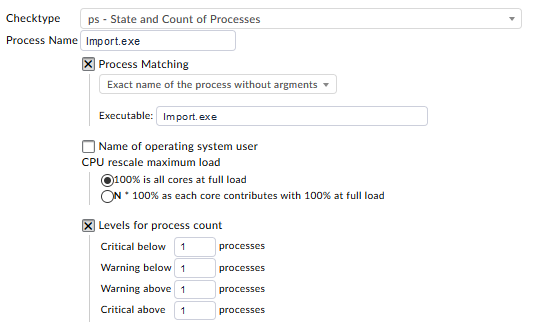
Recently I have updated to 1.6.0p7 and noticed that my manual checks for processes has stopped working.
I have been trying to fix it but I’m getting nowhere, and I don’t know why.
This is what is the process that is returned when long-output is turned on and I filter only by the user: name C:\\Program Files (x86)\\ABS\\Release\\Import\\Import.exe, user \\DVS-SRV\\DLX30_2052_Sys, virtual size 241920kB, resident size 22780kB, creation time 2019-12-31 15:25:08, cpu usage (user space) 0.0%, cpu usage (kernel space) 0.0%, pid 9168, cpu usage 0.0%, pagefile usage 15, handle count 252, args
So the systems sees the process, and filters by user name fine.
What was configured before and it worked fine before update:
But when I change it to filter by Process Matching it finds 0 processes, no matter what I try to enter into “Executable:” field. Just file name, full path, full path with double \\.
Hi,
Yes I have checked agent output, and the process is there. I have tried regex using several variants, but none seemed to work “Import”, “[Ii]mport”, “[[:<:]]import[[:>:]]” and such. Event tried “I”, “Im”, “Imp”.
OK. I am really confused. Just checked the service and it seems to be working fine for 5 days.
Most likely while trying out what @ChristianM offered to try regex. Have used correct exact match line. Still pretty weird that I have missed that.
At first I have been entering the expected match by hand and it was not working. After that I have checked the output from the agent and just copied the path to executable that the agent was giving out and it seems it got it working.