CheckMK raw 2.1.0p9 on Ubuntu 20.04 LTS.
I am trying to monitor an IBM x3650 M3 at the level of its IPMI management interface, but the scan for services does not find any sensor data yet. I’d be most grateful for a hint on what I am missing.
Here is what I have done so far.
In the web interface of the x3650 management console, I have created a user ‘monitoring’ with read only permissions. This user can indeed login to the web interface and see temperature, fan rpm data etc.
In CheckMK set up new host with the IP of the x3650 management interface.

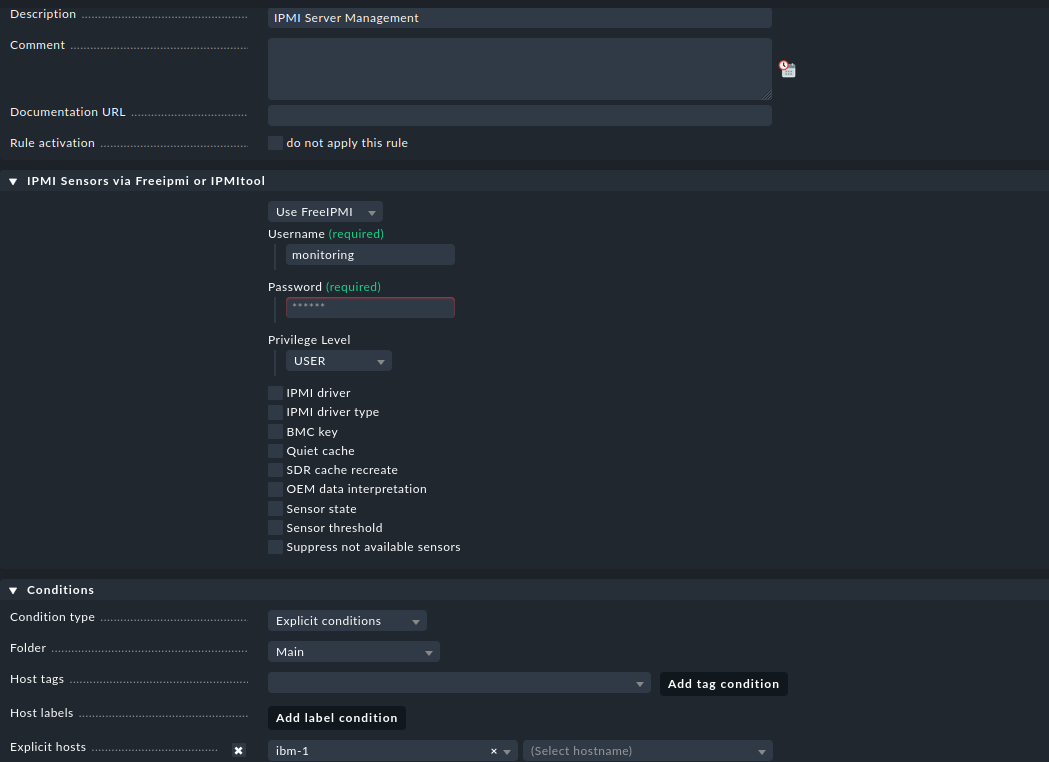
Also under Setup, Other Integrations, IPMI sensors via Freeipmi or IPMI tool, I have added a rule that assigns to that host the appropriate login data. As a newb I am allowed to post only one screenshot, and so I will reply below with a screenshot of this rule.
At this stage, I see only three services for that new host: ping, Check_MK Discovery and Check_MK, all status ‘ok’. No sensor data.
Have I misconfigured something up to this stage? What do I need to do in order to get all available sensor data monitored? Thank you in advance for any solutions, hints, ideas.
Bernhard