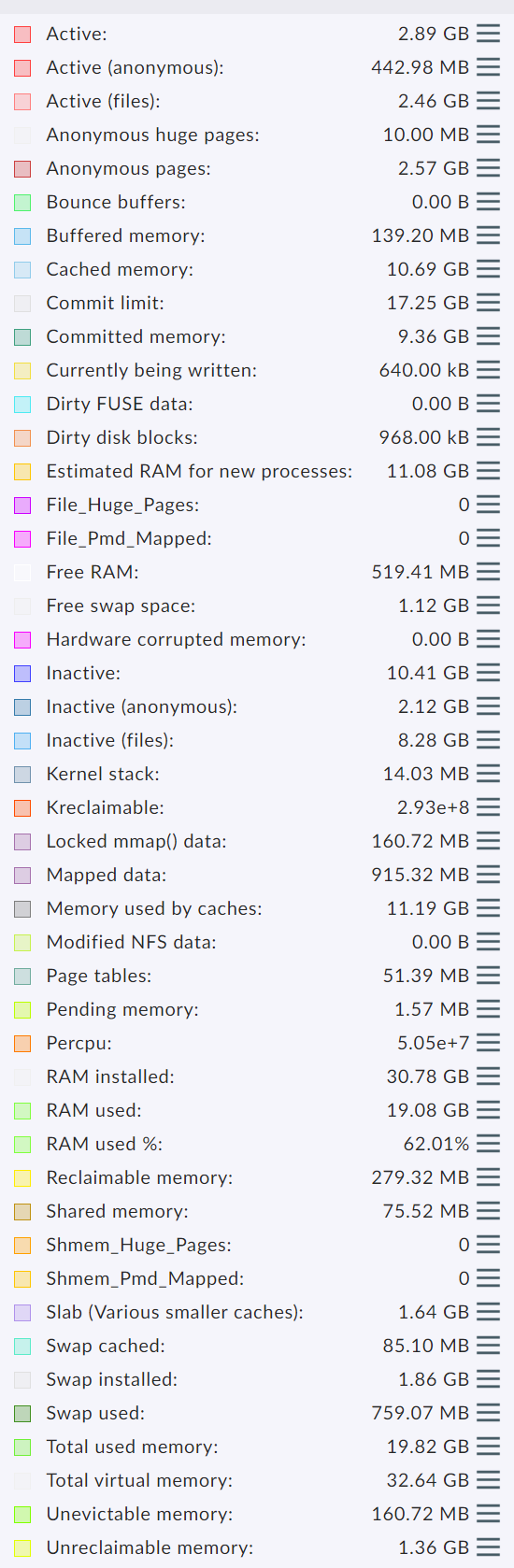
Hi guys.
I don’t know if this was already discussed (may be a thousand times):
Check this out:
[root@server1 ~]# free -m
total used free shared buff/cache available
Mem: 3806 836 160 184 2809 2464
Swap: 2047 576 1471
According to CMK:
CRIT - 3.59 GB used (2.89 RAM + 0.67 SWAP + 0.03 Pagetables, this is 96.5% of 3.72 RAM (2.00 total SWAP), 15 min average 96.4%, critical at 96.0% used, 0.0 mapped, 1.7 committed, 0.2 shared
Critical? Only 836 MB are being used. Why CMK is taking into the calculation cache & buffer values?
I’ve read the mem check “manual”:
The check measures the current usage of physical RAM and virtual memory used by processes. You can define a warning and critical level for the usage of virtual memory, not for the usage of RAM. This is not a bug, it’s a feature. In fact it is the only way to do it right (at least for Linux): What parts of a process currently reside in physical RAM and what parts are swapped out is not related in a direct way with the current memory usage.
Linux tends to swap out parts of processes even if RAM is available. It does this in situations where disk buffers (are assumed to) speed up the overall performance more than keeping rarely used parts of processes in RAM.
For example after a complete backup of your system you might experiance that your swap usage has increased while you have more RAM free then before. That is because Linux has taken RAM from processes in order to increase disk buffers.
So when defining a level to check against, the only value that is not affected by such internals of memory management is the total amount of virtual memory used up by processes (not by disk buffers).
You define levels in percentage of the physically installed RAM or as absolute values in MB. The default levels are at 150% and 200%. That means that this check gets critical if the memory used by processes is twice the size of your RAM.
Why did you do that? why don’t you just take into consideration only processes memory?
First question - what agent version is used on this host? Or is it SNMP data?
If it is SNMP then it is completely normal as SNMP don’t see what is real usage or buffer/cache.
I came to surprising results, which - well, you could probably say - shook the foundations of my view on the world:
The memory management of Linux is much more ingenious and sophisticated than I thought. The words "free" and "occupied" don't do justice for what actually happens
Looking at swap and RAM separately makes no sense at all.
And even the obvious idea of considering buffers/caches as free is not necessarily correct!
Many important parameters are not shown at all by free, but they can be absolutely critical.
Checkmk's Linux memory check needs to be completely reworked.
Hi guys!! @Andreas, it’s agent. No snmp. I see the same on 1.2.6p16, 1.4.0p38 and 1.6.0p27. The document i paste you it’s up to date, so i assume it’s the same on 2.1.0
@Martin, yes, i know linux memory management is complex, but, that’s the best you can come up with? I know that is not PERFECT (no value is perfect), but… again, why don’t you just do a: ps -axo rss | tail -n+2 | paste -sd+ | bc ? Just sum up rss values?
Ok. RSS does not take in cosideration buffer/cache, dirty pages, pagetables. Fantastic. Forget it.
3 things:
You saw the output. If i have 4 GB of ram and 2 GB of swap, check_mk sees only 4 GB of ram. Not 6. You said that “Looking at swap and RAM separately makes no sense at all”.
Well, it’s says 3.72 GB / 96,5% of RAM being used. Not the real amount: 836 + 2809 + 576 (swap) = 4.2 GB of ram. That’s more than 100%.
And, it says: 3.72 GB, not 6 GB. Where is swap?
It makes me dizzy.
If you set 150%/200%, what do we do about OOM events? It explodes way BEFORE reaching those values.
Check_mk → 2.99 GB used (2.88 RAM + 0.08 SWAP + 0.02 Pagetables, this is 38.9% of 7.69 RAM (2.00 total SWAP), 15 min average 38.9%, 0.0 mapped, 1.1 committed, 0.0 shared
2.88 GB of ram? How does it do the calculation? Where does that came from?
I’m seeing 6.7 GB of RAM being used, if i consider buffer and cache. And swap!!
If not, just 828 MB of ram.
You should have told me 1.2.6p16 server (not agent) is totally bogus, regarding mem monitoring. I could not find anything about it. Do you confirm this?
Same host being monitored:
1.2.6p16 (server and agent)
3.06 GB used (2.95 RAM + 0.08 SWAP + 0.02 Pagetables, this is 39.8% of 7.69 RAM (2.00 total SWAP)), 0.0 mapped, 1.2 committed, 0.0 shared
1.5.0p25 (server) and 1.2.6p16 (agent)
RAM used: 853.52 MB of 7.69 GB, Swap used: 86.87 MB of 2.00 GB, Total virtual memory used: 940.39 MB of 9.69 GB (9.5%),
I can’t believe it.
So, i have to migrate 3000 hosts to a 1.5.0 or newer CMK server.
I will not touch the agents though.
“I’m expecting free support from people on the internet and I’m upset if they don’t magically know I’m using 7-8 year old software versions and tell me all about the bugs that come with it”
I know it’s painful, but if you start updating, I’d suggest don’t stop at 1.5 - take the time to bring the system up to a 2.0 standard (or by the time you’re done, 2.1 might be released). There are hundreds (if not thousands) more bugfixes that you would profit from. A full list can be found at Werks . No one here will be able to pinpoint all the fixes you might profit from, but I’m pretty sure it will be more than just the memory. (ie. systemd services in linux, docker integration etc etc…)
1.2.6p16 is 100% enough and perfect. I’m the only one here defending good work?
I have all versions, by the way. Including 2.0. I leave 1.2.6p16 on a lot of servers, because it’s enough and flies.
I found this issue, and i cannot pinpoint the problem. And i hate it.
5 x Suse 11 → show memory OK
Other 5 x Suse 11 → does not
The problem is if there is an error or bug somewhere inside no one can help you as these old versions are not supported anymore. I have also systems with old agents but if an agent has such a problem i check then the actual agent.
From my over 20k monitored servers , only a fraction has a well maintained software management. These with software management get also the actual agents mostly automatically (agent bakery or own deployment). The other systems are updated on a “if needed” basis.
Doehler, you seem to know a lot about the agents. I was about to read the entire code of 1.2.6 vs 1.5.0.
You told me several times, i can just migrate monitored host to a newer cmk server. I don’t need to upgrade the agents, of course. I did it. All works FINE.
My quick question: 1.5.0 agent has the double of lines than 1.2.6 (~600 vs ~1200). What is really being added, that i should care of? what is really being added that i should worry enough to update the agents on all the monitored hosts?
There are so many things added over time.
Some of the key things are.
the agent is container aware (is sees that it runs inside or on a container host) - this change has impact on many parts of the agent
the encryption is more up2date
the agent itself is “splitted” in sections where you can select what sections you need to run and how you want it (synchronous or async) or completely disable the section
If you take a look at the 2.0 agent you see that nearly all the code is put into functions.
The old agent was mainly a long shellscript running from top to bottom.
Here you can say, that from the 1.2.8 over all the agents in between, the migration to a more modular agents is a step by step thing from version to version a little bit more.
Fabulous. Yes. I’m seeing that just now (looking the code from the 2 versions).
You are confirming my suspects then.
The information that is being pulled… has not changed.
I’m talking about the information only (cpu, ram, filesystems, etc). There is even “drbd” on 1.2.6.
Forget about the code architecture for one minute.
There are also some changes in the information that is fetched from the device.
All systemd dependent information or the handling of cgroupsv2.
If you have actual SuSE systems then you should see a difference.
And also some other added features like Proxmox support.
This comment will only refer to “memory management”:
I don’t want to play a “know-it-all”, but memory management (not only for Linux) is indeed one of the most complex topics in computing: I do not claim to fully understand it. I believe only “kernel hackers” really do… then again, “developers, have no friends” it is said…
While I haven’t used SuSE in a long time, perhaps this article explains how SLES “does things” regarding “overcommitment” (which makes this topic so much “fun”, it hurts…): Overcommit memory in SLES
Please don’t be offended: For Linux, I have found this (very old) page to be helpful, too: Linux ate my RAM!
Why migrate? Upgrade the site. It’s a pretty easy process really. You could even do a site backup, restore it with a new name, and upgrade the duplicate to test, I think, if you were being very cautious (or if you needed to relocate it to meet OS requirements).
If you’ve got what you want (and there’s no relevant security fixes out), upgrading agents isn’t particularly important in my experience. Memory, for example, is still just a grep of /proc/meminfo in 1.6. Although, you don’t know what you’re missing out on until you’ve seen it either. Plenty of improved details and extra components that are monitored.
I’m really not a fan of the modern devops bleeding-edge nightly-build culture either, I don’t like chasing every little update, but you are years behind at this point. These exact problems would’ve been raised years ago and the solution was implemented. The “good work” you expect has been done.
I don’t think I’ve ever regretted the changes in updates, if that’s any reassurance.