CMK version: 2.3.0p30
Redfish plugin: 2.3.75
OS version: Red Hat Enterprise Linux 9.5
Error message: None
Output of “cmk --debug -vvn hostname”: (If it is a problem with checks or plugins)
OMD[sitename]:~$ cmk --debug -vvn sitenameesx04-rm
value store: synchronizing
Trying to acquire lock on /omd/sites/sitename/tmp/check_mk/counters/sitenameesx04-rm
Got lock on /omd/sites/sitename/tmp/check_mk/counters/sitenameesx04-rm
value store: loading from disk
Releasing lock on /omd/sites/sitename/tmp/check_mk/counters/sitenameesx04-rm
Released lock on /omd/sites/sitename/tmp/check_mk/counters/sitenameesx04-rm
Checkmk version 2.3.0p30
+ FETCHING DATA
  Source: SourceInfo(hostname='sitenameesx04-rm', ipaddress='A.B.C.34', ident='special_redfish', fetcher_type=<FetcherType.SPECIAL_AGENT: 6>, source_type=<SourceType.HOST: 1>)
[cpu_tracking] Start [7f575ee875f0]
Read from cache: AgentFileCache(sitenameesx04-rm, path_template=/omd/sites/sitename/tmp/check_mk/data_source_cache/special_redfish/{hostname}, max_age=MaxAge(checking=0, discovery=90.0, inventory=90.0), simulation=False, use_only_cache=False, file_cache_mode=6)
Not using cache (Too old. Age is 30 sec, allowed is 0 sec)
Calling: /omd/sites/sitename/local/lib/python3/cmk_addons/plugins/redfish/libexec/agent_redfish -u ilo-read-only-username --password-id uuide7d8a80f-92b9-4438-b06e-899456fb56df:/omd/sites/sitename/var/check_mk/passwords_merged -P https -m Memory,Power,Processors,Thermal,FirmwareInventory,NetworkAdapters,NetworkInterfaces,EthernetInterfaces,Storage,ArrayControllers,SmartStorage,HostBusAdapters,PhysicalDrives,LogicalDrives,Drives,Volumes,SimpleStorage A.B.C.34
Get data from program
Write data to cache file /omd/sites/sitename/tmp/check_mk/data_source_cache/special_redfish/sitenameesx04-rm
Trying to acquire lock on /omd/sites/sitename/tmp/check_mk/data_source_cache/special_redfish/sitenameesx04-rm
Got lock on /omd/sites/sitename/tmp/check_mk/data_source_cache/special_redfish/sitenameesx04-rm
Releasing lock on /omd/sites/sitename/tmp/check_mk/data_source_cache/special_redfish/sitenameesx04-rm
Released lock on /omd/sites/sitename/tmp/check_mk/data_source_cache/special_redfish/sitenameesx04-rm
[cpu_tracking] Stop [7f575ee875f0 - Snapshot(process=posix.times_result(user=0.0, system=0.0, children_user=0.46, children_system=0.06, elapsed=2.2200000006705523))]
  Source: SourceInfo(hostname='sitenameesx04-rm', ipaddress='A.B.C.34', ident='piggyback', fetcher_type=<FetcherType.PIGGYBACK: 4>, source_type=<SourceType.HOST: 1>)
[cpu_tracking] Start [7f575ee87650]
Read from cache: NoCache(sitenameesx04-rm, path_template=/dev/null, max_age=MaxAge(checking=0.0, discovery=0.0, inventory=0.0), simulation=False, use_only_cache=False, file_cache_mode=1)
No piggyback files for 'sitenameesx04-rm'. Skip processing.
No piggyback files for 'A.B.C.34'. Skip processing.
Get piggybacked data
[cpu_tracking] Stop [7f575ee87650 - Snapshot(process=posix.times_result(user=0.0, system=0.0, children_user=0.0, children_system=0.0, elapsed=0.0))]
[cpu_tracking] Start [7f57602d22a0]
+ PARSE FETCHER RESULTS
<<<check_mk:sep(32)>>> / Transition NOOPParser -> HostSectionParser
<<<redfish_manager:sep(0)>>> / Transition HostSectionParser -> HostSectionParser
<<<redfish_system:sep(0)>>> / Transition HostSectionParser -> HostSectionParser
<<<redfish_chassis:sep(0)>>> / Transition HostSectionParser -> HostSectionParser
<<<redfish_firmwareinventory:cached(1746615772,9600):sep(0)>>> / Transition HostSectionParser -> HostSectionParser
<<<redfish_ethernetinterfaces:sep(0)>>> / Transition HostSectionParser -> HostSectionParser
<<<redfish_memory:sep(0)>>> / Transition HostSectionParser -> HostSectionParser
<<<redfish_storage:sep(0)>>> / Transition HostSectionParser -> HostSectionParser
<<<redfish_processors:sep(0)>>> / Transition HostSectionParser -> HostSectionParser
<<<redfish_networkinterfaces:sep(0)>>> / Transition HostSectionParser -> HostSectionParser
<<<redfish_drives:sep(0)>>> / Transition HostSectionParser -> HostSectionParser
<<<redfish_volumes:sep(0)>>> / Transition HostSectionParser -> HostSectionParser
<<<redfish_power:sep(0)>>> / Transition HostSectionParser -> HostSectionParser
<<<redfish_thermal:sep(0)>>> / Transition HostSectionParser -> HostSectionParser
<<<redfish_networkadapters:sep(0)>>> / Transition HostSectionParser -> HostSectionParser
  HostKey(hostname='sitenameesx04-rm', source_type=<SourceType.HOST: 1>)  -> Add sections: ['check_mk', 'redfish_chassis', 'redfish_drives', 'redfish_ethernetinterfaces', 'redfish_firmwareinventory', 'redfish_manager', 'redfish_memory', 'redfish_networkadapters', 'redfish_networkinterfaces', 'redfish_power', 'redfish_processors', 'redfish_storage', 'redfish_system', 'redfish_thermal', 'redfish_volumes']
  HostKey(hostname='sitenameesx04-rm', source_type=<SourceType.HOST: 1>)  -> Add sections: []
Received no piggyback data
CPU 1                Type: CPU, Model: Intel(R) Xeon(R) Gold 6444Y, Cores: 16, Threads: 32, Speed maximum 4000 MHz
CPU 2                Type: CPU, Model: Intel(R) Xeon(R) Gold 6444Y, Cores: 16, Threads: 32, Speed maximum 4000 MHz
Check_MK Agent       Version: 2.3.0, OS: redfish
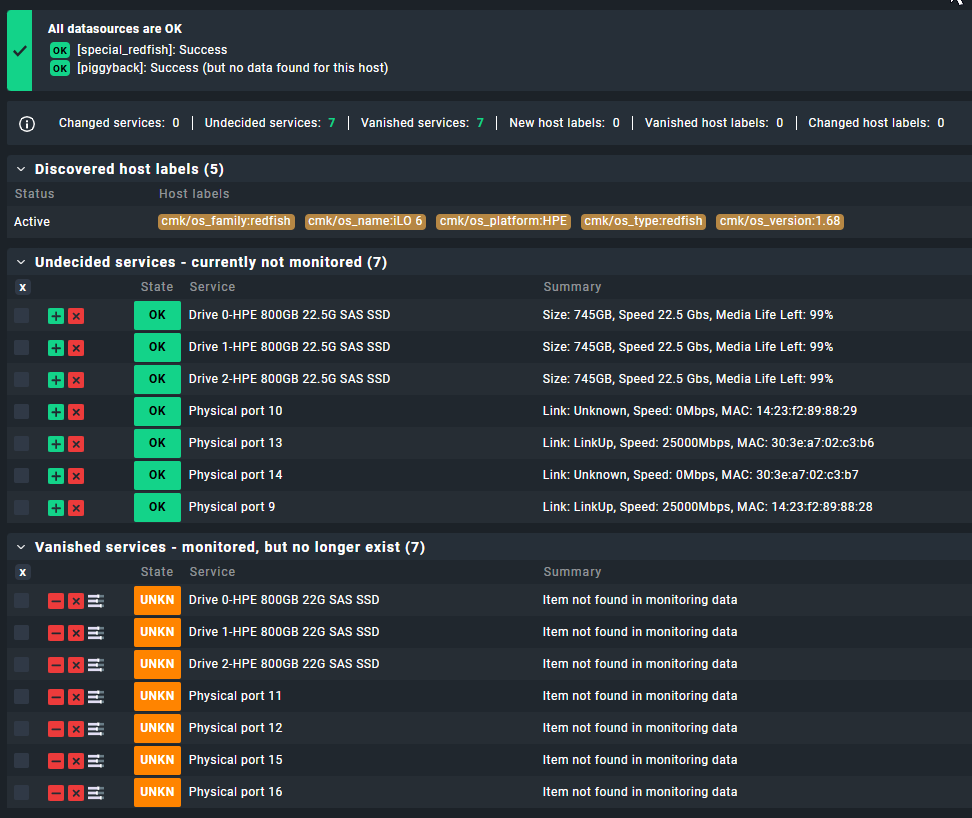
Drive 0-HPE 800GB 22G SAS SSD Item not found in monitoring data
Drive 1-HPE 800GB 22G SAS SSD Item not found in monitoring data
Drive 2-HPE 800GB 22G SAS SSD Item not found in monitoring data
Fan 1                Speed: 13.0%
Fan 2                Speed: 13.0%
Fan 3                Speed: 13.0%
Fan 4                Speed: 13.0%
Fan 5                Speed: 13.0%
Fan 6                Speed: 13.0%
Firmware health      All firmware in optimal state
Memory Summary       Capacity: 768GB, with State: Rollup State: Normal
Memory proc1dimm10   Size: 64GB, Type: DDR5-4800 MultiBitECC
Memory proc1dimm14   Size: 64GB, Type: DDR5-4800 MultiBitECC
Memory proc1dimm16   Size: 64GB, Type: DDR5-4800 MultiBitECC
Memory proc1dimm3    Size: 64GB, Type: DDR5-4800 MultiBitECC
Memory proc1dimm5    Size: 64GB, Type: DDR5-4800 MultiBitECC
Memory proc1dimm7    Size: 64GB, Type: DDR5-4800 MultiBitECC
Memory proc2dimm10   Size: 64GB, Type: DDR5-4800 MultiBitECC
Memory proc2dimm14   Size: 64GB, Type: DDR5-4800 MultiBitECC
Memory proc2dimm16   Size: 64GB, Type: DDR5-4800 MultiBitECC
Memory proc2dimm3    Size: 64GB, Type: DDR5-4800 MultiBitECC
Memory proc2dimm5    Size: 64GB, Type: DDR5-4800 MultiBitECC
Memory proc2dimm7    Size: 64GB, Type: DDR5-4800 MultiBitECC
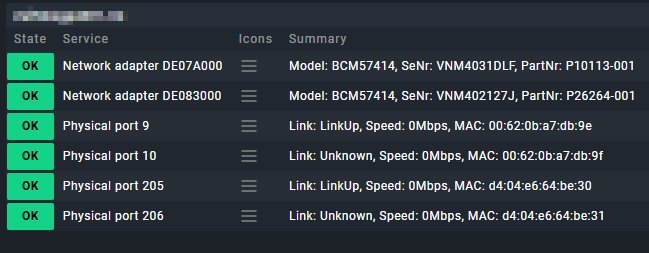
Network adapter DE07A000 Model: BCM57414, SeNr: VNMXXXXX, PartNr: P10113-001
Network adapter DE080000 Model: Intel(R) Ethernet Network Adapter E810-XXVDA2, SeNr: 303XXXXX, PartNr: P08441-001
Physical port 11     Item not found in monitoring data
Physical port 12     Item not found in monitoring data
Physical port 15     Item not found in monitoring data
Physical port 16     Item not found in monitoring data
Power supply 0-HpeServerPowerSupply 0.0 Watts input, 159.0 Watts output, 227.0 V input, Capacity 1600.0 Watts, Typ P38997-B21
Power supply 1-HpeServerPowerSupply 0.0 Watts input, 132.0 Watts output, 228.0 V input, Capacity 1600.0 Watts, Typ P38997-B21
Storage controller DE00B000 Everything looks OK - 1 detail available
System state         System with SerialNr: CZXXXXX, has State: Component State: Normal, Rollup State: Normal, This resource is enabled.
Temperature 01-Inlet Ambient Temperature: 18.0 °C
Temperature 02-CPU 1 PkgTmp Temperature: 36.0 °C
Temperature 03-CPU 2 PkgTmp Temperature: 32.0 °C
Temperature 04-P1 DIMM 1-8 Temperature: 33.0 °C
Temperature 06-P1 DIMM 9-16 Temperature: 33.0 °C
Temperature 08-P2 DIMM 1-8 Temperature: 32.0 °C
Temperature 10-P2 DIMM 9-16 Temperature: 32.0 °C
Temperature 12-VR P1 Temperature: 43.0 °C
Temperature 13-VR P2 Temperature: 41.0 °C
Temperature 14-HD Max Temperature: 40.0 °C
Temperature 18-Stor Batt Temperature: 19.0 °C
Temperature 21-Chipset Temperature: 41.0 °C
Temperature 22-BMC   Temperature: 60.0 °C
Temperature 23-P/S 1 Inlet Temperature: 26.0 °C
Temperature 24-P/S 1 Temperature: 40.0 °C
Temperature 25-P/S 2 Inlet Temperature: 27.0 °C
Temperature 26-P/S 2 Temperature: 40.0 °C
Temperature 28.1-OCP 1-I/O controller Temperature: 62.0 °C
Temperature 30.1-OCP 2-Network controller Temperature: 77.0 °C
Temperature 32.1-PCI 1-Network controller Temperature: 57.0 °C
Temperature 32.2-PCI 1-SFP28 (SFF-8402) Temperature: 38.0 °C
Temperature 49-Board Inlet Temperature: 23.0 °C
Temperature 50-Sys Exhaust 2 Temperature: 34.0 °C
Temperature 51-Battery Zone Temperature: 34.0 °C
Temperature 52-Sys Exhaust 1 Temperature: 34.0 °C
Temperature 53-P/S 2 Zone Temperature: 35.0 °C
Volume 239           Raid Type: RAID5, Size: 1489.4GB
+ EXECUTING INVENTORY PLUGINS
 allnet_ip_sensoric: skipped (no data)
 allnet_ip_sensoric: skipped (no data)
 aruba_wlc_aps: skipped (no data)
 aruba_wlc_aps: skipped (no data)
 check_mk: ok
 check_mk: skipped (no data)
 checkmk_agent_plugins: skipped (no data)
 checkmk_agent_plugins: skipped (no data)
 cisco_meraki_org_device_info: skipped (no data)
 cisco_meraki_org_device_info: skipped (no data)
 cisco_meraki_power_supplies: skipped (no data)
 cisco_meraki_power_supplies: skipped (no data)
 dell_hw_info: skipped (no data)
 dell_hw_info: skipped (no data)
 docker_node_info: skipped (no data)
 docker_node_info: skipped (no data)
 esx_systeminfo: skipped (no data)
 esx_systeminfo: skipped (no data)
 fireeye_sys_status: skipped (no data)
 fireeye_sys_status: skipped (no data)
 fritz: skipped (no data)
 fritz: skipped (no data)
 hp_proliant_da_phydrv: skipped (no data)
 hp_proliant_da_phydrv: skipped (no data)
 hp_proliant_mem: skipped (no data)
 hp_proliant_mem: skipped (no data)
 hp_proliant_systeminfo: skipped (no data)
 hp_proliant_systeminfo: skipped (no data)
 ibm_mq_channels: skipped (no data)
 ibm_mq_channels: skipped (no data)
 ibm_mq_managers: skipped (no data)
 ibm_mq_managers: skipped (no data)
 ibm_mq_queues: skipped (no data)
 ibm_mq_queues: skipped (no data)
 infoblox_osinfo: skipped (no data)
 infoblox_osinfo: skipped (no data)
 infoblox_systeminfo: skipped (no data)
 infoblox_systeminfo: skipped (no data)
 inv_cisco_vlans: skipped (no data)
 inv_cisco_vlans: skipped (no data)
 inv_esx_vsphere_hostsystem: skipped (no data)
 inv_esx_vsphere_hostsystem: skipped (no data)
 inv_if: skipped (no data)
 inv_if: skipped (no data)
 aix_baselevel: skipped (no data)
 aix_baselevel: skipped (no data)
 aix_lparstat_inventory: skipped (no data)
 aix_lparstat_inventory: skipped (no data)
 aix_packages: skipped (no data)
 aix_packages: skipped (no data)
 aix_service_packs: skipped (no data)
 aix_service_packs: skipped (no data)
 azure_load_balancer: skipped (no data)
 azure_load_balancer: skipped (no data)
 inventory_checkmk: skipped (no data)
 inventory_checkmk: skipped (no data)
 checkpoint_vpn_tunnels: skipped (no data)
 checkpoint_vpn_tunnels: skipped (no data)
 citrix_controller: skipped (no data)
 citrix_controller: skipped (no data)
 citrix_state: skipped (no data)
 citrix_state: skipped (no data)
 couchbase_nodes_ports: skipped (no data)
 couchbase_nodes_ports: skipped (no data)
 dmidecode: skipped (no data)
 dmidecode: skipped (no data)
 docker_container_labels: skipped (no data)
 docker_container_labels: skipped (no data)
 docker_container_network: skipped (no data)
 docker_container_network: skipped (no data)
 inventory_docker_container_node_name: skipped (no data)
 inventory_docker_container_node_name: skipped (no data)
 docker_node_images: skipped (no data)
 docker_node_images: skipped (no data)
 docker_node_network: skipped (no data)
 docker_node_network: skipped (no data)
 enviromux_micro_information: skipped (no data)
 enviromux_micro_information: skipped (no data)
 inventory_esx_vsphere_clusters: skipped (no data)
 inventory_esx_vsphere_clusters: skipped (no data)
 inventory_esx_vsphere_virtual_machines: skipped (no data)
 inventory_esx_vsphere_virtual_machines: skipped (no data)
 fortiauthenticator_system: skipped (no data)
 fortiauthenticator_system: skipped (no data)
 fortigate_ha: skipped (no data)
 fortigate_ha: skipped (no data)
 fortimail_system: skipped (no data)
 fortimail_system: skipped (no data)
 fortinet_firewall_network_interfaces: skipped (no data)
 fortinet_firewall_network_interfaces: skipped (no data)
 fortisandbox_software: skipped (no data)
 fortisandbox_software: skipped (no data)
 fortisandbox_system: skipped (no data)
 fortisandbox_system: skipped (no data)
 ipmi_firmware: skipped (no data)
 ipmi_firmware: skipped (no data)
 kube_cluster: skipped (no data)
 kube_cluster: skipped (no data)
 kube_cronjob: skipped (no data)
 kube_cronjob: skipped (no data)
 kube_daemonset: skipped (no data)
 kube_daemonset: skipped (no data)
 kube_deployment: skipped (no data)
 kube_deployment: skipped (no data)
 kube_namespace: skipped (no data)
 kube_namespace: skipped (no data)
 kube_node: skipped (no data)
 kube_node: skipped (no data)
 kube_pod: skipped (no data)
 kube_pod: skipped (no data)
 kube_statefulset: skipped (no data)
 kube_statefulset: skipped (no data)
 kyocera_printer: skipped (no data)
 kyocera_printer: skipped (no data)
 lnx_block_devices: skipped (no data)
 lnx_block_devices: skipped (no data)
 lnx_ip_r: skipped (no data)
 lnx_ip_r: skipped (no data)
 lnx_packages: skipped (no data)
 lnx_packages: skipped (no data)
 lnx_sysctl: skipped (no data)
 lnx_sysctl: skipped (no data)
 lnx_video: skipped (no data)
 lnx_video: skipped (no data)
 mobileiron_inventory: skipped (no data)
 mobileiron_inventory: skipped (no data)
 mssql_clusters: skipped (no data)
 mssql_clusters: skipped (no data)
 oracle_systemparameter: skipped (no data)
 oracle_systemparameter: skipped (no data)
 primekey: skipped (no data)
 primekey: skipped (no data)
 snmp_extended_info: skipped (no data)
 snmp_extended_info: skipped (no data)
 solaris_addresses: skipped (no data)
 solaris_addresses: skipped (no data)
 solaris_pkginfo: skipped (no data)
 solaris_pkginfo: skipped (no data)
 solaris_cpus: skipped (no data)
 solaris_cpus: skipped (no data)
 solaris_routes: skipped (no data)
 solaris_routes: skipped (no data)
 win_bios: skipped (no data)
 win_bios: skipped (no data)
 win_disks: skipped (no data)
 win_disks: skipped (no data)
 win_exefiles: skipped (no data)
 win_exefiles: skipped (no data)
 win_ip_r: skipped (no data)
 win_ip_r: skipped (no data)
 win_networkadapter: skipped (no data)
 win_networkadapter: skipped (no data)
 win_reg_uninstall: skipped (no data)
 win_reg_uninstall: skipped (no data)
 win_video: skipped (no data)
 win_video: skipped (no data)
 win_wmi_software: skipped (no data)
 win_wmi_software: skipped (no data)
 win_wmi_updates: skipped (no data)
 win_wmi_updates: skipped (no data)
 juniper_info: skipped (no data)
 juniper_info: skipped (no data)
 lnx_cpuinfo: skipped (no data)
 lnx_cpuinfo: skipped (no data)
 lnx_distro: skipped (no data)
 lnx_distro: skipped (no data)
 lnx_if: skipped (no data)
 lnx_if: skipped (no data)
 lnx_uname: skipped (no data)
 lnx_uname: skipped (no data)
 lparstat_aix: skipped (no data)
 lparstat_aix: skipped (no data)
 mem: skipped (no data)
 mem: skipped (no data)
 mem_used: skipped (no data)
 mem_used: skipped (no data)
 mssql_instance: skipped (no data)
 mssql_instance: skipped (no data)
 netapp_api_disk: skipped (no data)
 netapp_api_disk: skipped (no data)
 netapp_api_info: skipped (no data)
 netapp_api_info: skipped (no data)
 oracle_dataguard_stats: skipped (no data)
 oracle_dataguard_stats: skipped (no data)
 oracle_instance: skipped (no data)
 oracle_instance: skipped (no data)
 oracle_performance: skipped (no data)
 oracle_performance: skipped (no data)
 oracle_recovery_area: skipped (no data)
 oracle_recovery_area: skipped (no data)
 oracle_tablespaces: skipped (no data)
 oracle_tablespaces: skipped (no data)
 perle_chassis: skipped (no data)
 perle_chassis: skipped (no data)
 perle_chassis_slots: skipped (no data)
 perle_chassis_slots: skipped (no data)
 perle_psmu: skipped (no data)
 perle_psmu: skipped (no data)
 prtconf: skipped (no data)
 prtconf: skipped (no data)
 snmp_quantum_storage_info: skipped (no data)
 snmp_quantum_storage_info: skipped (no data)
 snmp_info: skipped (no data)
 snmp_info: skipped (no data)
 solaris_prtdiag: skipped (no data)
 solaris_prtdiag: skipped (no data)
 solaris_uname: skipped (no data)
 solaris_uname: skipped (no data)
 suseconnect: skipped (no data)
 suseconnect: skipped (no data)
 win_computersystem: skipped (no data)
 win_computersystem: skipped (no data)
 win_computersystemproduct: skipped (no data)
 win_computersystemproduct: skipped (no data)
 win_cpuinfo: skipped (no data)
 win_cpuinfo: skipped (no data)
 win_os: skipped (no data)
 win_os: skipped (no data)
 win_system: skipped (no data)
 win_system: skipped (no data)
 winperf_if: skipped (no data)
 winperf_if: skipped (no data)
 netapp_ontap_disk: skipped (no data)
 netapp_ontap_disk: skipped (no data)
 netapp_ontap_info: skipped (no data)
 netapp_ontap_info: skipped (no data)
 robotmk: skipped (no data)
 robotmk: skipped (no data)
 redfish_firmware: ok
 redfish_firmware: skipped (no data)
No piggyback files for 'sitenameesx04-rm'. Skip processing.
No piggyback files for 'A.B.C.34'. Skip processing.
[cpu_tracking] Stop [7f57602d22a0 - Snapshot(process=posix.times_result(user=0.2799999999999998, system=0.0, children_user=0.0, children_system=0.0, elapsed=0.27999999932944775))]
[special_redfish] Success, [piggyback] Success (but no data found for this host), execution time 2.5 sec | execution_time=2.500 user_time=0.280 system_time=0.000 children_user_time=0.460 children_system_time=0.060 cmk_time_ds=1.700 cmk_time_agent=0.000
After each reboot of server or ILO the physical ports get newly recognized.
The indexes are switching 9/10/13/14 and after next reboot 11/12/15/16.
The drives are get newly recognized, too.
Is there anything we could do to solve this?