**CMK version:RAW 2.4.0p12 as a docker container
**OS version:Ubuntu 20.04
Error message:
Hi all,
Trying to setup Checkmk raw 2.4 (Docker on Ubuntu 20.04) to monitor 4 Dell iDrac and 2 HP ILO (Basic Health like HD Disks,Power, Fan, Temp, etc…)
I just added the first host (Dell), activated, added redfish rule and press discover:
Im getting: [piggyback] Success (but no data found for this host)
Maybe I need to Uncheck/check some boxes in the Host properties?, maybe something else?
I did try several combinations…
Redfish connectivity is working towards this server running:
curl -k -u user:pass https://(server ip)/redfish/v1/ and got a reply from the server
Cannot find any specific info on how to setup this up, at least for this new 2.4
I find many references on the “old way” using mkp scripts and stuff but not for this one.
The setup of the Redfish integration for a specific host is the same as with older systems.
With 2.4 you only don’t need to install an extra mkp file as all the needed things are integrated into CheckMK.
What you need to do is,
Hi Andreas!
First of all thanks a lot for the quick reply!
Indeed I had choosen the wrong Monitoring Agent.
Now I get about 77 services discovered.
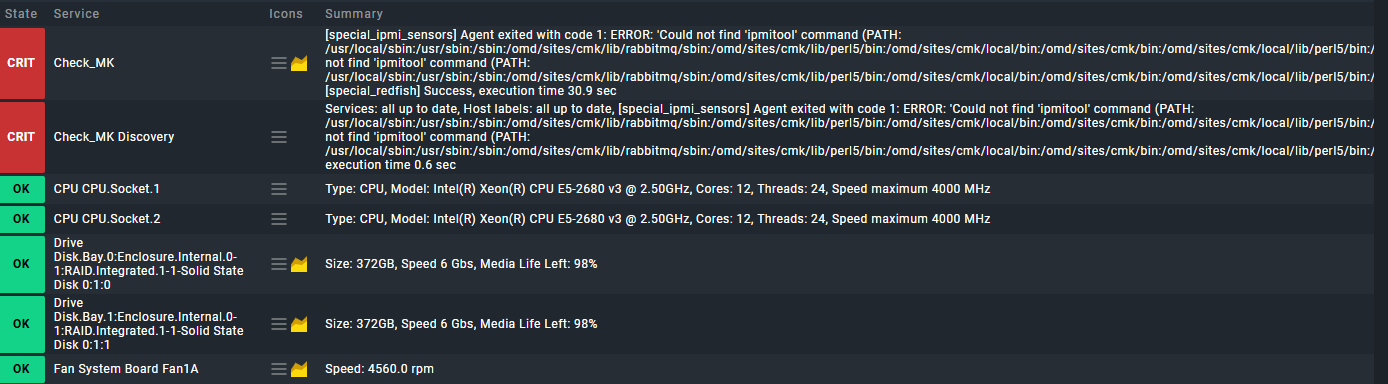
The thing is, it is still complaining about ipimitool not find in path…
Both as critical ondashboard check_mk & check_mk discovery
Here a screenshot:
In your case you have configured two special agents for this device.
The first special agent is the “IPMI special agent” and the second one is the “Redfish special agent”. Please configure the rule conditions for the “IPMI special agent” that they not affect the Redfish management board.
Hi again,
You were right, I played last week with snmp and ipmi “IPMI special agent” and forgot to delete it.
Once removed “IPMI special agent” and rescan, its all good now
If one of the answers helped you solve your question, please mark it as the solution. This way, you thank the person who helped you and also indicate that the question has been resolved. This, in turn, helps others who come across the same question.