the new stable release 2.3.0p14 of Checkmk is ready for download.
This stable release ships with 21 changes affecting all editions of Checkmk,
4 changes for the Enterprise editions, 0 Cloud Edition specific and
1 Managed Services Edition specific changes.
Changes in all Checkmk Editions:
Checks & agents
17123 KUBE: Addition of support for Kubernetes v1.30…
17151 FIX: Make Microsoft IIS monitoring locale independent… NOTE: Please refer to the migration notes!
16776 FIX: chrony: change default warning level… NOTE: Please refer to the migration notes!
15340 FIX: mysql_slave: propagate errors to service result… NOTE: Please refer to the migration notes!
Hi @DTB, it is unfortunate, that something does not seem to be working for you. However, from the few words you shared it is impossible to determine, what exactly went wrong. Maybe you can share just a bit more information, so folks might be able to help?
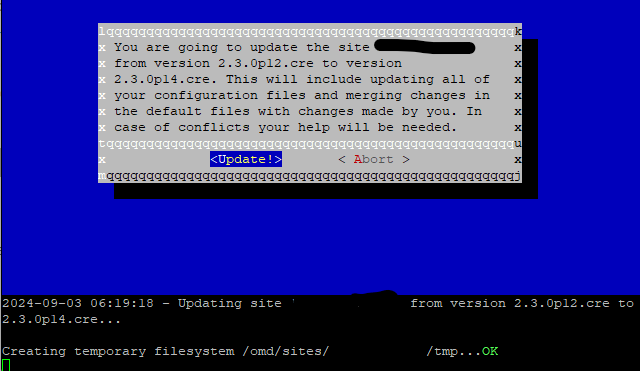
After installing the new version (RAW) I want to update this from 2.3.0p12.cre to 2.3.0p14.cre, but it stuck on creating and making backup…It just running there for hours without any other messages…Don’t know where to look for errors logs on this…
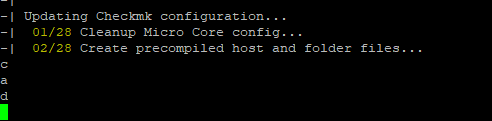
I have seen this recently on virtual appliance with CEE. In my case it stuck because there was a conflict and it asked to answer with continue or abort. Unfortunately this message was not shown on the screen. Only after hitting enter key it continued with default answer and the message was visible.
I will do some tests soon to verify. May have a look at update.log.
As the problem mentioned by @mike1098 is not shown as a fix in this version, i would strongly advise not to upgrade if you have some modifications in your site or it is an older site where you get some messages on every update.
For this problem a ticket should exists. @robin.gierse can you please have a look inside the system if there is any information about this not shown preflight check.
I am trying to reproduce the problem with the CRE but no luck. For me the update process works as expected. In my test, I just created a fresh 2.3.0p12.cre on Ubuntu 22.04 with few hosts and services and then updated to 2.3.0p14.cre. Do you also do/have something similar?
2024-09-03 09:13:29 - Updating site 'p12raw' from version 2.3.0p12.cre to 2.3.0p14.cre...

Creating temporary filesystem /omd/sites/p12raw/tmp...OK
ATTENTION
  Some steps may take a long time depending on your installation.
  Please be patient.

Cleanup precompiled host and folder files
Verifying Checkmk configuration...
 01/06 Legacy check plug-ins...
 02/06 Rulesets...
 03/06 UI extensions...
 04/06 Agent based plugins...
 05/06 Autochecks...
 06/06 Deprecated .mk configuration of plugins...
Done (success)


Completed verifying site configuration. Your site now has version 2.3.0p14.cre.
Executing update-pre-hooks script "01_mkp-disable-outdated"...OK
Executing update-pre-hooks script "02_cmk-update-config"...
-| ATTENTION
-|   Some steps may take a long time depending on your installation.
-|   Please be patient.
-|
-| Cleanup precompiled host and folder files
-| Verifying Checkmk configuration...
-|  01/06 Legacy check plug-ins...
-|  02/06 Rulesets...
-|  03/06 UI extensions...
-|  04/06 Agent based plugins...
-|  05/06 Autochecks...
-|  06/06 Deprecated .mk configuration of plugins...
-| Done (success)
-|
-| Updating Checkmk configuration...
-|  01/23 Create precompiled host and folder files...
-|  02/23 Validate user IDs...
-|  03/23 Update views...
-|  04/23 Update dashboards...
-|  05/23 User attributes...
-|  06/23 Global settings...
-|  07/23 Rulesets...
-|  08/23 Autochecks...
-|  09/23 Hosts and folders...
-|  10/23 Migrate CLI parent scan config...
-|  11/23 Cleanup version specific caches...
-|  12/23 Delete old dedicated agent receiver cert...
-|  13/23 Synchronize automationuser secrets...
-|  14/23 Check for incompatible password hashes...
-|  15/23 Remove unreadable prediction files...
-|  16/23 Update existing two factor...
-|  17/23 Update pagetypes...
-|  18/23 Split large audit logs...
-|  19/23 Event Console: Rewrite active config...
-|  20/23 Sanitize audit log...
-| Wrote audit log backup to /omd/sites/p12raw/audit_log_backup. Please check if the audit log in the GUI works as expected.
-| In case of problems you can copy the backup files back to /omd/sites/p12raw/var/check_mk/wato/log.
-| Please check the corresponding files in /omd/sites/p12raw/var/check_mk/wato/log for any leftover automation secrets and remove them if necessary.
-| If everything works as expected you can remove the backup.
-| For further details please have a look at Werk #17056.
-|  21/23 Remove persisted graph options...
-|  22/23 BI config...
-|  23/23 Update core config...
-| Generating configuration for core (type nagios)...
-| Precompiling host checks...OK
-| Done (success)
OK
Finished update.
For testing I setup a new 2.2.0 site with a self build MKP with a check which is deprecated in 2.3. While upgrading I had the above described behavior. After pressing enter key it did an abort of the upgrade and showed the message.
@robin.gierse Please let me know if one is already working on this. I think I can easily reproduce it.
> root@vm-omd-02:/home/omd# python3 /omd/sites/xxx/bin/cmk-update-config --conflict ask --dry-run
> Traceback (most recent call last):
>   File "/omd/sites/xxx/bin/cmk-update-config", line 8, in <module>
>     from cmk.update_config.main import ensure_site_is_stopped, main
> ModuleNotFoundError: No module named 'cmk'
quick fix: If you repeat “c” and press “enter”, the update is completed.
2024-09-06 11:15:46 - Updating site 'xxx' from version 2.3.0p11.cee to 2.3.0p14.cee...

Creating temporary filesystem /omd/sites/xxx/tmp...OK
c
c
c
ATTENTION
  Some steps may take a long time depending on your installation.
  Please be patient.

Cleanup precompiled host and folder files
Verifying Checkmk configuration...
 01/06 Legacy check plug-ins...
Ignoring outdated plugin 'winperf_citrix_mcs': Format no longer supported -- this API is deprecated!
Ignoring outdated plugin 'winperf_system': Format no longer supported -- this API is deprecated!


..........


OK
Finished update.