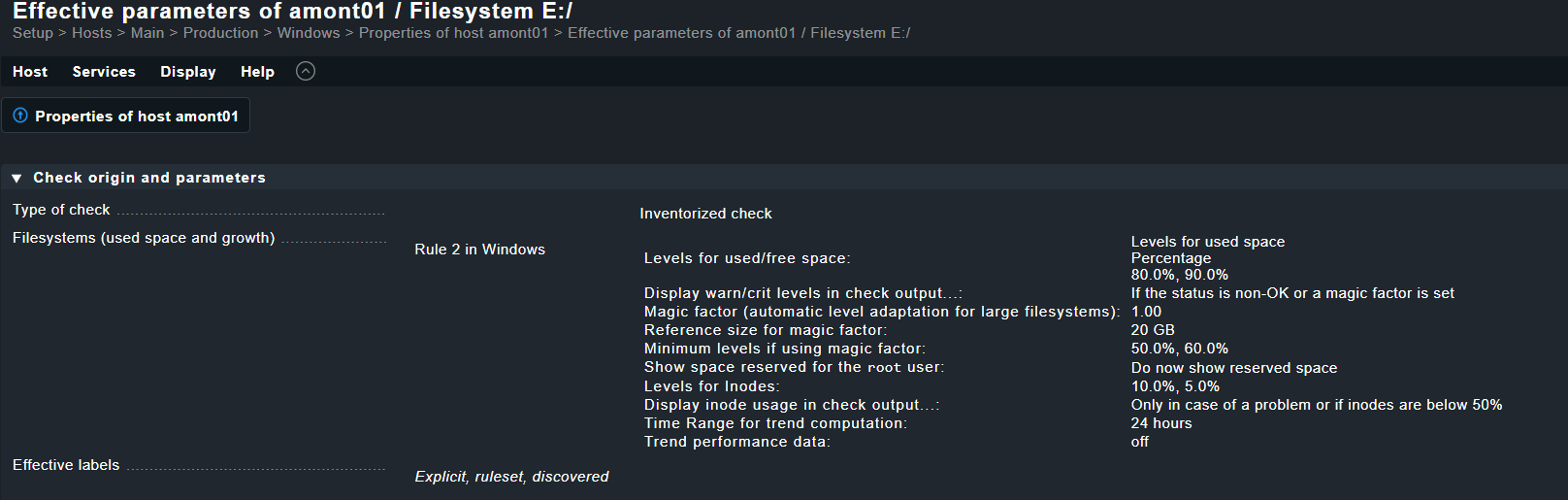
I’m wondering if it’s possible to exclude the magical factor and trend from the default file system discovery. I attempted to create a rule (as shown in my screenshot), but it seems that the default one is taking precedence over it. Thank you for your assistance!
thank you, but I still have “trend” in the output even after disabling …
Used: 97.06% - 1.14 TiB of 1.17 TiB (warn/crit at 80.00%/90.00% used)CRIT , trend per 1 day 0 hours: +1.21 MiB, trend per 1 day 0 hours: +<0.01%, Time left until disk full: 81 years 175 days
hm I guess I never tried to remove the trend completely, you can use the option “display time left in check output” but completely removing any trend computation doesn’t seem to be possible (at least a quick look in the code also didn’t show me any way.)
I tried to remove the trend completely from output also.
The PR that respects the rule setting was not accepted.
It is a very stupid rule but there was some customer at the starting days of CMK who wanted exactly this option.
This topic was automatically closed 365 days after the last reply. New replies are no longer allowed. Contact an admin if you think this should be re-opened.