Hello,
is there any way to do a reschedule via API or command line? I’ve tried cmk --checks=checkname hostname, but there I get an error that I’m doing active checks (e.g. reschedule an application log).
Thank you!
Hello,
is there any way to do a reschedule via API or command line? I’ve tried cmk --checks=checkname hostname, but there I get an error that I’m doing active checks (e.g. reschedule an application log).
Thank you!
First question is what type of check you try to reschedule.
For a normal passive check_mk dependent service you can do a “cmk hostname” on command line to do a check of the “Check_MK” service that also feeds the results to the monitoring core.
For active checks like “check_http” i think it is not so easy.
for example errors on an interface, or an Application log (which was cleared to remove the warning)
Booth are “normal” passive Check_MK checks. Here a simple “cmk hostname” should be enough.
My question is: Why do you want to reschedule something anyways?
We’re integrate check_MK to our ITSM Dashboard. Therefore we’d like to delete logs, reschedule and set downtime without opening CMK itself.
Thanks, but would be great if I we can just reschedule a single service of a host.
This is only meaningful if you have an active check that is producing own data.
All checks inside CMK that have one of these two symbols
 or
or
 are passive checks and depend on data produced by some other checks.
For the second symbol also a reschedule of the Check_MK service will do nothing as this is a check with cached data.
With mouse over you see what check it is
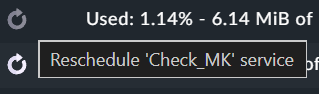
In 99% of all services this will be the “Check_MK” service. If you now reschedule such a check it triggers the reschedule of the Check_MK service. That’s why i said do a simple “cmk hostname” and that’s it.
With the default check interval of 60 seconds and build on Andreas’ answer, I would assume, there is no real need to reschedule. Just take a sip of coffee, lean back for a moment and the status will be updated. 