CMK version: OMD - Open Monitoring Distribution Version 2.2.0p22.cre OS version: Ubuntu 20.04.6 LTS
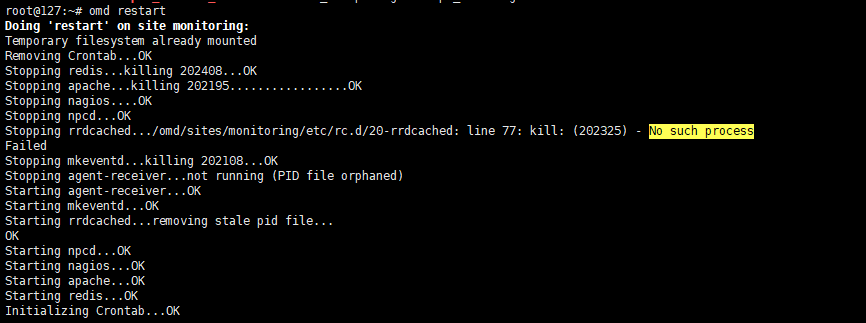
Error message: Stopping rrdcached…/omd/sites/monitoring/etc/rc.d/20-rrdcached: line 77: kill: (202325) - No such process
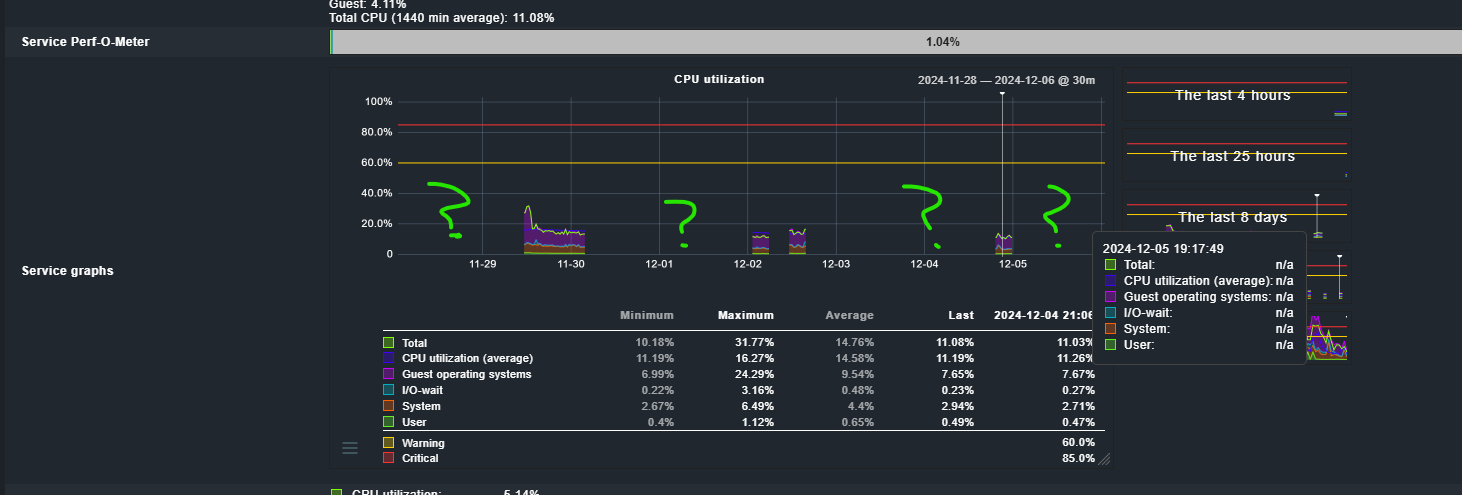
rrdcached going crash time to time because of that checkmk not storing monitoring data.
The reason for a rrdcached crash are most times invalid performance data.
I didn’t make any changes. I installed Monitoring APP months ago and it is like that unit now.
No one changed any configuration of monitoring. RRDcache crash came out of nowhere.
Can you please provide steps I have to follow to fix.
Thanks
As you use the RAW edition you can have a look at the pnp4nagios log files if there is anything usable inside.
I don’t think so - this is not coming out of nowhere.
I don’t know anything about Nagios checks. Can you please give me commands which will help me to check logs?
By default following nagios plugins are running:
OMD[monitoring]:~$ ll ~/lib/nagios/plugins/
total 3652
-rwxr-xr-x 1 root root   60760 Feb 13  2024 check_apt*
-rwxr-xr-x 1 root root    8816 Jan 23  2024 check_bi_aggr*
-rwxr-xr-x 1 root root    2319 Nov 30  2023 check_breeze*
-rwxr-xr-x 1 root root   61112 Feb 13  2024 check_by_ssh*
lrwxrwxrwx 1 root root       9 Feb 13  2024 check_clamd -> check_tcp*
-rwxr-xr-x 1 root root   48152 Feb 13  2024 check_cluster*
-rwxr-x--- 1 root omd    60632 Feb 13  2024 check_dhcp*
-rwxr-xr-x 1 root root   56728 Feb 13  2024 check_dig*
-rwxr-xr-x 1 root root   65472 Feb 13  2024 check_disk*
-rwxr-xr-x 1 root root   10139 Nov 30  2023 check_disk_smb*
-rwxr-xr-x 1 root root   64888 Feb 13  2024 check_dns*
-rwxr-xr-x 1 root root   39352 Feb 13  2024 check_dummy*
-rwxr-xr-x 1 root root    4385 Jan 23  2024 check_elasticsearch_query*
-rwxr-xr-x 1 root root    5175 Nov 30  2023 check_file_age*
-rwxr-xr-x 1 root root    6400 Nov 30  2023 check_flexlm*
-rwxr-xr-x 1 root root   12850 Jan 23  2024 check_form_submit*
lrwxrwxrwx 1 root root       9 Feb 13  2024 check_ftp -> check_tcp*
lrwxrwxrwx 1 root root      10 Feb 13  2024 check_host -> check_icmp*
-rwxr-xr-x 1 root root   56440 Feb 13  2024 check_hpjd*
-rwxr-xr-x 1 root root  111256 Feb 13  2024 check_http*
-rwxr-x--- 1 root omd    68576 Feb 13  2024 check_icmp*
-rwxr-xr-x 1 root root   48280 Feb 13  2024 check_ide_smart*
-rwxr-xr-x 1 root root   15270 Nov 30  2023 check_ifoperstatus*
-rwxr-xr-x 1 root root   13415 Nov 30  2023 check_ifstatus*
lrwxrwxrwx 1 root root       9 Feb 13  2024 check_imap -> check_tcp*
-rwxr-xr-x 1 root root    7065 Nov 30  2023 check_ircd*
lrwxrwxrwx 1 root root       9 Feb 13  2024 check_jabber -> check_tcp*
-rwxr-xr-x 1 root root   65176 Feb 13  2024 check_ldap*
lrwxrwxrwx 1 root root      10 Feb 13  2024 check_ldaps -> check_ldap*
-rwxr-xr-x 1 root root   52248 Feb 13  2024 check_load*
-rwxr-xr-x 1 root root    7170 Nov 30  2023 check_log*
-rwxr-xr-x 1 root root   10724 Jan 26  2024 check_mail*
-rwxr-xr-x 1 root root   13587 Jan 31  2024 check_mail_loop*
-rwxr-xr-x 1 root root    6801 Jan 23  2024 check_mailboxes*
-rwxr-xr-x 1 root root   23281 Nov 30  2023 check_mailq*
-rwxr-xr-x 1 root root 1068896 Feb 13  2024 check_mkevents*
-rwxr-xr-x 1 root root   52312 Feb 13  2024 check_mrtg*
-rwxr-xr-x 1 root root   52184 Feb 13  2024 check_mrtgtraf*
-rwxr-xr-x 1 root root   61048 Feb 13  2024 check_mysql*
-rwxr-xr-x 1 root root   52568 Feb 13  2024 check_mysql_query*
-rwxr-xr-x 1 root root   52280 Feb 13  2024 check_nagios*
lrwxrwxrwx 1 root root       9 Feb 13  2024 check_nntp -> check_tcp*
lrwxrwxrwx 1 root root       9 Feb 13  2024 check_nntps -> check_tcp*
-rwxr-xr-x 1 root root    2949 Jan 23  2024 check_notify_count*
-rwxr-xr-x 1 root root   53200 Feb 13  2024 check_nrpe*
-rwxr-xr-x 1 root root   64728 Feb 13  2024 check_nt*
-rwxr-xr-x 1 root root   64792 Feb 13  2024 check_ntp*
-rwxr-xr-x 1 root root   60888 Feb 13  2024 check_ntp_peer*
-rwxr-xr-x 1 root root   56600 Feb 13  2024 check_ntp_time*
-rwxr-xr-x 1 root root   68728 Feb 13  2024 check_nwstat*
-rwxr-xr-x 1 root root    9392 Nov 30  2023 check_oracle*
-rwxr-xr-x 1 root root   52312 Feb 13  2024 check_overcr*
-rwxr-xr-x 1 root root   65208 Feb 13  2024 check_pgsql*
-rwxr-xr-x 1 root root   60760 Feb 13  2024 check_ping*
lrwxrwxrwx 1 root root       9 Feb 13  2024 check_pop -> check_tcp*
-rwxr-xr-x 1 root root   61016 Feb 13  2024 check_procs*
-rwxr-xr-x 1 root root   52408 Feb 13  2024 check_real*
-rwxr-xr-x 1 root root    9671 Nov 30  2023 check_rpc*
-rwxr-xr-x 1 root root    1509 Nov 30  2023 check_sensors*
-rwxr-xr-x 1 root root    8624 Jan 23  2024 check_sftp*
lrwxrwxrwx 1 root root       9 Feb 13  2024 check_simap -> check_tcp*
-rwxr-xr-x 1 root root   73656 Feb 13  2024 check_smtp*
-rwxr-xr-x 1 root root   78104 Feb 13  2024 check_snmp*
lrwxrwxrwx 1 root root       9 Feb 13  2024 check_spop -> check_tcp*
-rwxr-xr-x 1 root root   15245 Jan 23  2024 check_sql*
-rwxr-xr-x 1 root root   52408 Feb 13  2024 check_ssh*
lrwxrwxrwx 1 root root       9 Feb 13  2024 check_ssmtp -> check_tcp*
-rwxr-xr-x 1 root root   48088 Feb 13  2024 check_swap*
-rwxr-xr-x 1 root root   69624 Feb 13  2024 check_tcp*
-rwxr-xr-x 1 root root   52376 Feb 13  2024 check_time*
-rwxr-xr-x 1 root root    8866 Jan 23  2024 check_traceroute*
lrwxrwxrwx 1 root root       9 Feb 13  2024 check_udp -> check_tcp*
-rwxr-xr-x 1 root root    3544 Jan 24  2024 check_uniserv*
-rwxr-xr-x 1 root root   56472 Feb 13  2024 check_ups*
-rwxr-xr-x 1 root root    9951 Nov 30  2023 check_uptime*
-rwxr-xr-x 1 root root   43896 Feb 13  2024 check_users*
-rwxr-xr-x 1 root root    3005 Nov 30  2023 check_wave*
-rwxr-xr-x 1 root root   48032 Feb 13  2024 negate*
-rwxr-xr-x 1 root root   39632 Feb 13  2024 urlize*
-rwxr-xr-x 1 root root    1973 Nov 30  2023 utils.pm*
-rwxr-xr-x 1 root root    2807 Nov 30  2023 utils.sh*
They are not running, this is only the folder where the default plugins located.
system
December 12, 2025, 5:46am
7
This topic was automatically closed 365 days after the last reply. New replies are no longer allowed. Contact an admin if you think this should be re-opened.