It is indeed sometimes difficult to tell if a certain “search field” is just for ordinary text or regexes. I already suggested a solution for this. Sometimes you can prepend the search term with a tilde ~ to indicate that it should be handled as a regex.
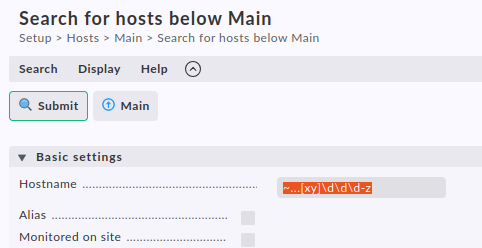
Fortunately, this is also the case in this search dialog in the Setup→Hosts section:
The actual regex pattern is ...[xy]\d\d\d-z and this works for me.
I have a followon question: How do I select and delete all hosts that are currently down? There is no filter for this in setup and no way to delete in monitoring as far as I know, so what other way is there?
Good to know that there is a rule for this, but I don’t want to automate - I want to be able to filter our the hosts I need to delete based on a variety of criteria that change from time to time - and then delete them when I have the list of hosts the way I want it in monitoring.
This topic was automatically closed 365 days after the last reply. New replies are no longer allowed. Contact an admin if you think this should be re-opened.