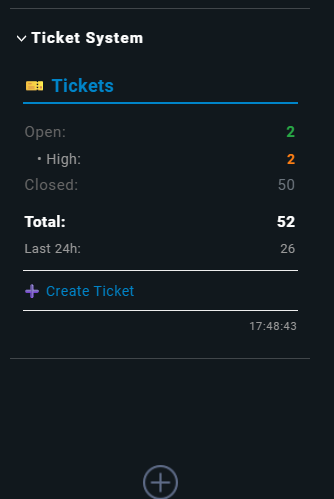
Checkmk 2.4 Sidebar Snapin Development Guideline
Complete guide for developing sidebar snapins for Checkmk 2.4+, based on the Ticket System Snapin development experience.
 Table of Contents
- Prerequisites
- Project Structure
- Core Concepts
- Minimum Requirements
- Step-by-Step Development
- API Reference
- Best Practices
- Common Pitfalls
- Testing Strategy
- Deployment
- Troubleshooting
- Advanced Topics
Prerequisites
Environment
- Checkmk 2.4.0 or higher
- Python 3.12+ (included with Checkmk 2.4)
- OMD Site with write access
- Basic Python knowledge
- Understanding of Checkmk’s plugin architecture
Tools
# Development tools
- Text editor (VSCode, PyCharm, vim)
- Git for version control
- Python linter (pylint, flake8)
- SQLite browser (for database snapins)
Project Structure
File System Layout
~/local/lib/python3/
└── cmk/
    ├── __init__.py              # Required!
    └── gui/
        ├── __init__.py          # Required!
        └── plugins/
            ├── __init__.py      # Required!
            └── sidebar/
                ├── __init__.py  # Required!
                └── my_snapin.py # Your snapin
Important Paths
| Path |
Purpose |
~/local/lib/python3/cmk/gui/plugins/sidebar/ |
Snapin location |
~/var/log/web.log |
Error logs |
~/tmp/check_mk/ |
Temporary files |
/omd/sites/<site>/lib/python3/cmk/gui/sidebar/ |
Core snapin code (read-only) |
Core Concepts
What is a Sidebar Snapin?
A sidebar snapin is a modular UI component that appears in the Checkmk sidebar, providing:
- Quick information display
- Navigation shortcuts
- Status monitoring
- Action buttons
Snapin Lifecycle
1. Registration   → @snapin_registry.register
2. Discovery      → Checkmk scans plugins directory
3. Instantiation  → Class is instantiated
4. Rendering      → show() method is called
5. Auto-refresh   → Periodic re-rendering (if enabled)
Minimum Requirements
Required Imports
from cmk.gui.i18n import _
from cmk.gui.htmllib.html import html
from cmk.gui.sidebar._snapin import snapin_registry, SidebarSnapin
Minimal Snapin Template
#!/usr/bin/env python3
# -*- coding: utf-8 -*-
"""
Minimal Snapin Template for Checkmk 2.4+
"""

from cmk.gui.i18n import _
from cmk.gui.htmllib.html import html
from cmk.gui.sidebar._snapin import snapin_registry, SidebarSnapin


@snapin_registry.register
class MyMinimalSnapin(SidebarSnapin):

    @staticmethod
    def type_name():
        """Unique identifier (lowercase, no spaces)"""
        return "my_snapin"

    @classmethod
    def title(cls):
        """Display name in snapin list"""
        return _("My Snapin")

    @classmethod
    def description(cls):
        """Tooltip description"""
        return _("Short description of what this snapin does")

    def show(self):
        """Main render function - REQUIRED"""
        html.write_text("Hello World!")
Mandatory Methods
| Method |
Type |
Returns |
Purpose |
type_name() |
@staticmethod |
str |
Unique ID |
title() |
@classmethod |
str |
Display name |
description() |
@classmethod |
str |
Description |
show() |
instance |
None |
Render content |
Step-by-Step Development
Phase 1: Planning
Define your snapin’s purpose:
 What information will it display?
- What data sources will it use?
- What interactions will it provide?
- How often should it refresh?
Example:
Purpose: Display ticket system statistics
Data Source: SQLite database
Interactions: Click to filter tickets
Refresh: Every 30 seconds
Phase 2: Basic Structure
1. Create the file:
cd ~/local/lib/python3/cmk/gui/plugins/sidebar
touch my_snapin.py
2. Add minimal template:
from cmk.gui.i18n import _
from cmk.gui.htmllib.html import html
from cmk.gui.sidebar._snapin import snapin_registry, SidebarSnapin

@snapin_registry.register
class MySnapin(SidebarSnapin):

    @staticmethod
    def type_name():
        return "my_snapin"

    @classmethod
    def title(cls):
        return _("My Snapin")

    @classmethod
    def description(cls):
        return _("Description")

    def show(self):
        html.write_text("Static test")
3. Test immediately:
python3 -m py_compile my_snapin.py
omd reload apache
Phase 3: Add Data Source
Option A: Database Access
import sqlite3
from pathlib import Path
import os

def _get_data(self):
    db_path = Path(os.getenv("OMD_ROOT", "")) / "var/data.db"

    if not db_path.exists():
        return None

    conn = sqlite3.connect(str(db_path), timeout=5)
    cursor = conn.cursor()
    cursor.execute("SELECT COUNT(*) FROM table")
    result = cursor.fetchone()[0]
    conn.close()

    return result
Option B: REST API Access
import urllib.request
import json

def _fetch_api_data(self):
    try:
        url = "https://api.example.com/stats"
        response = urllib.request.urlopen(url, timeout=5)
        data = json.loads(response.read().decode('utf-8'))
        return data
    except Exception:
        return None
Option C: Livestatus Access
import cmk.gui.sites as sites

def _get_host_stats(self):
    try:
        query = "GET hosts\nColumns: state\nStats: state = 0\nStats: state = 1\nStats: state = 2"
        result = sites.live().query(query)
        return result
    except Exception:
        return None
Phase 4: Render Content
Basic HTML Structure:
def show(self):
    # Container
    html.open_div(style="padding: 10px;")

    # Header
    html.open_div(style="font-weight: bold; margin-bottom: 10px;")
    html.write_text("Title")
    html.close_div()

    # Content
    data = self._get_data()

    if data is None:
        html.write_text("No data available")
    else:
        html.open_table(style="width: 100%;")
        html.open_tr()
        html.td("Label:")
        html.td(str(data), style="text-align: right;")
        html.close_tr()
        html.close_table()

    # Close container
    html.close_div()
Phase 5: Add Interactivity
Clickable Elements:
# Clickable header
html.a(
    "Dashboard",
    href="view.py?view_name=myview",
    style="text-decoration: none; color: #0084c8;",
    title=_("Open Dashboard")
)

# Clickable row
html.open_tr(
    style="cursor: pointer;",
    onclick="location.href='view.py?view_name=myview&filter=active'"
)
html.td("Active:")
html.td("5")
html.close_tr()
Action Buttons:
html.open_div(style="margin-top: 10px;")
html.a(
    "➕ Create New",
    href="wato.py?mode=create",
    style="color: #0084c8; text-decoration: none;"
)
html.close_div()
Phase 6: Add Auto-Refresh
@classmethod
def refresh_regularly(cls):
    """Enable auto-refresh"""
    return True

@classmethod
def refresh_interval(cls):
    """Refresh interval in seconds"""
    return 30  # Refresh every 30 seconds
Phase 7: Error Handling
def show(self):
    html.open_div(style="padding: 10px;")

    try:
        data = self._get_data()

        if data is None:
            # User-friendly error
            html.open_div(style="background: #fff3cd; padding: 8px; border-radius: 4px;")
            html.write_text(_("Data source not available"))
            html.close_div()
        else:
            # Render data
            self._render_stats(data)

    except Exception as e:
        # Error display
        html.open_div(style="background: #f8d7da; padding: 8px; border-radius: 4px;")
        html.write_text(_("Error: "))
        html.write_text(str(e))
        html.close_div()

    html.close_div()
API Reference
HTML Methods
Text Output
html.write_text("Simple text")           # Plain text
html.write_html("<b>Bold</b>")          # Raw HTML (use with caution!)
html.br()                                # Line break
html.hr()                                # Horizontal rule
Structure Elements
# Div
html.open_div(style="padding: 10px;")
html.write_text("Content")
html.close_div()

# Table
html.open_table(style="width: 100%;")
html.open_tr()
html.td("Label:", style="color: #666;")
html.td("Value", style="text-align: right;")
html.close_tr()
html.close_table()

# List
html.open_ul(style="margin: 0; padding: 0;")
html.open_li()
html.write_text("Item 1")
html.close_li()
html.close_ul()
Links
# Simple link
html.a("Click here", href="view.py?view=myview")

# Styled link
html.a(
    "Dashboard",
    href="wato.py?mode=dashboard",
    style="color: #0084c8; text-decoration: none;",
    title=_("Tooltip text"),
    target="_blank"  # Open in new tab
)
Common Patterns
# Clickable row
html.open_tr(
    style="cursor: pointer;",
    onclick="location.href='url.py'"
)

# Colored text
html.span("Text", style="color: #28a745; font-weight: bold;")

# Icon with text
html.write_text("🎫 ")
html.write_text("Tickets")
Important HTML Rules
 WRONG:
html.td(style="padding: 5px;")              # Missing content!
html.text("Hello")                          # Method doesn't exist!
html.p("Paragraph")                         # Method doesn't exist!
CORRECT:
html.td("", style="padding: 5px;")          # Empty string as content
html.write_text("Hello")                    # Correct method
html.open_div()                             # Use div instead
html.write_text("Paragraph")
html.close_div()
Internationalization (i18n)
from cmk.gui.i18n import _

# Wrap all user-visible text
html.write_text(_("Status"))               # Will be translated
html.write_text(_("Open: %d") % count)     # With variables

# Don't translate:
# - Technical IDs (type_name)
# - Log messages
# - Internal strings
Best Practices
Code Organization
class MySnapin(SidebarSnapin):
    # 1. Required static/class methods first
    @staticmethod
    def type_name():
        return "my_snapin"

    @classmethod
    def title(cls):
        return _("Title")

    @classmethod
    def refresh_regularly(cls):
        return True

    # 2. Private helper methods
    def _get_data(self):
        """Fetch data from source"""
        pass

    def _render_stats(self, data):
        """Render statistics table"""
        pass

    # 3. Main show method last
    def show(self):
        """Main render function"""
        pass
Performance Optimization
# ✅ GOOD: Use connection pooling
def _get_db_connection(self):
    if not hasattr(self, '_conn'):
        self._conn = sqlite3.connect(db_path)
    return self._conn

# ✅ GOOD: Cache expensive operations
def _get_cached_data(self):
    cache_key = 'my_data'
    if cache_key in self._cache:
        return self._cache[cache_key]

    data = self._fetch_data()
    self._cache[cache_key] = data
    return data

# ✅ GOOD: Use timeouts
response = urllib.request.urlopen(url, timeout=5)

# ✅ GOOD: Limit query results
cursor.execute("SELECT * FROM table LIMIT 100")

# ❌ BAD: No timeout
response = urllib.request.urlopen(url)  # Can hang forever

# ❌ BAD: Fetch all data
cursor.execute("SELECT * FROM huge_table")  # Can be very slow
Security
# ✅ GOOD: Parameterized queries
cursor.execute("SELECT * FROM tickets WHERE status = ?", (status,))

# ✅ GOOD: Read-only database access
conn = sqlite3.connect(f"file:{db_path}?mode=ro", uri=True)

# ✅ GOOD: Timeout protection
conn = sqlite3.connect(db_path, timeout=5)

# ✅ GOOD: Escape user input
from html import escape
html.write_text(escape(user_input))

# ❌ BAD: SQL injection vulnerable
cursor.execute(f"SELECT * FROM tickets WHERE status = '{status}'")

# ❌ BAD: No timeout
conn = sqlite3.connect(db_path)  # Can hang
Error Messages
# ✅ GOOD: User-friendly messages
if not db_path.exists():
    html.write_text(_("Database not found. Please install the Ticket System."))

# ✅ GOOD: Actionable errors
html.write_text(_("Connection failed. Check network settings."))

# ❌ BAD: Technical jargon
html.write_text("sqlite3.OperationalError: no such table")

# ❌ BAD: No context
html.write_text("Error")
Common Pitfalls
1. Import Errors
WRONG (Old API):
from cmk.gui.plugins.sidebar.utils import SidebarSnapin
CORRECT (Checkmk 2.4):
from cmk.gui.sidebar._snapin import SidebarSnapin
2. Method Decorators
WRONG:
def refresh_regularly(self):  # Instance method
    return True
CORRECT:
@classmethod
def refresh_regularly(cls):  # Class method
    return True
3. HTML Method Usage
WRONG:
html.td(style="padding: 5px;") # Missing content
CORRECT:
html.td("", style="padding: 5px;") # Empty string
4. Missing init.py
WRONG:
~/local/lib/python3/cmk/gui/plugins/sidebar/my_snapin.py
# Missing __init__.py files!
CORRECT:
~/local/lib/python3/cmk/__init__.py
~/local/lib/python3/cmk/gui/__init__.py
~/local/lib/python3/cmk/gui/plugins/__init__.py
~/local/lib/python3/cmk/gui/plugins/sidebar/__init__.py
~/local/lib/python3/cmk/gui/plugins/sidebar/my_snapin.py
5. Cache Issues
WRONG:
# Only reload Apache
omd reload apache  # Python cache remains!
CORRECT:
# Clear cache AND reload
find ~/local/lib/python3 -name "__pycache__" -exec rm -rf {} + 2>/dev/null
omd reload apache
Testing Strategy
Phase 1: Syntax Validation
# Python syntax check
python3 -m py_compile my_snapin.py

# If syntax errors:
python3 my_snapin.py  # Shows detailed error
Phase 2: Import Testing
# test_import.py
import sys
import os
sys.path.insert(0, os.environ['OMD_ROOT'] + '/local/lib/python3')

try:
    from cmk.gui.plugins.sidebar.my_snapin import MySnapin
    print(f"✓ Import successful")
    print(f"  Type: {MySnapin.type_name()}")
    print(f"  Title: {MySnapin.title()}")
except Exception as e:
    print(f"✗ Import failed: {e}")
    import traceback
    traceback.print_exc()
Phase 3: Data Source Testing
# test_data.py - Standalone test for data fetching
import sqlite3
from pathlib import Path
import os

db_path = Path(os.getenv("OMD_ROOT", "")) / "var/data.db"

if db_path.exists():
    conn = sqlite3.connect(str(db_path))
    cursor = conn.cursor()
    cursor.execute("SELECT COUNT(*) FROM table")
    result = cursor.fetchone()
    print(f"✓ Query result: {result[0]}")
    conn.close()
else:
    print(f"✗ Database not found: {db_path}")
Phase 4: Registration Testing
# test_registration.py
import sys
import os
sys.path.insert(0, os.environ['OMD_ROOT'] + '/local/lib/python3')
sys.path.insert(0, os.environ['OMD_ROOT'] + '/lib/python3')

from cmk.gui.sidebar._snapin import snapin_registry

# Before import
before = set(snapin_registry.keys())

# Import your snapin
from cmk.gui.plugins.sidebar.my_snapin import MySnapin

# After import
after = set(snapin_registry.keys())

new_snapins = after - before
if new_snapins:
    print(f"✓ Registered: {new_snapins}")
else:
    print(f"✗ Not registered!")
Phase 5: GUI Testing
# 1. Clear cache
find ~/local/lib/python3 -name "__pycache__" -exec rm -rf {} + 2>/dev/null

# 2. Reload Apache
omd reload apache

# 3. Check logs
tail -f ~/var/log/web.log | grep -i "my_snapin\|error"

# 4. Test in browser
# - Open Checkmk GUI
# - Click "Add snapin" (+)
# - Search for your snapin
# - Add it
# - Check for errors
Deployment
Development Workflow
# 1. Edit code
vim ~/local/lib/python3/cmk/gui/plugins/sidebar/my_snapin.py

# 2. Test syntax
python3 -m py_compile my_snapin.py

# 3. Clear cache
find ~/local/lib/python3 -name "__pycache__" -exec rm -rf {} + 2>/dev/null

# 4. Reload
omd reload apache

# 5. Test in GUI
# 6. Check logs
tail ~/var/log/web.log
Version Control
# Git workflow
cd ~/local/lib/python3/cmk/gui/plugins/sidebar/

git init
git add my_snapin.py
git commit -m "Initial version"

# After changes
git add my_snapin.py
git commit -m "Added auto-refresh"
git tag v1.0.0
Distribution
Option 1: Standalone File
# Single file distribution
cp my_snapin.py ~/export/my_snapin.py

# Users install:
cp my_snapin.py ~/local/lib/python3/cmk/gui/plugins/sidebar/
omd reload apache
Option 2: Package
# Create package
mkdir -p my_snapin_package
cp my_snapin.py my_snapin_package/
cp README.md my_snapin_package/
cp INSTALL.md my_snapin_package/
tar -czf my_snapin.tar.gz my_snapin_package/
Option 3: MKP Package (Advanced)
# Create MKP package (Checkmk's package format)
# This requires additional setup and configuration
# See Checkmk documentation for MKP creation
Troubleshooting
Snapin Not Appearing
Issue: Snapin doesn’t show in “Add snapin” list
Solutions:
- Check init.py files
- Verify Python syntax
- Clear cache completely
- Restart site (not just reload)
- Check logs for import errors
# Debug script
python3 << 'EOF'
import sys, os
sys.path.insert(0, os.environ['OMD_ROOT'] + '/local/lib/python3')
from cmk.gui.sidebar._snapin import snapin_registry
from cmk.gui.plugins.sidebar.my_snapin import MySnapin
print(f"Registered: {MySnapin.type_name() in snapin_registry}")
EOF
Shows Error in GUI
Issue: Snapin appears but shows error
Solutions:
- Check web.log for Python errors
- Test data source separately
- Add try-except blocks
- Verify HTML method usage
# Live error monitoring
tail -f ~/var/log/web.log | grep -A 10 "my_snapin"
Doesn’t Refresh
Issue: Snapin doesn’t auto-refresh
Solutions:
- Verify refresh_regularly() returns True
- Check refresh_interval() is @classmethod
- Clear browser cache
- Check if refresh is disabled site-wide
Performance Issues
Issue: Snapin loads slowly
Solutions:
- Add query timeouts
- Limit result sets
- Cache expensive operations
- Profile slow queries
import time

def show(self):
    start = time.time()
    # ... your code ...
    elapsed = time.time() - start
    print(f"Render time: {elapsed:.2f}s")
Advanced Topics
Custom Permissions
@classmethod
def allowed_roles(cls):
    """Restrict to specific roles"""
    return ["admin", "user"]  # Empty list = all roles
Custom CSS (Deprecated in 2.4)
# Note: Custom styles() method is deprecated
# Use inline styles instead

def show(self):
    html.open_div(style="""
        background: #f5f5f5;
        padding: 10px;
        border-radius: 4px;
    """)
    # Content
    html.close_div()
Multi-Site Support
import cmk.gui.sites as sites

def _get_multisite_stats(self):
    """Get stats from all sites"""
    stats = {}

    for site_id, site_status in sites.states().items():
        if site_status.get("state") == "online":
            query = "GET hosts\nStats: state = 0"
            result = sites.live().query(query)
            stats[site_id] = result[0][0]

    return stats
Configuration Options
from cmk.gui.config import active_config

def _get_config(self):
    """Get custom configuration"""
    default_config = {
        'enabled': True,
        'threshold': 10,
        'url': '',
    }

    try:
        config = getattr(active_config, 'my_snapin_config', default_config)
        return {**default_config, **config}
    except Exception:
        return default_config
Users configure in:
# ~/etc/check_mk/multisite.d/wato/my_snapin.mk
my_snapin_config = {
    'enabled': True,
    'threshold': 20,
    'url': 'https://api.example.com',
}
JavaScript Integration
def show(self):
    # Add JavaScript for dynamic behavior
    html.write_html("""
        <script>
        function updateCounter() {
            console.log('Counter updated');
        }
        </script>
    """)

    html.open_div(onclick="updateCounter()")
    html.write_text("Click me")
    html.close_div()
Checklist
Development Checklist
- Created file in correct location
- All init.py files present
- Required methods implemented
- Imports are correct (Checkmk 2.4 API)
- Python syntax is valid
- Error handling added
- User-friendly error messages
- All text is translatable (_())
- Code follows best practices
- Performance optimized
- Security measures in place
Testing Checklist
- Syntax validation passed
- Import test successful
- Data source test works
- Registration verified
- Appears in GUI list
- Adds to sidebar successfully
- Displays content correctly
- No errors in web.log
- Auto-refresh works
- Clickable elements work
- Tested with no data
- Tested with error conditions
Deployment Checklist
- Version control set up
- README documentation written
- Installation guide created
- Screenshot/demo prepared
- License added
- Code commented
- Tested on clean system
- Package created
- Distribution method chosen
Resources
Official Documentation
Community
Examples
- Built-in Snapins:
/omd/sites/<site>/lib/python3/cmk/gui/sidebar/
- Checkmk Exchange: Search for “snapin” or “sidebar”
- This Repository: Ticket System Snapin as reference
Conclusion
This guideline covers the complete development process for Checkmk 2.4 sidebar snapins, from initial setup to deployment. Follow the phases step-by-step, test thoroughly, and refer to the API reference and best practices sections as needed.
Key Takeaways:
- Use correct Checkmk 2.4 imports
- Always include init.py files
- Implement all required methods
- Use @classmethod for class methods
- Test incrementally at each phase
- Handle errors gracefully
- Optimize for performance
- Document your code
Happy Snapin Development! 
Document Version: 1.0.0
Last Updated: 2026-02-13
Tested with: Checkmk 2.4.0p1
Author: BH2005 - Based on Ticket System Snapin development experience