We have set up E-Mail Notifications in a distributed setup environment.
These are sent via the “MAIL_RELAY_HOST” Variable to our SMTP Relay hosted by MS365.
When faking a CRIT Error on a Host the mails get sent to our spam folder.
if i analyze the mail header i can see that the mail is sent out from on of the remote instead of the main site. How can we make sure the mail is sent from our main site?
We need this because otherwise the SPF-Check will always fail and entering every IP from every remote-site into our SPF record is not an option.
With internal tools you can only achieve this with the enterprise edition. There you have the mknotifyd daemon that can transport events from the remote systems to the central one for processing.
With RAW edition you need to configure your local MTA to forward mails first to your central site for further processing. On the central machine itself you need then some configuration inside your postfix/sendmail for correct handling of these forwarded messages.
You have two settings inside the “Global settings” for this
“Notification Spooling” & “Notification Spooler Configuration”
These settings must be done for the remote sites.
First you set the “Notification Spooling” to “Forward to remote site” and then you configure the remote site inside the “Configuration” setting.
I’ve set up the Notification-Spooler using your infos and the e-mails now get sent solely from the main site. Now we are getting a couple of error on our checkmk containers that looks like this:
[CRIT] remotesite2-monitoring.mainsite.com:6555 Notify Connection, Connection failed or terminatedCRIT , Error reading data: [Errno 104] Connection reset by peer
[CRIT] remotesite3-monitoring.mainsite.com:6555 Notify Connection, Connection failed or terminatedCRIT , Error reading data: [Errno 104] Connection reset by peer
The Remote-Sites dont even run under the mainsite.com domain but rather on a diffrent one.
How can i stop the notifyd Deamon from prefixing the sitename to the mainsites domain or rather force it to use the configuration i have set up in the Notification Spooler Configuration?
Distributed monitoring uses other ports than the notify connection.
Your log files says that a sites have the same port. If really all sites are inside the same container (what i would strongly not recommend), then you need to check your configuration.
Do you inspect what you MTA sees as sender address?
So if i understand you correctly, because i want to spool notifications from remote-sites to our main-site i have to open the notify ports on the remote sites? But this still doesnt fix the main problem of notifyd trying to connect to a dns-name which doesnt exsist because like i said in this comment:
for some odd reason the remote-sites site-id is getting prefixed to the hostname of our main-site so that A-Record doesnt exist.
if you want i can send you some screenshots via PM.
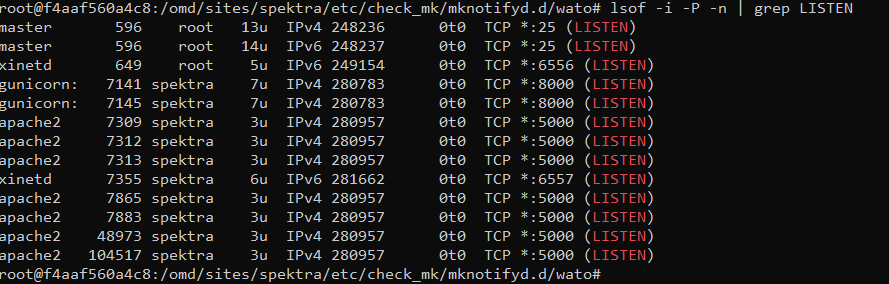
i found that the checkmk container from our main site isnt even listening on port 6555. ive already recreated the container and restartet the site. running omd status outputs Overall state: running. any idea why this is happening? the docker host is listening properly and no other firewall is blocking either:
This topic was automatically closed 365 days after the last reply. New replies are no longer allowed. Contact an admin if you think this should be re-opened.