Hi,
I have Check_MK RAW edition v1.6.0p13.
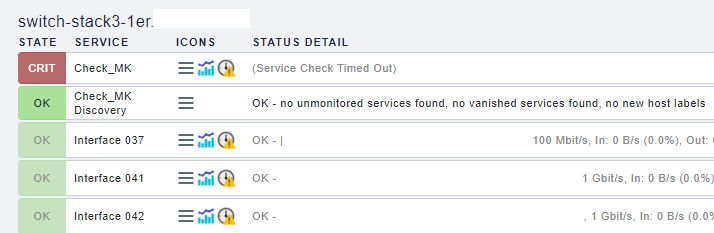
For a stack of 3 x 48ports switches, I have a “Service Check Timed Out” . Could you tell me how to change the settings ?

Thanks for all.
Regards,
Sebastien
Hi,
I have Check_MK RAW edition v1.6.0p13.
For a stack of 3 x 48ports switches, I have a “Service Check Timed Out” . Could you tell me how to change the settings ?
Thanks for all.
Regards,
Sebastien
First troubleshooting step is the following.
On the command line do a cmk --debug -vvn hostname If it runs correctly you get a time at the end.
This you can do 2-3 times to see if there is a deviation between each run.
For the RAW edition you can only change the timeout globally. This is important to remember as you have to consider this for the check interval settings of hosts with high runtime.
Go to ~/etc/nagios/nagios.d/ open the tuning.cfg and search for this option service_check_timeout=60. This is the global check timeout for service checks.
I have the timeout problem only for “Check_MK” and “Check_MK Discovery” services.
I changed the tuning.cfg file with 180s for the service_check_timeout
cmk output :
OK - [snmp] Success, execution time 235.9 sec | execution_time=235.868 user_time=0.100 system_time=0.060 children_user_time=0.090 children_system_time=0.140 cmk_time_snmp=235.471 cmk_time_agent=0.001
after the cmk command, “Check_MK” timeout disappeared :

snmp checks can be hard on equipment. IMHO, set the interval for those checks to be longer (don’t do them as much). Especially true if you have multiple things hammering a device using snmp.
I know it wasn’t terribly long ago that you could kill Dell iDracs by hammering them all the time.
Hi,
check your config of snmp setting. Use SNMPv2c instead of SNMPv1, this will be faster.
I already use v2c 
These two are the only real services executed by your monitoring core all other get the data from the “check_mk” service.
With the command cmk --debug -vvn hostname you run the Check_MK service manually.
That’s why i said you should do this more than one time to get an average and maximum time.
This is way more than your maximum time of 180 seconds. It is possible that you get timeouts again.
You should watch at what part it takes so long and decide if you want these checks or not.
This topic was automatically closed 30 days after the last reply. New replies are no longer allowed.
