CMK version:2.5.0.P3
OS version:Ubuntu 24.04LTS
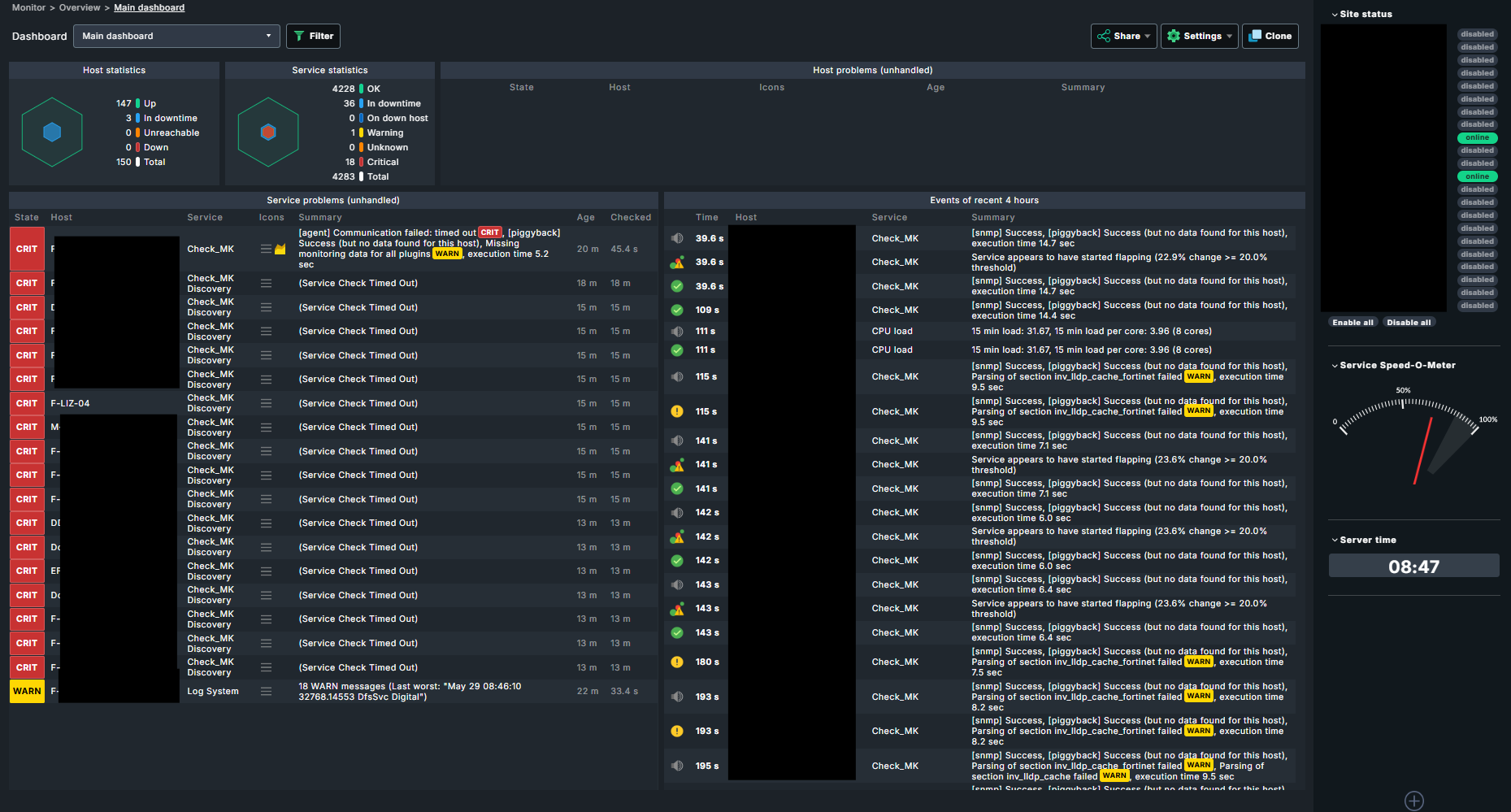
Error message:Service Check Timed Out
Output of “cmk --debug -vvn hostname”:
OMD[frankfurt01]:~$ cmk --debug -vvn F-LIZ-04
value store: loading from disk
Checkmk version 2.5.0p3
-
FETCHING DATA
Source: SourceInfo(hostname=‘F-LIZ-04’, ipaddress=‘10.XX.X.XX’, ident=‘agent’, fetcher_type=<FetcherType.TCP: 8>, source_type=<SourceType.HOST: 1>)
[cpu_tracking] Start [72d434dfb770]
Read from cache: AgentFileCache(base_path=/omd/sites/frankfurt01, relative_path_template=tmp/check_mk/cache/F-LIZ-04, max_age=MaxAge(checking=0, discovery=90.0, inventory=90.0), simulation=False, use_only_cache=False, file_cache_mode=6)
Not using cache (Too old. Age is 58 sec, allowed is 0 sec)
Connecting via TCP to 10.70.0.32:6556 (5.0s timeout)
Detected transport protocol: TransportProtocol.PLAIN
Reading data from agent
Closing TCP connection to 10.70.0.32:6556
Write data to cache file /omd/sites/frankfurt01/tmp/check_mk/cache/F-LIZ-04
[cpu_tracking] Stop [72d434dfb770 - Snapshot(process=posix.times_result(user=0.009999999999999787, system=0.0, children_user=0.0, children_system=0.0, elapsed=3.1299999998882413))]
Source: SourceInfo(hostname=‘F-LIZ-04’, ipaddress=‘10.XX.XX.XX’, ident=‘piggyback’, fetcher_type=<FetcherType.PIGGYBACK: 4>, source_type=<SourceType.HOST: 1>)
[cpu_tracking] Start [72d434e95bd0]
Read from cache: NoCache(base_path=/dev/null, relative_path_template=, max_age=MaxAge(checking=0.0, discovery=0.0, inventory=0.0), simulation=False, use_only_cache=False, file_cache_mode=1)
[cpu_tracking] Stop [72d434e95bd0 - Snapshot(process=posix.times_result(user=0.0, system=0.0, children_user=0.0, children_system=0.0, elapsed=0.0))]
[cpu_tracking] Start [72d434e95bd0] -
PARSE FETCHER RESULTS
<<<check_mk>>> / Transition NOOPParser → HostSectionParser
<<<cmk_agent_ctl_status:sep(0)>>> / Transition HostSectionParser → HostSectionParser
<<<wmi_cpuload:sep(124)>>> / Transition HostSectionParser → HostSectionParser
<<>> / Transition HostSectionParser → HostSectionParser
<<fileinfo:sep(124)>> / Transition HostSectionParser → HostSectionParser
<<>> / Transition HostSectionParser → HostSectionParser
<<df:sep(9)>> / Transition HostSectionParser → HostSectionParser
<<>> / Transition HostSectionParser → HostSectionParser
<<<winperf_phydisk>>> / Transition HostSectionParser → HostSectionParser
<<<winperf_if>>> / Transition HostSectionParser → HostSectionParser
<<<winperf_processor>>> / Transition HostSectionParser → HostSectionParser
<<<checkmk_agent_plugins_win:sep(0)>>> / Transition HostSectionParser → HostSectionParser
<<<dotnet_clrmemory:sep(124)>>> / Transition HostSectionParser → HostSectionParser
<<>> / Transition HostSectionParser → HostSectionParser
<<ps:sep(9)>> / Transition HostSectionParser → HostSectionParser
Transition HostSectionParser → NOOPParser
Transition NOOPParser → NOOPParser
<<>> / Transition NOOPParser → HostSectionParser
Using persisted section ‘win_cpuinfo’
Using persisted section ‘win_os’
Using persisted section ‘win_bios’
Using persisted section ‘win_system’
Using persisted section ‘win_computersystem’
Using persisted section ‘win_computersystemproduct’
Using persisted section ‘win_disks’
Using persisted section ‘win_video’
Using persisted section ‘win_networkadapter’
Using persisted section ‘win_ip_r’
Using persisted section ‘win_wmi_software’
Using persisted section ‘win_wmi_updates’
Using persisted section ‘win_reg_uninstall’
Using persisted section ‘win_exefiles’
Get piggybacked data
0 piggyback files for ‘F-LIZ-04’.
0 piggyback files for ‘10.XX.X.XX’.
HostKey(hostname=‘F-LIZ-04’, source_type=<SourceType.HOST: 1>) → Add sections: [‘check_mk’, ‘checkmk_agent_plugins_win’, ‘cmk_agent_ctl_status’, ‘df’, ‘dotnet_clrmemory’, ‘fileinfo’, ‘logwatch’, ‘mem’, ‘ps’, ‘services’, ‘systemtime’, ‘uptime’, ‘win_bios’, ‘win_computersystem’, ‘win_computersystemproduct’, ‘win_cpuinfo’, ‘win_disks’, ‘win_exefiles’, ‘win_ip_r’, ‘win_networkadapter’, ‘win_os’, ‘win_reg_uninstall’, ‘win_system’, ‘win_video’, ‘win_wmi_software’, ‘win_wmi_updates’, ‘winperf_if’, ‘winperf_phydisk’, ‘winperf_processor’, ‘wmi_cpuload’]
HostKey(hostname=‘F-LIZ-04’, source_type=<SourceType.HOST: 1>) → Add sections:
Received no piggyback data
CPU utilization Total CPU: 4.67%
Disk IO SUMMARY Read: 528 B/s, Write: 40.5 kB/s, Latency: 1 millisecond
DotNet Memory Management Global Time in GC: 0%
Filesystem C:/ Used: 16.55% - 33.0 GiB of 199 GiB, trend per 1 day 0 hours: +2.69 GiB, trend per 1 day 0 hours: +1.35%, Time left until disk full: 61 days 19 hours
Interface Microsoft Hyper-V Network Adapter [1], (up), MAC: 00:15:5D:XX:XX:XX:00:00, Speed: 25 GBit/s, In: 2.87 kB/s (<0.01%), Out: 2.24 kB/s (<0.01%)
Log Application No error messages
Log HardwareEvents No error messages
Log Internet Explorer No error messages
Log Key Management Service No error messages
Log Windows PowerShell No error messages
Memory RAM: 31.93% - 2.55 GiB of 8.00 GiB, Virtual memory: 22.35% - 2.08 GiB of 9.31 GiB
Processor Queue 15 min load: 0.05, 15 min load per core: 0.01 (4 logical cores)
Service Summary Autostart services: 68, Stopped services: 7
System Time Offset: -1 second
Uptime Up since 2026-05-28 20:10:14, Uptime: 12 hours 31 minutes
0 piggyback files for ‘10.X.X.X’.
0 piggyback files for ‘F-LIZ-04’.
[cpu_tracking] Stop [72d434e95bd0 - Snapshot(process=posix.times_result(user=0.03000000000000025, system=0.0, children_user=0.0, children_system=0.0, elapsed=0.03000000026077032))]
[agent] Success, [piggyback] Success (but no data found for this host), execution time 3.2 sec | execution_time=3.160 user_time=0.040 system_time=0.000 children_user_time=0.000 children_system_time=0.000 cmk_time_agent=3.120 -
Hello everyone:
Since yesterday evening, I’ve been getting a “Service Check Timed Out” error on a lot of hosts, even though they’re actually accessible. I can retry the check, and the message disappears, but it reappears after a few minutes. These include Windows servers, Ubuntu servers, as well as Synology devices and switches.
Maybe someone had already this issue and can provide a Solution?