CMK version: Version: 2.2.0p31 OS version: Ubuntu 22.04.4 LTS
Question: I’m using the VmWare ESX via vSphere rule to monitor our ESX hosts. For each VM that’s running on a certain ESX, I did like to set the parent property to that specific ESX. Yes, it’s possible for a VM to change ESX host and thats when the parent property should change as well.
Is this possible to achieve?
esx_vsphere_vm_running_on returns the name of the ESX where the VM is running on. Can I set this as a variable somewhere and link it in the parent property field? Or what is a good way to handle this?
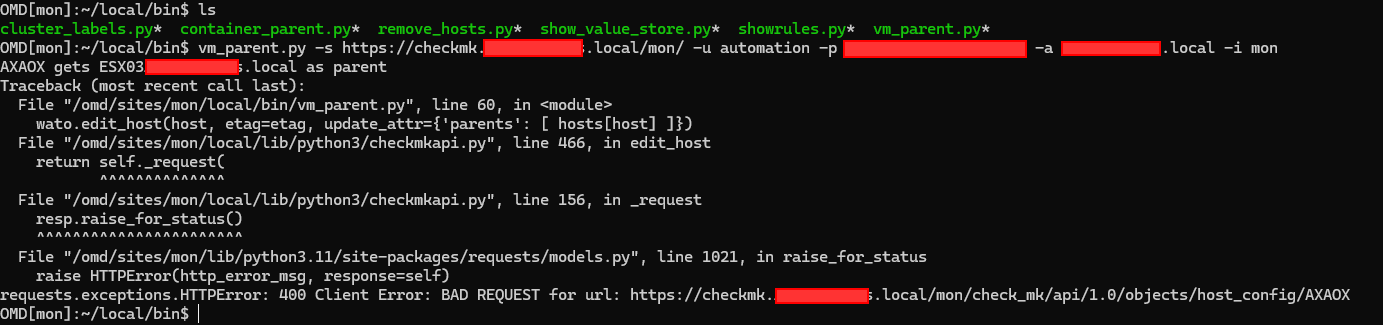
Thank you for handing me the solution. However, when trying this out, I got hit with a few errors. For host AXAOX, it finds the Parent element, but fails to adjust it.
I don’t see any blocked traffic over firewall. Has this to do with a PUT request that fails?
Hi @dries,
I get the same error message as you under 2.3.0p6. But when I stop and start the site afterwards, all changes are displayed. After activating the changes, the parents are entered correctly.
I made a script that collects all my hosts and searches the corresponding ESX host for them. Gets saved in a associative array based on key value and this works correctly.
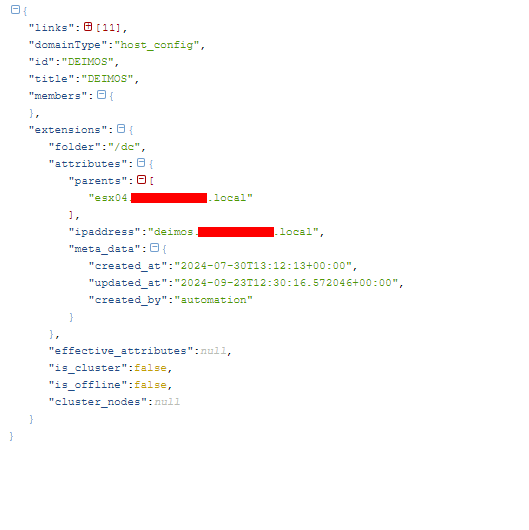
For my next step, I wanted to do a PUT request to adjust the parent parameter. Before adding this in my script, I just wanted to test out the PUT requests, but I seem to struggle with this.
#!/bin/bash
# API details
API_URL="https://checkmk.xxxxxx/mon/check_mk/api/1.0"
USERNAME="automation"
PASSWORD="xxxx"
HOST_NAME="DEIMOS"

# Fetch the current host config and extract the ETag
RESPONSE=$(curl -s -u "$USERNAME:$PASSWORD" -D - "$API_URL/objects/host_config/$HOST_NAME")

# Extract the ETag from the response
ETAG=$(echo "$RESPONSE" | grep -i '^ETag:' | awk '{print $2}' | tr -d '"')
echo "Extracted ETag: $ETAG"

# If ETag is empty, exit with an error
if [[ -z "$ETAG" ]]; then
    echo "ETag not found. Exiting."
    exit 1
fi

# Perform PUT request to update the parent attribute
out=$(curl -v -u "$USERNAME:$PASSWORD" \
    --request PUT \
    --write-out "\nxxx-status_code=%{http_code}\n" \
    --header "Accept: application/json" \
    --header "If-Match: $ETAG" \
    --header "Content-Type: application/json" \
    --data '{
          "extensions": {
            "attributes": {
              "parents": ["esx01.xxxxxx.local"]
            }
          }
        }' \
    "$API_URL/objects/host_config/$HOST_NAME")

resp=$( echo "${out}" | grep -v "xxx-status_code" )
code=$( echo "${out}" | awk -F"=" '/^xxx-status_code/ {print $2}')

# For indentation, please install 'jq' (JSON query tool)
echo "$resp" | jq
# echo "$resp"

if [[ $code -lt 400 ]]; then
    echo "OK"
    exit 0
else
    echo "Request error"
    exit 1
fi
Since sander his script did not work for me, I decided to create my on bash script to retrieve the parent of each host and to update it in case it changed. For those who want to use it, you can schedule it to run every x-hours with cron.
It’s a little specific towards my environment, but just putting it out here, you can always change it.
#!/bin/bash

BASE_URL="https://checkmk.xxxxx.local/mon/check_mk/api/1.0/domain-types/host_config/collections/all?effective_attributes=false"
USERNAME="automation"
PASSWORD="xxxxx"

# Mogelijke ESX labels
ESX_LABELS=("cmk/piggyback_source_esx01.xxxxx.local" "cmk/piggyback_source_esx02.xxxxx.local" "cmk/piggyback_source_esx03.xxxxx.local" "cmk/piggyback_source_esx04.xxxxx.local")

# Associatieve array voor hosts en hun ESX servers
declare -A HOST_ESX

# API call voor hosts dynamisch toe te voegen
RESPONSE=$(curl -s -u "$USERNAME:$PASSWORD" "$BASE_URL")

if echo "$RESPONSE" | jq -e '.value != null'; then
    # Filter out hosts starting with AP, PR, or SW, en hexadecimale strings van 12 tekens
    HOSTS=($(echo "$RESPONSE" | jq -r '.value[] | select(.title | test("^(AP|PR|NODERED|UPS|PLC|ESX|esx|PLT|PCREMAL|LTO|CUPPI|RPIEN|USB|SW|^[0-9a-f]{12}$)") | not) | .title'))

    TOTAL_HOSTS=${#HOSTS[@]} # Totaal aantal hosts
    if [[ $TOTAL_HOSTS -eq 0 ]]; then
        echo "No hosts to process."
        exit 1
    fi

    COUNTER=0 # Progress counter

    # Function to display the progress bar
    show_progress() {
        local PROGRESS=$(( ($COUNTER * 100) / $TOTAL_HOSTS ))
        local FILLED=$(( ($PROGRESS * 40) / 100 )) # Progress bar size (40 characters)
        local EMPTY=$((40 - $FILLED))

        # Zorg ervoor dat de waarde van PROGRESS geen lege waarde is
        printf "\r[%-${FILLED}s>%${EMPTY}s] %d%% (%d/%d)" "#" " " "$PROGRESS" "$COUNTER" "$TOTAL_HOSTS"
    }

    # Loop over the filtered array of hosts
    for HOST in "${HOSTS[@]}"; do
        ((COUNTER++)) # Increment the counter

        CHECKMK_URL="https://checkmk.xxxxx.local/mon/check_mk/api/1.0/objects/service_discovery/$HOST"
        RESPONSE=$(curl -s -u "$USERNAME:$PASSWORD" "$CHECKMK_URL")
        FOUND_ESX="No ESX found"

        # Loop through all possible ESX labels
        for LABEL in "${ESX_LABELS[@]}"; do
            LABEL_VALUE=$(echo "$RESPONSE" | jq -r ".extensions.host_labels[\"$LABEL\"].value // empty")

            # If the label is found and has value 'yes', update FOUND_ESX
            if [[ "$LABEL_VALUE" == "yes" ]]; then
                FOUND_ESX="${LABEL#cmk/piggyback_source_}"
                break
            fi
        done

        # Store the result in the associative array
        HOST_ESX["$HOST"]="$FOUND_ESX"

        # Update the progress bar
        show_progress
    done
    echo # Move to the next line after the progress bar
else
    echo "No hosts found or the value is null."
fi

# Output the contents of the associative array
echo "Host-ESX Mappings:"
for HOST in "${!HOST_ESX[@]}"; do
    # PUT REQUEST
    if [[ "${HOST_ESX[$HOST]}" != "No ESX found" ]]; then
        GET_URL="https://checkmk.xxxxx.local/mon/check_mk/api/1.0/objects/host_config/$HOST"
        PUT_URL="https://checkmk.xxxxx.local/mon/check_mk/api/1.0/objects/host_config/$HOST"

        # Fetch the current resource to get the ETag
        ETag=$(curl -s -u "$USERNAME:$PASSWORD" -I "$GET_URL" | grep -i "etag" | awk '{print $2}' | tr -d '\r')

        if [[ -z "$ETag" ]]; then
            echo "No ETag found for $HOST, skipping update."
            continue
        fi

        # Construct the JSON payload with the updated parents
        DATA=$(cat <<EOF
{
    "attributes": {
        "parents": ["${HOST_ESX[$HOST]}"],
        "ipaddress": "$HOST.xxxxx.local"
    }
}
EOF
)

        # Perform the PUT request with the If-Match header and ETag
        curl -s -u "$USERNAME:$PASSWORD" -X PUT -H "Content-Type: application/json" -H "If-Match: $ETag" -d "$DATA" "$PUT_URL" -o /dev/null

        echo "Updated $HOST with parent ${HOST_ESX[$HOST]} using ETag $ETag"
    fi
done