Since 2.3, checkmk caches old code from MKPs

CMK version: cee 2.3.0p34 and p42
OS version: Ubuntu and Suse

Since our update from checkmk 2.2 to 2.3 I observe a new and very annoying behaviour when changing an MKP from one version to another.
Checkmk seems to cache and run the old code from the old MKP even though a new MKP was activated.

Scenario:

I have a very simple “check” which is always OK and prints the text “This is the first version”:

#!/usr/bin/env python3

from cmk.agent_based.v2 import (
    CheckPlugin,
    Service,
    Result,
    State,
)

def discover_mkp_update_checker(section):
    if section:
        yield Service()

def check_mkp_update_checker(section):
    if section:
        yield Result(state=State.OK, summary='This is the first version.')

check_plugin_mkp_update_checker = CheckPlugin(
    name='mkp_update_checker',
    sections=['omd_apache'],
    service_name='MKP Update checker',
    discovery_function=discover_mkp_update_checker,
    check_function=check_mkp_update_checker,
)

(The check uses the section <<<omd_apache>>> to keep things simple. This section exists on every checkmk server, so this service will appear on all checkmk servers as well.)

I packed this check into an MKP with version 1.0.0.

Then I changed the plugin to return “This is the second version” instead and packed it into an MKP 2.0.0.

My expectation is:

  • If I activate the MKP 1.0.0, it prints “This is the first version”.
  • If I activate the MKP 2.0.0, it prints “This is the second version”.

But the actual result is:

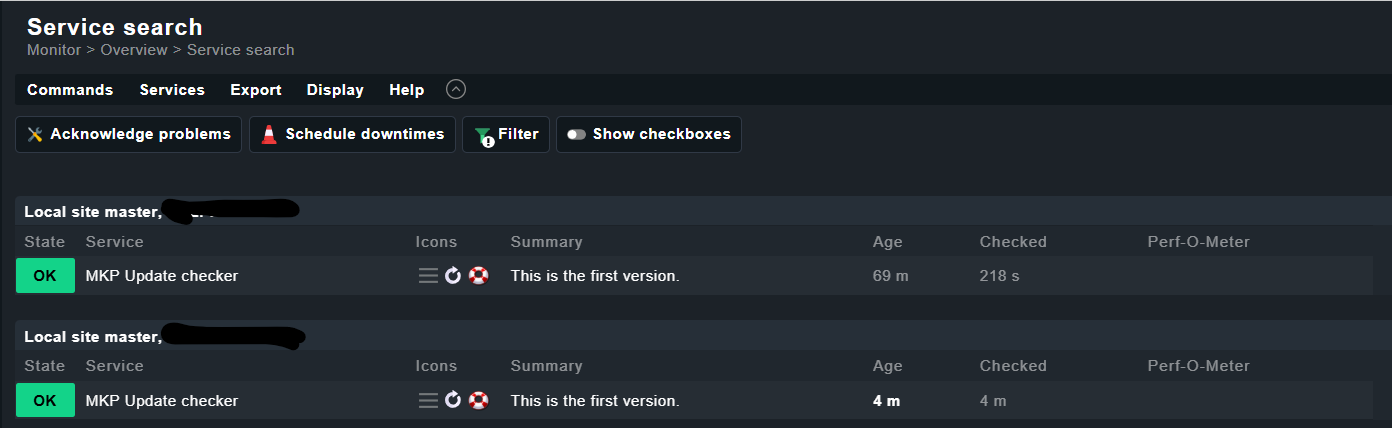
After activating MKP 1.0.0 it prints “…first…” and sticks to that text.
If I activate MKP 2.0.0 and do a tabula-rasa-discovery afterwards and/or reschedule the Discovery service, it still shows “…first…”. The new text (“…second…”) is only shown on the discovery page.

On disc, the new version of the check plugin is located in ~/local/lib/python3/cmk_addons/plugins/mkp-checker/agent_based and even the *.pyc files are updated and get a new timestamp. Still, the GUI shows the old text.

Only a cmk -R helps. Especially in a distributed environment this is very annoying, because we must do a cmk -R on every single remote site after we change the MKP on the central site. “activate changes” doesn’t help either.

Am I the only one noticing this behaviour? What do people do if they have 50 remote sites and no access to their shells? Currently it seems impossible to “really” activate a new MKP via the GUI alone.

1 Like

As far as i can say, this problem should be solved with 2.4.
Yes with 2.3 i had also such issues and after updating mkps a “cmk -R” was the best way to ensure that all the running worker processes get the new code.

That is your real problem - the check worker runs with the old code and only if they are restarted the new code will run.

With 2.4 the activation of new mkps takes way more time than in 2.3 and i think in the background some “magic” happens that the worker all get the new code.

2 Likes

This is very disappointing because it means that the GUI method to upload and activate MKPs is totally useless in checkmk 2.3 if the administrator has not the possibility to access the checkmk server’s shell afterwards. In my experience these are often two different groups of people.

In a distributed environment things get even worse: first activate a MKP in the master’s GUI and then visit every remote site’s shell and issue cmk -R.

How come that nobody noticed this buggy behaviour before?

First of all, everyone does MKP development on a separate machine, where omd restart is recommended after changing local files anyway. Second, I assume many users with larger distributed environments sync the update of their own MKPs with patch updates of Checkmk.

I will try to find out if we have support tickets for this issue.

3 Likes

Thank you for digging into this.

Well, it’s not only with my own MKPs. If I download and install any MKP from the Exchange and next day I download and install a newer version with a fix, then there is currently no way to update the MKP without also accessing the shell.

Is there maybe the possibility to install some kind of hook or something in a checkmk server with scripts that get called after something happened? Some sort of preprocess.d and/or postprocess.d directory would be very convenient for such a case as we could then simply do a cmk -R or omd restart cmc after an MKP was activated.

I noticed this behavior but it is not so urgent that a restart on remote sites is needed. Normally it takes some time then also the remote sites are working with the new code.

With my bigger distributed sites i had not the need to restart remote site only on the web interface where i wanted to use the new code directly i had done the “cmk -R”.

Unfortunately not in our case. Even overnight checkmk still runs the old code.

If all else fails, I would have to resort to a workaround: monitoring the directory ~/local/share/check_mk/enabled_packages with a systemd path unit (or inotifywait) and then run cmk -R if the directory content changes. Maybe with a bit of a delay. It’s not perfect but would help our customer with their remote sites and avoid the manual step afterwards.

I first thought this might be Werk #18220: Updated MKPs were not correctly picked up by the core missing from 2.3, but that does not seem to be the issue.

first activate a MKP in the master’s GUI and then visit every remote site’s shell and issue cmk -R .

That should definitely not be necessary. The act of adding/removing/editing … an MKP via GUI should create a change that requires a restart on the remote site. I just took a look at the code and to me it suggests that that should in fact be the case. I if you have a clean repro that shows otherwise, you should open a ticket with us I think.

1 Like

Hello,

We are going to test it this afternoon and I will open a ticket if its really the case that a new code needs a cmk -R on the remote site.

regards

Mike

1 Like

I reproduced it with 2.3.0p42.cee in two docker containers (central and one remote site) and the attached MKPs. The distributed environment is not even neccessary. The problem also occurs with just one site.


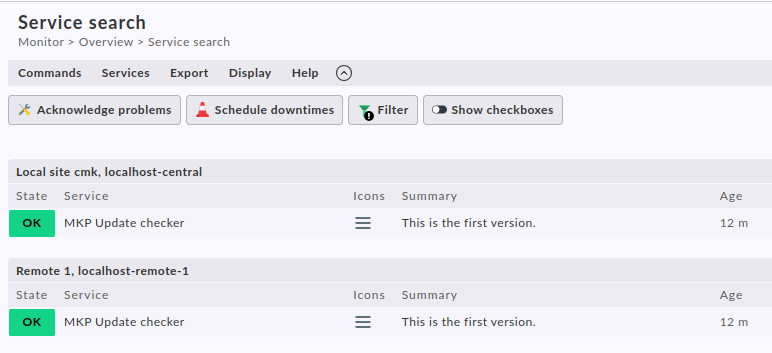
Install and activate MKP-1.0.0 and make a service discovery. It will show this service on all hosts that supply a section <<<omd_apache>>> (content doesn’t matter):


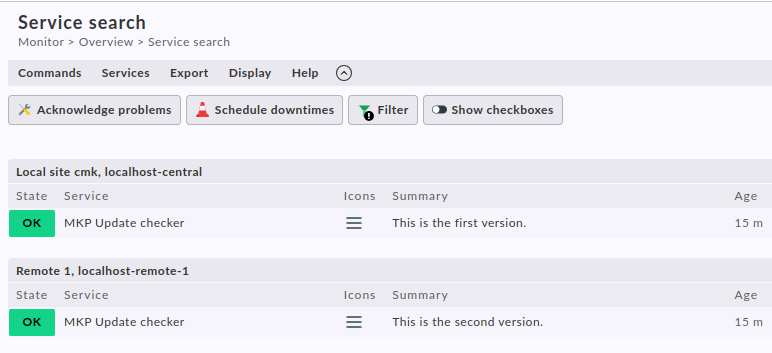
Then install and activate MKP-2.0.0. No matter what I do in the GUI (activate, discovery, wait, …). The output is still the same:


When I finally do cmk -R on the remote site only, I get this:

So apparently the cmk -R is crucial when updating MKPs via GUI.

mkp-update-checker-2.0.1.mkp (1.1 KB)
mkp-update-checker-1.0.1.mkp (1.1 KB)

I checked on my docker test system also with 2.3.0p42 and got the following result.

  • first MKP installed and check shown es expected –> “This is the first version.”
  • updated MKP
  • disabled the old one
  • only activate changes - no change in check output - but
  • open Discovery - here already the new output “This is the second version” is shown but only here :slight_smile:
  • now only the “cmk -R” activates the new plugin

Test with 2.4 gives no problem anymore there. One reason more to work to the update^^

But if i remember correctly - with 2.3 i had this problem at no time in real environments.

1 Like

Thank you @andreas-doehler . That’s exactly what I observed and I’m glad someone else could reproduce it. The new text shows up on the discovery page, but only there.

Yes, we are willing to update, but the thing is that we have many (and I mean really many) check plugins and most of them are not yet migrated to the new check API :smiley:

Slightly off topic, but: I’ve made some good experiences with AI agents in that regard. I just say “Migrate xyz as described in this file” Maybe something similar can work for you.

1 Like

Hello,

As promised I tested that as well and can confirm the wrong behavior. Its not related to a distributed environment. All below is done on master and the two hosts the service is discovered are monitored on master.

CMK version: cee 2.3.0p42
OS version: Virt1 1.7.14

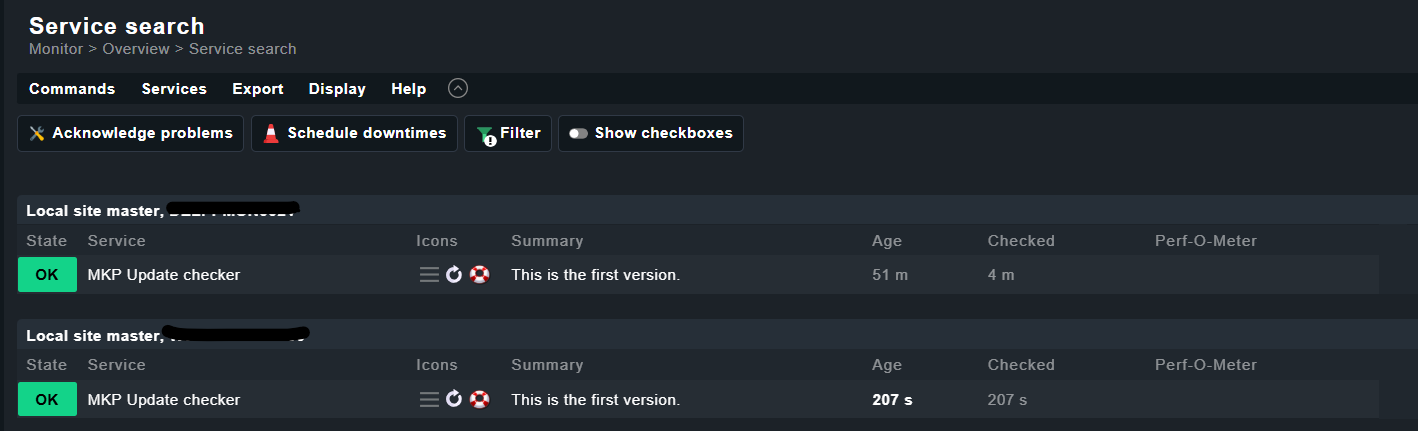
Installing mkp-update-checker 1.0.1 shows me the service as expected on two hosts:

After installing and enabling mkp-update-checker 2.0.1 the version 1.0.1 becomes inactive and 2.0.1 active in the GUI and on CLI:

mkp-update-checker 2.0.1 MKP Update checker Dirk 2.3.0p34 None 1 Enabled (active on this site)
mkp-update-checker 1.0.1 MKP Update checker Dirk 2.3.0p34 None 1 Enabled (inactive on this site)

After Activating changes and re-scheduling the check in the GUI the service Summary doesn’t change as described above.
In addition to the Summary I also changed the state to CRIT. Also this doesn’t change the state in the GUI.
I then run the check from command line:

OMD[master]:~/local/lib/python3/cmk_addons/plugins/dirk/agent_based$ cmk -vvv --debug --plugins mkp_update_checker --check HOSTNAME
value store: synchronizing
Trying to acquire lock on /omd/sites/master/tmp/check_mk/counters/HOSTNAME
Got lock on /omd/sites/master/tmp/check_mk/counters/HOSTNAME
value store: loading from disk
Releasing lock on /omd/sites/master/tmp/check_mk/counters/HOSTNAME
Released lock on /omd/sites/master/tmp/check_mk/counters/HOSTNAME
Checkmk version 2.3.0p42
+ FETCHING DATA
  Source: SourceInfo(hostname='HOSTNAME', ipaddress='10.10.10.10', ident='agent', fetcher_type=<FetcherType.TCP: 8>, source_type=<SourceType.HOST: 1>)
[cpu_tracking] Start [7f42b011e240]
Read from cache: AgentFileCache(HOSTNAME, path_template=/omd/sites/master/tmp/check_mk/cache/{hostname}, max_age=MaxAge(checking=0, discovery=450.0, inventory=450.0), simulation=False, use_only_cache=False, file_cache_mode=6)
Not using cache (Too old. Age is 162 sec, allowed is 0 sec)
Connecting via TCP to 10.10.10.10:6556 (5.0s timeout)
Detected transport protocol: TransportProtocol.PLAIN
Reading data from agent
Closing TCP connection to 10.10.10.10:6556
Write data to cache file /omd/sites/master/tmp/check_mk/cache/HOSTNAME
Trying to acquire lock on /omd/sites/master/tmp/check_mk/cache/HOSTNAME
Got lock on /omd/sites/master/tmp/check_mk/cache/HOSTNAME
Releasing lock on /omd/sites/master/tmp/check_mk/cache/HOSTNAME
Released lock on /omd/sites/master/tmp/check_mk/cache/HOSTNAME
[cpu_tracking] Stop [7f42b011e240 - Snapshot(process=posix.times_result(user=0.0, system=0.0, children_user=0.0, children_system=0.0, elapsed=0.7800000011920929))]
  Source: SourceInfo(hostname='HOSTNAME', ipaddress='10.10.10.10', ident='piggyback', fetcher_type=<FetcherType.PIGGYBACK: 4>, source_type=<SourceType.HOST: 1>)
[cpu_tracking] Start [7f42b0c71e80]
Read from cache: NoCache(HOSTNAME, path_template=/dev/null, max_age=MaxAge(checking=0.0, discovery=0.0, inventory=0.0), simulation=False, use_only_cache=False, file_cache_mode=1)
No piggyback files for 'HOSTNAME'. Skip processing.
No piggyback files for '10.10.10.10'. Skip processing.
Get piggybacked data
[cpu_tracking] Stop [7f42b0c71e80 - Snapshot(process=posix.times_result(user=0.0, system=0.0, children_user=0.0, children_system=0.0, elapsed=0.0))]
[cpu_tracking] Start [7f42b0b14800]
+ PARSE FETCHER RESULTS
<<<check_mk>>> / Transition NOOPParser -> HostSectionParser
<<<df>>> / Transition HostSectionParser -> HostSectionParser
<<<systemd_units>>> / Transition HostSectionParser -> HostSectionParser
<<<nfsmounts>>> / Transition HostSectionParser -> HostSectionParser
<<<cifsmounts>>> / Transition HostSectionParser -> HostSectionParser
<<<mounts>>> / Transition HostSectionParser -> HostSectionParser
<<<ps>>> / Transition HostSectionParser -> HostSectionParser
<<<ps_lnx>>> / Transition HostSectionParser -> HostSectionParser
<<<mem>>> / Transition HostSectionParser -> HostSectionParser
<<<cpu>>> / Transition HostSectionParser -> HostSectionParser
<<<uptime>>> / Transition HostSectionParser -> HostSectionParser
<<<lnx_if>>> / Transition HostSectionParser -> HostSectionParser
<<<lnx_if:sep(58)>>> / Transition HostSectionParser -> HostSectionParser
<<<tcp_conn_stats>>> / Transition HostSectionParser -> HostSectionParser
<<<diskstat>>> / Transition HostSectionParser -> HostSectionParser
<<<kernel>>> / Transition HostSectionParser -> HostSectionParser
<<<md>>> / Transition HostSectionParser -> HostSectionParser
<<<vbox_guest>>> / Transition HostSectionParser -> HostSectionParser
<<<chrony:cached(1771968571,30)>>> / Transition HostSectionParser -> HostSectionParser
<<<omd_status:cached(1771968520,60)>>> / Transition HostSectionParser -> HostSectionParser
<<<mknotifyd:sep(0)>>> / Transition HostSectionParser -> HostSectionParser
<<<omd_apache:sep(124)>>> / Transition HostSectionParser -> HostSectionParser
<<<livestatus_status:sep(59)>>> / Transition HostSectionParser -> HostSectionParser
<<<livestatus_ssl_certs:sep(124)>>> / Transition HostSectionParser -> HostSectionParser
<<<mkeventd_status:sep(0)>>> / Transition HostSectionParser -> HostSectionParser
<<<job>>> / Transition HostSectionParser -> HostSectionParser
<<<local>>> / Transition HostSectionParser -> HostSectionParser
<<<check_mk:cached(1771945678,86400)>>> / Transition HostSectionParser -> HostSectionParser
  HostKey(hostname='HOSTNAME', source_type=<SourceType.HOST: 1>)  -> Add sections: ['check_mk', 'chrony', 'cifsmounts', 'cpu', 'df', 'diskstat', 'job', 'kernel', 'livestatus_ssl_certs', 'livestatus_status', 'lnx_if', 'local', 'md', 'mem', 'mkeventd_status', 'mknotifyd', 'mounts', 'nfsmounts', 'omd_apache', 'omd_status', 'ps', 'ps_lnx', 'systemd_units', 'tcp_conn_stats', 'uptime', 'vbox_guest']
  HostKey(hostname='HOSTNAME', source_type=<SourceType.HOST: 1>)  -> Add sections: []
Received no piggyback data
MKP Update checker   This is the second version.
No piggyback files for 'HOSTNAME'. Skip processing.
No piggyback files for '10.10.10.10'. Skip processing.
[cpu_tracking] Stop [7f42b0b14800 - Snapshot(process=posix.times_result(user=0.009999999999999898, system=0.0, children_user=0.0, children_system=0.0, elapsed=0.010000001639127731))]
value store: synchronizing
Trying to acquire lock on /omd/sites/master/tmp/check_mk/counters/HOSTNAME
Got lock on /omd/sites/master/tmp/check_mk/counters/HOSTNAME
value store: already loaded
Releasing lock on /omd/sites/master/tmp/check_mk/counters/HOSTNAME
Released lock on /omd/sites/master/tmp/check_mk/counters/HOSTNAME
[agent] Success, [piggyback] Success (but no data found for this host), execution time 0.8 sec | execution_time=0.790 user_time=0.010 system_time=0.000 children_user_time=0.000 children_system_time=0.000 cmk_time_agent=0.780

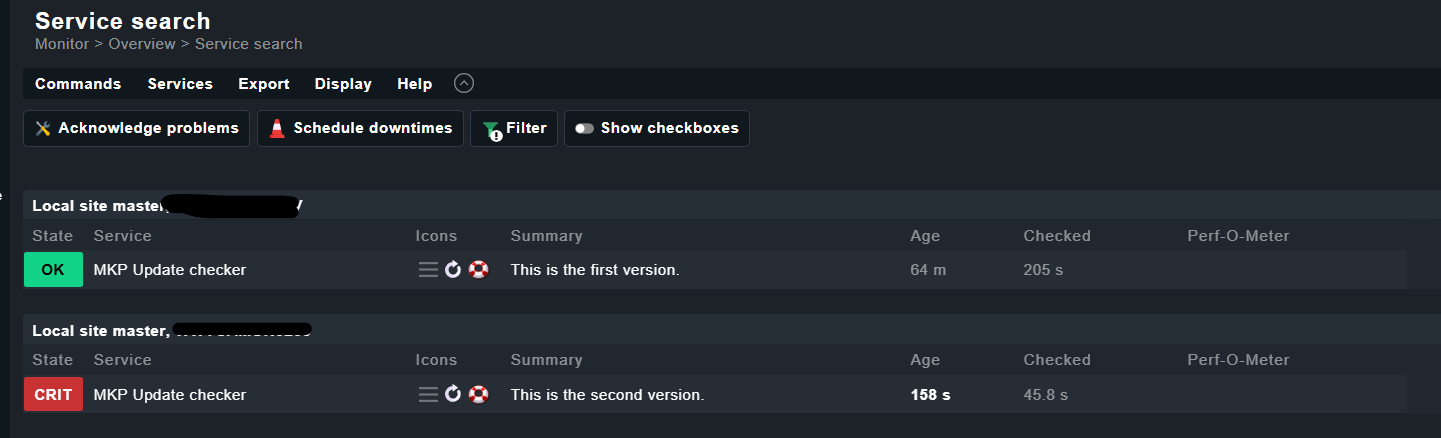
A refresh of the search in the GUI shows now correct result:

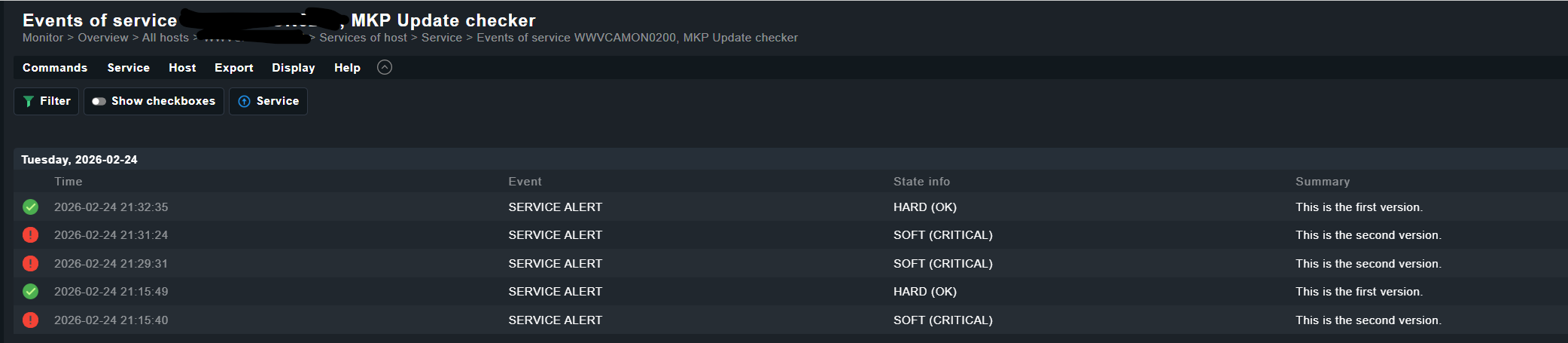
But after re-scheduling the check in the GUI it shows again the wrong result!

In the event history the different results are listed:

I guess that needs some care and I will open a ticket to get that done. As we are on the way to update to 2.3 I hope we will have that in 2.3.0p43 already fixed otherwise we have to wait another couple of weeks :frowning:

Thanks to @Dirk for your finding.

regards

Mike

1 Like