update_location_direct_v2.py (21.6 KB)
Mit der Hilfe von Ki das Script generiert. ~/local/bin
In ~/etc/nagios/conf.d/check_mk_templates.cfg die Zeile 391 hinzugefügt:
388- NOTIFY_HOST_ADDRESS_4=‘$_HOSTADDRESS_4$’
389- NOTIFY_HOST_ADDRESS_6=‘$_HOSTADDRESS_6$’
390- NOTIFY_HOST_ADDRESS_FAMILY=‘$_HOSTADDRESS_FAMILY$’
391- NOTIFY_HOST_SNMP_LOCATION=‘$_HOSTSNMP_LOCATION$’
392- check_mk --notify
In den Email notification paramter : $HOST_SNMP_LOCATION$ verwendet
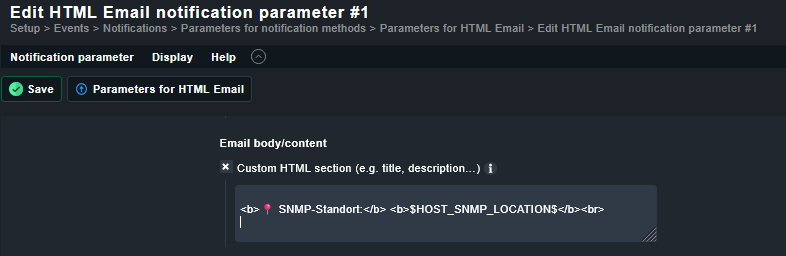
crontab -e
#Einmal täglich um 03:00 Uhr: SNMP Locations aus Inventory nach WATO synchronisieren
0 3 * * * /usr/bin/python3 /omd/sites/net/local/bin/update_location_direct.py --apply > /dev/null 2>&1
und man bekommt in der Alarm E-Mail den snmp Standort des Gerätes angezeigt. 
Test E-Mail funktioniert mit $_HOSTSNMP_LOCATION$ und $_HOST_SNMP_LOCATION$