SNMPv3 authPriv connection to QNAP not working

Hello,

I’m currently running the Raw Edition 2.3.0p11 and I’m trying to integrate a QNAP NAS.
At the QNAP SNMPv3 is configured, as well as Security name, Authentication password and Privacy pass phrase. As authentication protocol I can only choose HMAC-MD5 or HMAC-SHA.

My problem is, whatever I set, the system is not able to readout anything at the connection test.

When I change the NAS to not use authentication and privacy and set the same at the system, it’s working.

Maybe someone could point me in the right direction and tell me what I’m doing wrong.

Thank you!

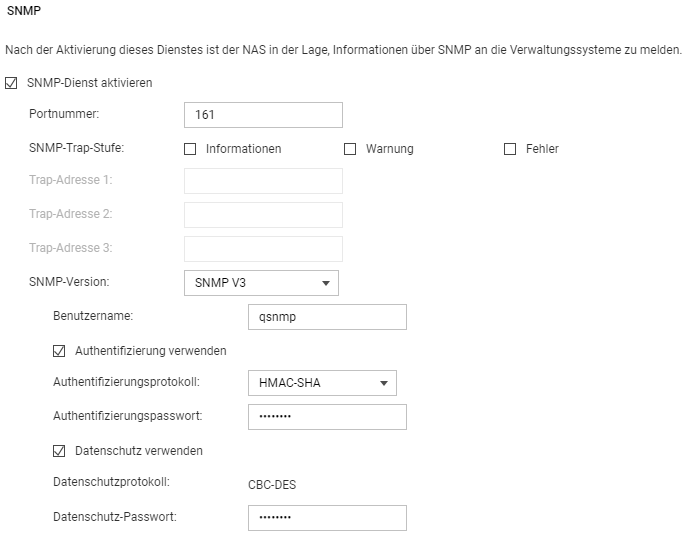
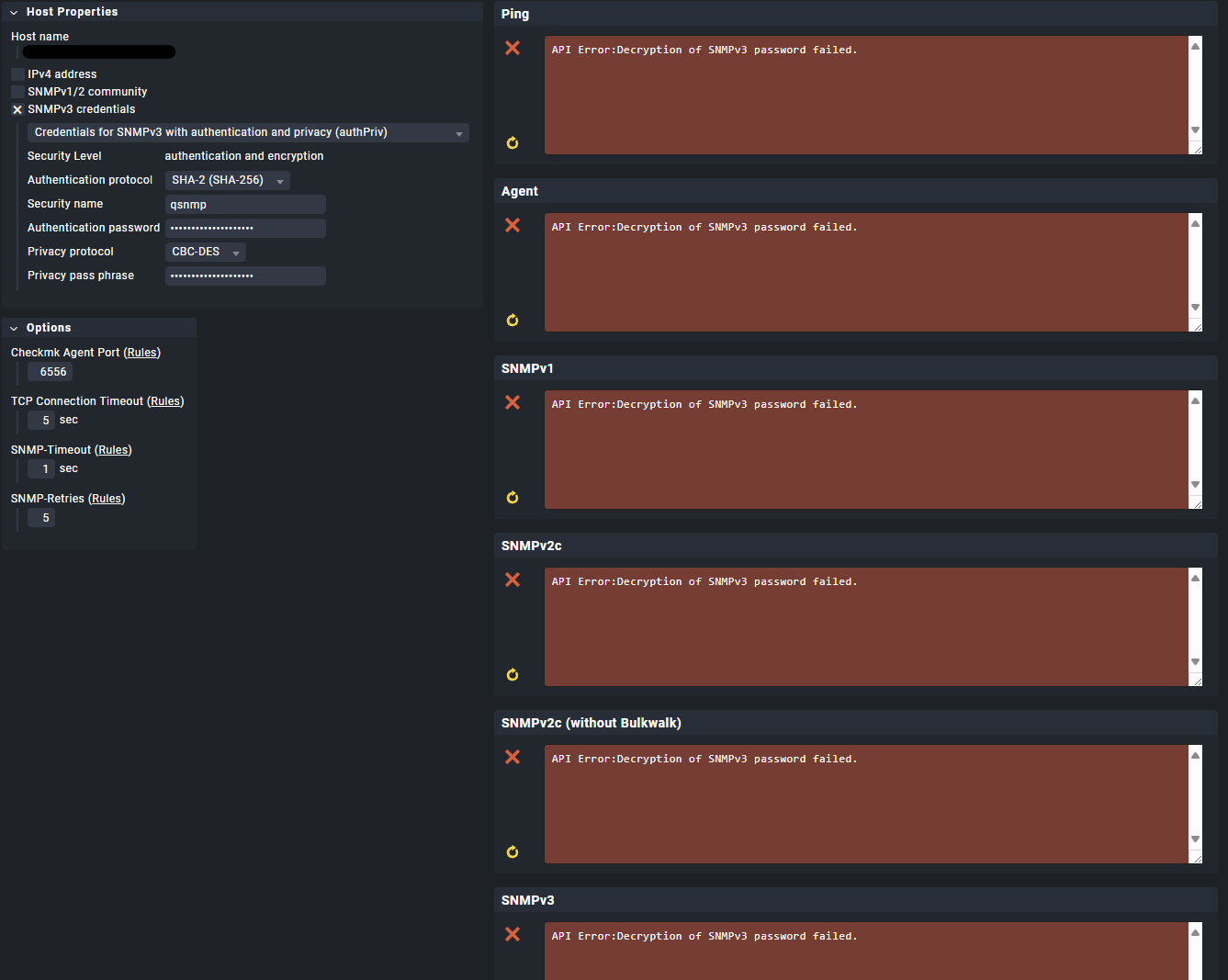
Can you please show the configuration from the QNAP GUI and from inside CheckMK?
This whole thing should be no problem and must work.

Hi,

please find attached the settings of the QNAP and CheckMK.

When I disable authentication and privacy on both sides, it’s working.
The Password(s) are not to complex. Even if I put something simple like Start123! it’s not working.
All auth. protocols have been tested. None is working.

Thank you!

Can you please check your password config.
Not that it is a problem like this here.

As alternative you can also check on command line as site user.

cmk --debug -vvI hostname

Here you get a complete SNMPv3 command line with all the options set.
Please check this manually and compare the passwords against your configured ones.

Unfortunately it’s not the password.
I disabled the Password Manager and set manually a simple password: same result.

What exactly should I see with your command??

I saw it only now on the device you configured “SHA1” but inside CMK it is “SHA-256”.
Please select also “SHA1” inside CMK.

The mentioned output from the command should look like this.

Discovering services and host labels on: SWITCH123
SWITCH123:
+ FETCHING DATA
  Source: SourceInfo(hostname='SWITCH12', ipaddress='192.168.10.100', ident='snmp', fetcher_type=<FetcherType.SNMP: 7>, source_type=<SourceType.HOST: 1>)
[cpu_tracking] Start [7ff4b34797c0]
Read from cache: SNMPFileCache(SWITCH123, path_template=/omd/sites/SITE/tmp/check_mk/data_source_cache/snmp/{mode}/{hostname}, max_age=MaxAge(checking=0, discovery=90.0, inventory=90.0), simulation=False, use_only_cache=False, file_cache_mode=1)
  SNMP scan:
       Getting OID .1.3.6.1.2.1.1.1.0: Running 'snmpget -v3 -l authPriv -a SHA-256 -u SNMPUSER -A AUTHPASSWORD -x AES -X PRIVPASSWORD -m "" -M "" -On -OQ -Oe -Ot 192.168.10.100 .1.3.6.1.2.1.1.1.0'

I tried all SHA versions without any change of my problem.

When I run the comman cmk --debug -vvI xxxxxxxx this is my result:

> Trying to acquire lock on /omd/sites/xxxxx/var/check_mk/crashes/base/a40dc40c-c90e-11ef-af1a-005056af84e8/crash.info
Got lock on /omd/sites/xxxxx/var/check_mk/crashes/base/a40dc40c-c90e-11ef-af1a-005056af84e8/crash.info
Releasing lock on /omd/sites/xxxxx/var/check_mk/crashes/base/a40dc40c-c90e-11ef-af1a-005056af84e8/crash.info
Released lock on /omd/sites/xxxxx/var/check_mk/crashes/base/a40dc40c-c90e-11ef-af1a-005056af84e8/crash.info
Traceback (most recent call last):
  File "/omd/sites/xxxxx/bin/cmk", line 97, in <module>
    errors = config.load_all_plugins(
             ^^^^^^^^^^^^^^^^^^^^^^^^
  File "/omd/sites/xxxxx/lib/python3/cmk/base/config.py", line 1400, in load_all_plugins
    errors.extend(load_checks(get_check_api_context, filelist))
                  ^^^^^^^^^^^^^^^^^^^^^^^^^^^^^^^^^^^^^^^^^^^^
  File "/omd/sites/xxxxx/lib/python3/cmk/base/config.py", line 1449, in load_checks
    did_compile |= load_precompiled_plugin(f, check_context)
                   ^^^^^^^^^^^^^^^^^^^^^^^^^^^^^^^^^^^^^^^^^
  File "/omd/sites/xxxxx/lib/python3/cmk/base/config.py", line 1559, in load_precompiled_plugin
    exec(
  File "/omd/sites/xxxxx/local/share/check_mk/checks/woehrle_battery_installdate.py", line 38, in <module>
    register.check_plugin(
  File "/omd/sites/xxxxx/lib/python3/cmk/base/api/agent_based/register/export.py", line 372, in check_plugin
    get_validated_plugin_location(),
    ^^^^^^^^^^^^^^^^^^^^^^^^^^^^^^^
  File "/omd/sites/xxxxx/lib/python3/cmk/base/api/agent_based/register/utils.py", line 34, in get_validated_plugin_location
    full_module_name = str(sys._getframe(2).f_globals["__name__"])
                           ~~~~~~~~~~~~~~~~~~~~~~~~~~^^^^^^^^^^^^
KeyError: '__name__'

This error has nothing to do with your SNMP problem i think, but you have a broken check there installed.

The provided command must/should run without any error messages.

Well, it’s getting “different”:

+ FETCHING DATA
  Source: SourceInfo(hostname='_HOSTNAME_', ipaddress='_IP_', ident='agent', fetcher_type=<FetcherType.TCP: 8>, source_type=<SourceType.HOST: 1>)
[cpu_tracking] Start [75ad82873f80]
Read from cache: AgentFileCache(_HOSTNAME_, path_template=/omd/sites/xxxxx/tmp/check_mk/cache/{hostname}, max_age=MaxAge(checking=0, discovery=90.0, inventory=90.0), simulation=False, use_only_cache=False, file_cache_mode=1)
Connecting via TCP to _IP_:6556 (5.0s timeout)
Closing TCP connection to _IP_:6556
[cpu_tracking] Stop [75ad82873f80 - Snapshot(process=posix.times_result(user=0.0, system=0.0, children_user=0.0, children_system=0.0, elapsed=0.0))]
  Source: SourceInfo(hostname='_HOSTNAME_', ipaddress='_IP_', ident='piggyback', fetcher_type=<FetcherType.PIGGYBACK: 4>, source_type=<SourceType.HOST: 1>)
[cpu_tracking] Start [75ad82873f50]
Read from cache: NoCache(_HOSTNAME_, path_template=/dev/null, max_age=MaxAge(checking=0.0, discovery=0.0, inventory=0.0), simulation=False, use_only_cache=False, file_cache_mode=1)
No piggyback files for '_HOSTNAME_'. Skip processing.
No piggyback files for '_IP_'. Skip processing.
Get piggybacked data
[cpu_tracking] Stop [75ad82873f50 - Snapshot(process=posix.times_result(user=0.0, system=0.0, children_user=0.0, children_system=0.0, elapsed=0.0))]
+ PARSE FETCHER RESULTS
  HostKey(hostname='_HOSTNAME_', source_type=<SourceType.HOST: 1>)  -> Add sections: []
Received no piggyback data
+ ANALYSE DISCOVERED HOST LABELS
Trying host label discovery with:
SUCCESS - Found no new host labels
+ ANALYSE DISCOVERED SERVICES
+ EXECUTING DISCOVERY PLUGINS (0)
  Trying discovery with:
SUCCESS - Found no new services

This device is not configured to use SNMP. It is a agent host.
Please check the configuration of the device first.

1 Like

This topic was automatically closed 365 days after the last reply. New replies are no longer allowed. Contact an admin if you think this should be re-opened.