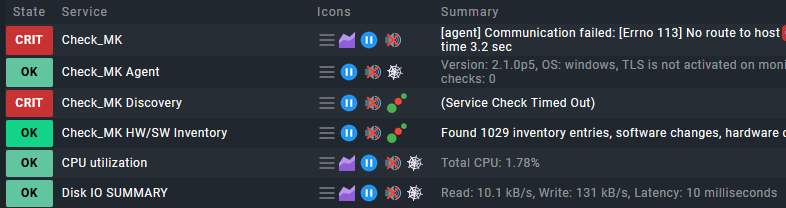
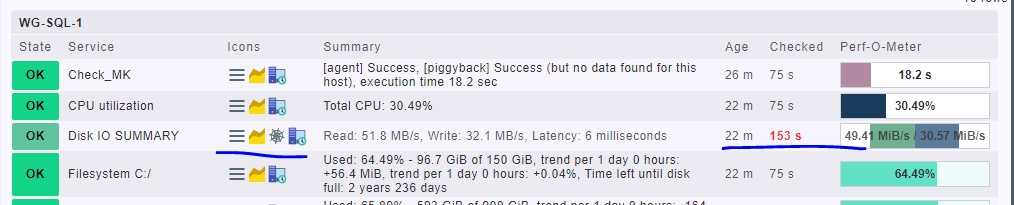
We uses check-mk 2.2.
following the upgrading of check_mk agent from 1.6 to 2.2 on Windows server.
As seen in the screen capture, we frequently receive the Stale notifications below for the DISK IO Summary.
I merely wish to understand what may be the issue.
when i run the below command to debug, i can see its taking more time as compare to other servers.
cmk --debug -vvn TEST-SQL-xyxy
Checkmk version 2.2.0p9
FETCHING DATA
Source: SourceInfo(hostname=‘TEST-SQL-xyxy’, ipaddress=‘xxx.x.xx.xx’, ident=‘agent’, fetcher_type=<FetcherType.TCP: 8>, source_type=<SourceType.HOST: 1>)
[cpu_tracking] Start [7f98fb2d5f90]
Read from cache: AgentFileCache(TEST-SQL-xyxy, path_template=/omd/sites/watchsite/tmp/check_mk/cache/{hostname}, max_age=MaxAge(checking=0, discovery=120, inventory=120), simulation=False, use_only_cache=False, file_cache_mode=6)
Not using cache (Too old. Age is 259 sec, allowed is 0 sec)
[TCPFetcher] Execute data source
Connecting via TCP to xxx.x.xx.xx:6556 (5.0s timeout)
[agent] Success, [piggyback] Success (but no data found for this host),
execution time 167.7 sec | execution_time=167.730 user_time=0.020 system_time=0.010 children_user_time=0.000 children_system_time=0.000 cmk_time_agent=167.700
when i run the below command from check_mk server, i get the execution time 73.4 sec with check_mk agent Checkmk version 2.2.0p9
cmk --debug -vvn EC2-HOST1
[agent] Success, [piggyback] Success (but no data found for this host), execution time 73.4 sec | execution_time=73.400 user_time=0.020 system_time=0.000 children_user_time=0.000 children_system_time=0.000 cmk_time_agent=73.380
Note: but when i execute the same with check_mk agent version 1.6, it executed fast with in 0.5 seconds. also i tried to execute the check_Mk agent locally , with both the versions of check_Mk, those are executing with very good speed.
Just wish to share one more observation , when uninstall 2.2 agent and install 1.6 agent.
still i m facing the same issue ,and that is only for DISK_IO_SUMMARY, other parameters , we dont face stale issue.
in our case 2.2.0p9 is check_mk_server , and check-mk-agent-2.2.0p9-99f951149311e641 is the agent .i am still facing issue of DISK_IO_SUMMARY (showing stale ).
in our case 2.2.0p9 is check_mk_server , and check-mk-agent-2.2.0p9-99f951149311e641 is the agent .i am still facing issue of DISK_IO_SUMMARY (showing stale ).
could you please suggest, which version of check_mk agent we should use?
ok thanks for the reply.
since not able to find the exact root cause, for time being i just disable the DISK IO Summary monitoring with disable rule. since as per my observation, we received stale issue for DISK IO Summary only.
is there any way , i can debug this stale issue ?
currently we are running the command(cmk --debug -vvn SERVER-SQL-001)
.which is taking [agent] Success, [piggyback] Success (but no data found for this host), Missing monitoring data for plugins: mssql_counters_file_sizes, mssql_counters_transacti ons, mssql_instance(!), execution time 116.9 sec | execution_time=116.920 user_t ime=0.010 system_time=0.000 children_user_time=0.000 children_system_time=0.000 cmk_time_agent=116.910
but locally on the specific host, if we execute agent ,it is working very fast.
This topic was automatically closed 365 days after the last reply. New replies are no longer allowed. Contact an admin if you think this should be re-opened.