Hi,
we’ve upgraded our check-mk installation to Version 2.0p8 and did a upgrade on our agents as well. But after the upgrade our current check for the LSI RAID stopped working. We decided, because check-mk offers one, to move to the build-in storcli check. But there our problems start.
We copied the storcli64.exe into the folder that is mentioned in the storcli.bat, restart the check_mk service and ran a full scan on WATO but there is a warning message that the plugin has crashed.
WATO

local config
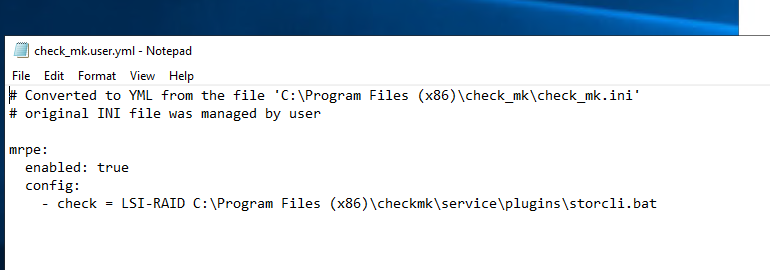
check-mk local test
1514 0 0 0 0 0 0 0 0 0 100nsec_timer
1516 196069850 4569286 40119837 2957476 40920485 8665562 24819658 4140043 322262197 bulk_count
1518 1100591123 157001197 288206068 74008431 629375247 479520989 756639000 231107858 3716449913 bulk_count
1520 0 0 0 0 0 0 0 0 0 bulk_count
<<<mrpe>>>
(Program) LSI-RAID 0 <<<storcli_pdisks>>> CLI Version = 007.1613.0000.0000 Oct 29, 2020 Operating system = Windows Server 2019 Controller = 0 Status = Success Description = Show Drive Information Succeeded.   Drive Information : =================  ---------------------------------------------------------------------------------- EID:Slt DID State DG       Size Intf Med SED PI SeSz Model                Sp Type  ---------------------------------------------------------------------------------- 8:1      11 Onln   1  12.732 TB SATA HDD N   N  512B TOSHIBA MG07ACA14TE  U  -     8:2      19 Onln   1  12.732 TB SATA HDD N   N  512B TOSHIBA MG07ACA14TE  U  -     8:3      12 Onln   1  12.732 TB SATA HDD N   N  512B TOSHIBA MG07ACA14TE  U  -     8:4      24 Onln   1  12.732 TB SATA HDD N   N  512B TOSHIBA MG07ACA14TE  U  -     8:5      14 Onln   1  14.551 TB SATA HDD N   N  512B TOSHIBA MG08ACA16TE  U  -     8:6      18 Onln   1  12.732 TB SATA HDD N   N  512B WDC  WUH721414ALE6L4 U  -     8:7      13 Onln   1  12.732 TB SATA HDD N   N  512B TOSHIBA MG07ACA14TE  U  -     8:8      27 Onln   1  12.732 TB SATA HDD N   N  512B TOSHIBA MG07ACA14TE  U  -     8:9      29 DHS    1  12.732 TB SATA HDD N   N  512B TOSHIBA MG07ACA14TE  D  -     8:10     15 Onln   1  12.732 TB SATA HDD N   N  512B TOSHIBA MG07ACA14TE  U  -     8:11     21 Onln   1  12.732 TB SATA HDD N   N  512B TOSHIBA MG07ACA14TE  U  -     8:12     16 Onln   1  12.732 TB SATA HDD N   N  512B TOSHIBA MG07ACA14TE  U  -     8:13     22 Onln   1  12.732 TB SATA HDD N   N  512B TOSHIBA MG07ACA14TE  U  -     8:14     17 Onln   1  12.732 TB SATA HDD N   N  512B TOSHIBA MG07ACA14TE  U  -     8:15     20 Onln   1  12.732 TB SATA HDD N   N  512B TOSHIBA MG07ACA14TE  U  -     8:16     23 Onln   1  12.732 TB SATA HDD N   N  512B TOSHIBA MG07ACA14TE  U  -     8:17     25 Onln   1  12.732 TB SATA HDD N   N  512B TOSHIBA MG07ACA14TE  U  -     8:18     28 Onln   1  12.732 TB SATA HDD N   N  512B TOSHIBA MG07ACA14TE  U  -     8:19     26 Onln   1  12.732 TB SATA HDD N   N  512B TOSHIBA MG07ACA14TE  U  -     252:0     9 Onln   0 223.062 GB SATA SSD N   N  512B INTEL SSDSC2KB240G8  U  -     252:1    10 Onln   0 223.062 GB SATA SSD N   N  512B INTEL SSDSC2KB240G8  U  -     ----------------------------------------------------------------------------------  EID=Enclosure Device ID|Slt=Slot No|DID=Device ID|DG=DriveGroup DHS=Dedicated Hot Spare|UGood=Unconfigured Good|GHS=Global Hotspare UBad=Unconfigured Bad|Sntze=Sanitize|Onln=Online|Offln=Offline|Intf=Interface Med=Media Type|SED=Self Encryptive Drive|PI=Protection Info SeSz=Sector Size|Sp=Spun|U=Up|D=Down|T=Transition|F=Foreign UGUnsp=UGood Unsupported|UGShld=UGood shielded|HSPShld=Hotspare shielded CFShld=Configured shielded|Cpybck=CopyBack|CBShld=Copyback Shielded UBUnsp=UBad Unsupported|Rbld=Rebuild    <<<storcli_vdrives>>> CLI Version = 007.1613.0000.0000 Oct 29, 2020 Operating system = Windows Server 2019 Controller = 0 Status = Success Description = None   Virtual Drives : ==============  ----------------------------------------------------------------- DG/VD TYPE  State Access Consist Cache Cac sCC       Size Name    ----------------------------------------------------------------- 0/0   RAID1 Optl  RW     Yes     NRWTD -   ON  223.062 GB OS      1/1   RAID6 Optl  RW     Yes     RWBD  -   ON  203.726 TB Backup  -----------------------------------------------------------------  VD=Virtual Drive| DG=Drive Group|Rec=Recovery Cac=CacheCade|OfLn=OffLine|Pdgd=Partially Degraded|Dgrd=Degraded Optl=Optimal|dflt=Default|RO=Read Only|RW=Read Write|HD=Hidden|TRANS=TransportReady B=Blocked|Consist=Consistent|R=Read Ahead Always|NR=No Read Ahead|WB=WriteBack AWB=Always WriteBack|WT=WriteThrough|C=Cached IO|D=Direct IO|sCC=Scheduled Check Consistency
<<<>>>
<<<>>>
<<<systemtime>>>
1628500251
Can anyone help us with this problem? How should it be configured right?
Cheers,
Shorty


