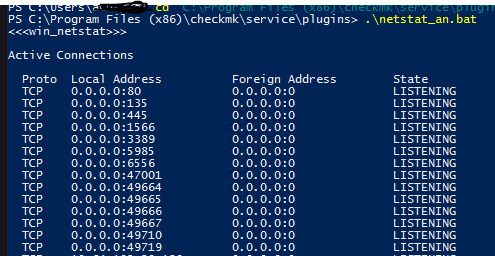
I am debugging an issue where in TCP connection data is not coming from windows hosts. I have verified that the plugin is available in the C:\Program Files (x86)\checkmk\service\plugins folder and manually running it results in data.
I have checked the disabled checks and see the windows tcp stats is not disabled, what can be reason the agent is not picking up the data.
Can port be a concern , we have port 6556 open right now. Not sure if the data is wrapped in this port communication or needs any other port too.
don’t use the enforced services rule, if your plugin reports data the service must be found automatically with the discovery
check the output of your agent - with “cmk -d hostname” or with “Download agent output” from Check_MK service menu
If you have no agent output please take a look the the agent log file inside “C:\programdata\checkmk\agent\log\check_mk.log”. You should find there if the plugin was executed and the amount of data it produces.
Example from some other plugin.
2022-06-01 21:44:52.150 [srv 4688] restarted thread for plugin 'C:\ProgramData\checkmk\agent\plugins\win_cert.ps1'
2022-06-01 21:44:52.150 [srv 4688] Async Thread for C:\ProgramData\checkmk\agent\plugins\win_cert.ps1 is to be started
2022-06-01 21:44:52.151 [srv 4688] [Trace] Exec app 'powershell.exe -NoLogo -NoProfile -ExecutionPolicy Bypass -File "C:\ProgramData\checkmk\agent\plugins\win_cert.ps1"', mode [0]
2022-06-01 21:44:52.158 [srv 4688] Plugin 'C:\ProgramData\checkmk\agent\plugins\win_cert.ps1'  is  async with age:0 timeout:60 retry:0
2022-06-01 21:45:04.200 [srv 4688] perf:  In [12049] milliseconds process 'powershell.exe -NoLogo -NoProfile -ExecutionPolicy Bypass -File "C:\ProgramData\checkmk\agent\plugins\win_cert.ps1"' pid:[8652] SUCCEDED - generated [23] bytes of data in [1] blocks
2022-06-01 21:45:04.201 [srv 4688] [Trace] Thread OFF: 'C:\ProgramData\checkmk\agent\plugins\win_cert.ps1'
I am not able to see the output of pluging in “cmk -d hostname” or the log you mentioned. What confuses me if the fact that the netstat works inside the server however the agent is not pulling it.
When i run “cmk -Dvv hostname” i do see that the check is present there
My apologies if i presented it wrongly, i do have the log but i cant see anything related to plugin. To be sure i should looking for “win_netstat” / “TCP Connection” right ?
You should look for the name of the plugin file.
In your case it is the “netstat_an.bat” what you should see.
Inside your test screenshot it shows the “C:\Program Files (x86)” path where you tested it. You need to copy the plugin inside the “Programdata” plugin folder or configure your “check_mk.user.yml” to execute the plugin inside this place. Automatically there is no plugin executed inside the “C:\Program Files (x86)” folder.
This topic was automatically closed 365 days after the last reply. New replies are no longer allowed. Contact an admin if you think this should be re-opened.